Congrats on the New Website — Now Brace for the Spam

So your website is live, it looks great, and Google has noticed it. Unfortunately, so has everyone else with a mailing list and no conscience.

Within weeks of launching a site (or after a big SEO win), many business owners start getting official-looking letters, urgent emails, and phone calls from people who “just happened” to find their website. They did not just happen to find it. Domain registration data, business directories, and website scrapers make it easy to build a target list, and a fresh, visible site goes straight to the top.

Here is a field guide for what to expect, and what to do about it.

The “Domain Expiration Notice” Letter
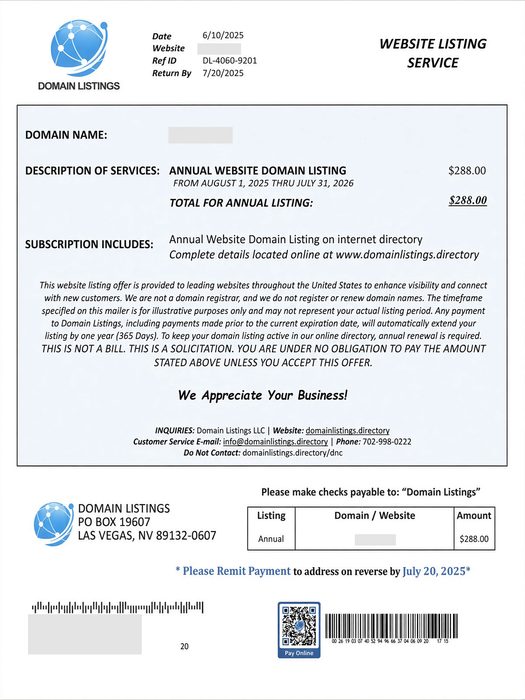
Domain registration solicitation

This one arrives in the mail and looks very official. It lists your real domain name, an expiration date, a deadline, a payment slip, and often a QR code. It warns that you could lose your online identity if you do not act now. Recent versions ask for around $265 for a five-year “renewal.”

Here is the catch: it usually is not from your registrar at all. It is a solicitation to transfer your domain to the sender, often at several times the going rate. The fine print tends to say something like “this is not a bill.” This tactic is called domain slamming, and the FTC went after one of its best-known practitioners years ago. The copycats never left.

How to check: Log in to the registrar where you actually bought your domain (GoDaddy, Namecheap, Squarespace, etc.) and look at the expiration date there. If the sender is not that company, you owe them nothing. Not sure where your domain is registered, or who handles your DNS records? Ask your web developer before you pay anyone.

Bonus move: Turn on registrar lock (transfer lock) and auto-renew for your domain.

The Friendly SEO Email

You know the one:

  • “I took a look at your website and found several issues hurting your ranking.”
  • “We can get you on page one of Google in 30 days. Guaranteed.”
  • “Your competitors are outranking you.”

The tells: The email never mentions anything specific about your site, your town, or your keywords. The list of “problems” is vague jargon (missing meta tags, poor image optimization) that could be pasted into any email to any business. And nobody, anywhere, can guarantee a ranking. Google says so itself.

If you get one, ask two questions: Which keywords, in which city, against which competitors? And can I see a client you have worked for? Real SEO professionals can answer. Mass-mailers go quiet.

Want to know how your site is really doing? You can see it for yourself, for free, in Google Search Console and Google Analytics. No cold email required.

(Quick sanity check: if you search your own business name and you are already on page one, congratulations, that is not a service you need to buy.)

The “Google Listing” Phone Call

Google business listing telemarketing call

The caller says they are with Google, or “Google Business Services,” and that your listing is about to be removed, needs verification, or can be bumped to the top of the map results. A robot voice may tell you to press 1 to continue.

What’s more, the call may even come from your local area code.

Google’s own guidance is clear: they will never ask for payment to keep, verify, or reinstate your Business Profile, and they will never guarantee you a special spot in search or Maps. They also will not ask for a PIN or one-time code.

What to do: Hang up. Do not press any buttons, even if the voice tells you to. If someone insists they work at Google, ask them to email you from an @google.com address. (They will not.)

The Fake Invoice and the “Free” Directory Listing

The FTC warned small businesses about this in May 2026: fake invoices for things you never ordered, like domain registration, SEO, or tech support. Some arrive as “past due.” Some look like they are from big names. Whoever handles your bills is the target, hoping they will just pay it.

A close cousin is the directory listing scam. A call or letter says you are being listed (for free, or as a “renewal”) in a business directory. A bill shows up later, along with a claim that you agreed to it. If you never agreed, do not pay.

Rule of thumb: Do not pay any invoice for a service you cannot connect to a person who actually sold it to you. Search the company name plus “scam,” “review,” or “complaint” first.

Someone Pretending to Be Your Web Designer or Host

Scammers can read a web designer’s portfolio page, collect the contact email from each client’s site, and send messages that look like they came from the designer. They say your site “is not compliant,” your plugins or hosting are “due for renewal,” or your account will be suspended in 48 hours. The goal is payment, or your WordPress or hosting login.

What to do: Do not click the link or call the number in the message. Contact your designer or host using a phone number or email address you already have. And never enter your credentials on a page you reached from an email.

Spoofed email is a big part of this one. It is worth reading up on securing your domain email with SPF, DKIM, and DMARC, and on protecting your WordPress site from hackers. Regular website maintenance also means you will know what is actually due and when.

The Quick Red Flag Checklist

  • Urgency. “Act now,” “final notice,” “48 hours.”
  • Guarantees. Rankings, results, or “priority” with Google.
  • Payment pressure. Gift cards, wire transfers, QR codes, or “pay to avoid suspension.”
  • Vague specifics. No mention of your actual site problems, or generic “errors.”
  • Wrong sender. Not the company you actually do business with.
  • Fine print that contradicts the headline. “This is not a bill.”

What to Do When One Shows Up

  1. Pause. Scammers rely on you reacting before thinking.
  2. Verify independently. Log in to your registrar, host, or Google account directly. Do not use links or phone numbers from the message.
  3. Do not engage. Replying, pressing buttons, and scanning QR codes confirm that your contact info is live.
  4. Tell whoever pays the bills. A one-line policy helps: we never pay anything domain-, SEO-, or Google-related unless it goes through our known vendors.
  5. Report it.
  6. FTC: ReportFraud.ftc.gov (phone scams and fake invoices)
  7. Phishing emails: [email protected]
  8. Scam texts: forward to 7726 (SPAM)
  9. Fake Google calls: report through Google Business Profile Help
  10. Do Not Call Registry: donotcall.gov (it will not stop scammers, but it is worth having)

Not Sure About Something?

When in doubt, do not pay, click, or call back. Send it to your web developer, your IT person, or a trusted friend who knows their way around the internet and ask for a second opinion first. A quick look usually settles it, and it is a lot cheaper than a five-year “renewal” from a company you have never heard of.

6 Steps for Creating a Cohesive and Polished Website

A cohesive and polished website design is not just a luxury but a necessity. Your website is often the first point of contact for potential customers or visitors, and it plays a pivotal role in shaping their perception of your brand. A well-designed website can captivate and engage users, instilling trust and credibility. In contrast, a poorly executed website can lead to frustration and missed opportunities.

A cohesive website design brings together various visual elements, user interface components, and content to create a harmonious and seamless user experience. It ensures that every page and interaction on your website reflects your brand identity consistently. With a strong visual identity and applying consistent design principles, you can convey professionalism, build brand recognition, and differentiate yourself from competitors.

So, whether you are building a new website or seeking to enhance your existing one, this article will serve as your guide to creating a cohesive and polished web presence.

1. Establish a Strong Visual Identity

Collage of various logos
A strong brand image begins with a memorable logo.

When it comes to creating a cohesive and polished website, one of the first steps is to define your brand’s visual elements. These elements serve as the foundation for your website’s design and help establish a strong visual identity. Start by crafting a memorable logo that embodies your brand’s essence and aligns with your target audience. Consider the use of colors, typography, and imagery that reflect your brand’s personality, values, and industry.

Consistency is key to creating a cohesive website design. Once you have established your brand’s visual elements, it’s crucial to apply them consistently across all pages. Ensure that your logo is prominently displayed and positioned consistently throughout the website. Use uniform color schemes and typography choices to maintain a cohesive look and feel. Consistency in design elements helps users recognize and associate your website with your brand, fostering trust and familiarity.

Whitespace, also known as negative space, is the empty space between elements on a webpage. It plays a vital role in creating a clean and organized layout. Strategic use of whitespace allows the content and design elements to breathe, improving readability and visual hierarchy. Avoid cluttering your pages with excessive text or crowded visuals. Instead, embrace whitespace to create a sense of balance, focus, and elegance. It helps draw attention to important elements and improves the overall user experience.

2. Craft a Seamless User Experience

User experience

A crucial aspect of creating a cohesive and polished website is designing intuitive navigation menus and a logical site structure. Your website’s navigation should be easy to understand and navigate, allowing users to find information effortlessly. Consider using clear and descriptive menu labels and organizing your pages into logical categories. Additionally, incorporate a search function to enable users to quickly locate specific content.

Effective call-to-action (CTA) buttons are essential for guiding users towards desired actions on your website. To create a cohesive user experience, it’s crucial to ensure that your CTAs are consistent in design and placement across all pages. Use clear and action-oriented language that compels users to take the desired action. Additionally, employ visual cues such as contrasting colors or arrows to draw attention to the buttons.

In today’s mobile-driven world, optimizing your website for different devices is paramount. Implementing responsive design ensures that your website adapts and performs seamlessly on various screen sizes and devices, including smartphones, tablets, and desktops. A responsive website design not only enhances user experience but also improves your search engine rankings. Google values mobile-friendly websites and ranks them higher in search results. Therefore, ensure that your website’s layout, images, and content adjust smoothly to different screen sizes, providing users with a consistent and enjoyable browsing experience.

3. Create Consistent Content Presentation

Consistency in content presentation is crucial for a cohesive and polished website. When it comes to text and images, maintaining a consistent layout and formatting enhances readability and visual appeal. Use the same font styles and sizes across your website to establish a cohesive typographic hierarchy. Consistency in text formatting, such as alignment, spacing, and paragraph styles, creates a harmonious reading experience. Similarly, ensure that images are presented consistently in terms of size, aspect ratio, and placement.

Headings and subheadings play a vital role in guiding users through your content and establishing a clear hierarchy. Consistently use heading tags (H1, H2, H3, etc.) to structure your content and help search engines understand the organization of your information. Ensure that the hierarchy of headings is logical and that they are used consistently across pages. This not only aids in readability but also contributes to better SEO practices.

Consistency extends beyond visual elements; it also applies to the tone and voice of your written content. Establishing a consistent tone helps build brand identity and creates a cohesive user experience. Whether your content is formal, conversational, or playful, maintain a consistent tone throughout your website. Consider your target audience and align your language and writing style accordingly. Consistency in tone and voice fosters familiarity, trust, and brand recognition among your audience.

4. Pay Attention to Detail

Optimizing your website’s loading speed is crucial for providing a smooth browsing experience. Slow-loading pages can lead to user frustration and high bounce rates, negatively impacting your search engine rankings. To enhance website speed, consider techniques such as optimizing image sizes, minifying code, and leveraging caching mechanisms. Additionally, ensure that your hosting provider offers reliable and fast server performance.

Broken links and 404 errors can harm user experience and have a negative impact on your website’s SEO. It’s essential to regularly check for broken links and fix them promptly. Broken links not only frustrate users but also indicate to search engines that your website may have outdated or low-quality content. Utilize tools or plugins that scan your website for broken links and provide you with a comprehensive report. Once identified, update or remove the broken links to ensure a seamless user experience and maintain a healthy website reputation.

With the multitude of devices and web browsers available today, it’s crucial to ensure that your website displays and functions consistently across different platforms. Conducting thorough cross-browser and cross-device testing helps identify any design or functionality issues that may arise on specific browsers or devices. Test your website on popular web browsers such as Chrome, Firefox, Safari, and Edge, and ensure compatibility with both desktop and mobile devices.

5. Ensure Accessibility and Usability

Creating a cohesive and polished website involves considering the needs of all users, including those with disabilities. Designing with accessibility guidelines in mind ensures that your website is inclusive and usable by a broader audience. Follow the Web Content Accessibility Guidelines (WCAG) to provide equal access to information and functionality. This includes considerations such as ensuring proper color contrast for text readability and implementing keyboard navigation for users who cannot use a mouse.

Images are not only visual elements but also provide important context and information. To make your website more accessible, use descriptive alt text for images. Alt text describes the content of the image, allowing visually impaired users who rely on screen readers to understand its meaning. Additionally, use proper heading structure with semantic HTML tags to create a clear and logical reading order for both users and search engines. This improves accessibility, facilitates navigation, and enhances the overall user experience.

When users encounter errors while interacting with your website’s forms or performing actions, it’s essential to provide clear and concise error messages. Error messages should accurately describe the issue and provide guidance on how to resolve it. Additionally, implement form validations to ensure that users provide valid and properly formatted input. Real-time validation can help users catch errors as they occur, preventing frustration and improving the overall usability of your website.

6. Optimize for Search Engines

To ensure your website reaches its intended audience, it’s crucial to conduct thorough keyword research. Identify the keywords and phrases that are relevant to your content, industry, and target audience. Consider user intent and search volume when selecting keywords to incorporate into your website’s content. Strategically place these keywords in your page titles, headings, paragraphs, and image alt text. However, be mindful not to overdo it or engage in keyword stuffing, as this can have a negative impact on user experience and search engine rankings.

Meta titles and descriptions are crucial elements of your website’s search engine optimization. Craft compelling and concise headlines that accurately represent the content of each page. Incorporate relevant keywords while keeping the title within the recommended character limit of 50-60 characters to ensure it appears fully in search engine results. Similarly, write engaging meta descriptions that provide a summary of the page’s content and entice users to click through. Including keywords in meta descriptions can improve search engine visibility and attract more organic traffic.

Prepare for Launch

Applying these techniques to your own projects can help you create a cohesive and polished website that not only engages users but also ranks favorably on search engine result pages. Remember, a well-designed website not only enhances your brand’s image but also establishes a strong online presence, attracts more visitors, and increases conversions.

As technology and user expectations evolve, it’s important to continuously monitor and refine your website’s design and functionality. Keep up-to-date on the latest industry trends and updates, and be open to incorporating new techniques to improve your website’s cohesiveness and polish.

Investing time and effort into creating a cohesive and polished website is a long-term strategy that yields numerous benefits. It enhances user experience, builds trust with your audience, improves search engine rankings, and ultimately drives the success of your online presence.

Traditional Marketing and Advertising: Going Offline to Grow Your Online Presence

Online marketing and advertising strategies have become an essential component for driving website traffic. However, in the quest for digital dominance, many businesses often overlook the power of offline promotion. By leveraging traditional marketing techniques, businesses can tap into a new and often untapped audience. Let’s delve into the various offline promotion strategies that can help drive website traffic. From utilizing printed materials to harnessing the power of word of mouth and partnering with local businesses, we’ll cover everything you need to know to take your website to new heights. So, let’s dive in and discover how offline promotion can play a vital role in driving traffic to your website.

Utilizing Printed Materials

The tangible nature of printed materials can have a remarkable impact on promoting your website and driving traffic. While online advertisements and social media campaigns have their place, the benefits of utilizing printed materials should not be overlooked.

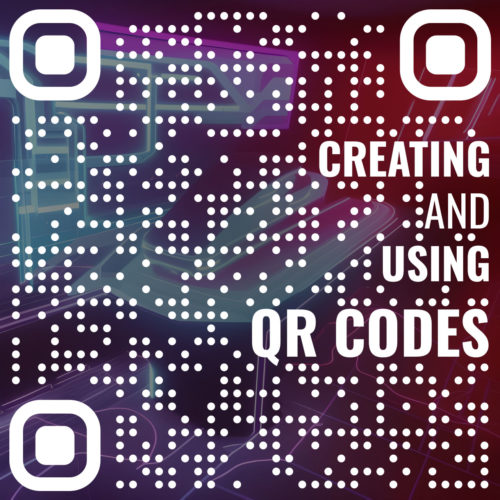
Creating and Using QR Codes

One of the key advantages of printed materials is their ability to leave a lasting impression. Well-designed business cards, flyers, and brochures can capture attention and make a memorable impact on potential visitors. Make sure to incorporate your website URL prominently on these materials, as it serves as a direct invitation for people to visit your online presence.

In addition to website URLs, consider adding QR codes to your printed materials. These codes provide a quick and convenient way for people to access your website by simply scanning the code with their mobile devices. QR codes can be easily generated online and customized to fit your brand.

To maximize the reach of your printed materials, distribute them strategically. Attend relevant events, conferences, and trade shows where your target audience is likely to be present. Network with other businesses and establishments in your local community to display your materials. By placing your brochures or flyers in coffee shops, libraries, and other high-traffic locations, you increase the chances of people stumbling upon them and being enticed to visit your website. When executed thoughtfully and strategically, paper materials can be powerful tools in driving traffic to your website.

Harnessing the Power of Word of Mouth

Word of mouth has long been recognized as one of the most powerful and influential forms of marketing. People are more likely to trust recommendations from their friends, family, and peers when it comes to discovering new websites and online resources. Exploiting the influence of word of mouth can significantly boost the traffic to your website.

The first step in leveraging word of mouth is to provide an exceptional user experience on your website. Deliver valuable content, intuitive navigation, and a seamless browsing experience that encourages visitors to return and share their positive experiences with others. Satisfied customers are more inclined to recommend your website to their network, expanding your reach organically.

To actively encourage word of mouth promotion, consider implementing referral programs. Incentivize your satisfied customers to refer others to your website by offering rewards or discounts for successful referrals. This not only motivates your existing audience to spread the word, but also attracts new visitors who are interested in benefiting from the referral rewards.

Personal recommendations happen anywhere people communicate. Word of mouth has expanded its reach through social media and online communities. Encourage your visitors and customers to share their positive experiences on social media platforms, leaving reviews, testimonials, and recommendations. Engage with your audience on social media channels to foster a sense of community and encourage discussions around your website and its offerings.

Partnering with Local Businesses and Organizations

Forging partnerships with local businesses and organizations can be a valuable strategy to promote your website offline. By tapping into existing networks and communities, you can extend your reach and attract targeted traffic to your website.

Collaborating with local businesses and organizations offers mutual benefits. Identify complementary businesses or organizations that share a similar target audience or have a related niche. Explore opportunities for cross-promotion, such as featuring each other’s websites or products in your respective marketing materials. This can include sharing links, promoting special offers, or displaying promotional materials at each other’s physical locations.

Sponsoring local events, charities, or community initiatives is another effective way to gain visibility and generate website traffic. Look for events or causes that align with your website’s values and target audience. By sponsoring these activities, you not only contribute to the community but also position your website as a responsible and engaged entity. Make sure to include your website’s URL and branding in any event-related materials, such as banners, signage, or promotional items.

Offline networking events provide valuable opportunities to meet and connect with potential partners, clients, or customers. Attend industry conferences, trade shows, or networking events relevant to your website’s niche. Be prepared to share your website’s value proposition and provide tangible takeaways for attendees.

Offline Advertising and Media Coverage

While online advertising has gained significant prominence, offline advertising still holds value in promoting your website and driving traffic. By leveraging traditional advertising channels and seeking media coverage, you can reach a broader audience and increase your website’s visibility.

Traditional advertising channels such as newspapers, magazines, and radio continue to have a wide reach and can be effective in targeting specific demographics. Consider the audience demographics and interests of the respective medium and choose the ones that align with your website’s target audience. Craft compelling advertisements that effectively communicate your unique value proposition and include a clear call-to-action that directs viewers or listeners to visit your website. Use attention-grabbing visuals, persuasive copy, and memorable slogans to make your advertisement stand out.

In addition to traditional advertising, pursuing media coverage can significantly amplify your website’s exposure. Write and distribute press releases to relevant media outlets, announcing significant updates, new features, or noteworthy achievements of your website. Craft your press releases in a newsworthy format, highlighting the unique aspects of your website that would pique the interest of journalists and their readers. Consider targeting niche-specific publications or local newspapers to enhance the relevance and reach of your media coverage.

When evaluating offline advertising methods, consider their cost-effectiveness and targeting options. Assess the return on investment (ROI) of each channel by analyzing the potential reach, the alignment with your target audience, and the cost of placing advertisements. Some channels may offer more precise targeting options, such as demographic filters or geographical targeting, which can help optimize your ad spend.

Using Branded Merchandise and Giveaways

Branded swag and contests can be powerful tools for offline promotion, creating awareness, and driving traffic to your website. By developing unique and eye-catching items that bear your website’s branding, you can leave a lasting impression on potential visitors and convert them into loyal users.

Consider creating a range of branded merchandise such as t-shirts, pens, stickers, keychains, or tote bags that prominently display your logo and URL. These items can serve as walking advertisements when worn or used by your audience. Opt for high-quality materials and designs that align with your website’s branding and resonate with your target audience. Branded merchandise not only raises awareness but also fosters a sense of connection and loyalty among those who receive or use these items.

Promotional products not only serve as conversation starters but also act as brand ambassadors. When people use or wear your branded merch, they become walking advertisements, sparking conversations and generating interest in your website. Encourage recipients to share photos of themselves with your branded items on social media, using a specific hashtag or tagging your website’s account. This can further amplify the reach of your offline promotions and create a sense of community around your brand.

Organizing contests, giveaways, or sweepstakes can be an effective way to generate interest, engagement, and traffic to your website. Create enticing offers or prizes related to your website’s niche and promote them through various online and offline channels. For example, you can offer exclusive access to premium content, discounts, or even free products or services. Encourage participants to visit your website, subscribe to your newsletter, or follow your social media accounts for a chance to win. Publicize the contest or giveaway through printed materials, local media, and word of mouth to maximize participation.

By using branded merchandise and giveaways, you can leverage the power of tangible items to generate awareness and drive traffic to your website. Develop a range of branded merchandise, distribute them at relevant events, and encourage recipients to become brand ambassadors. These offline strategies complement your online efforts and help create a strong presence for your website.

Tracking Offline Efforts

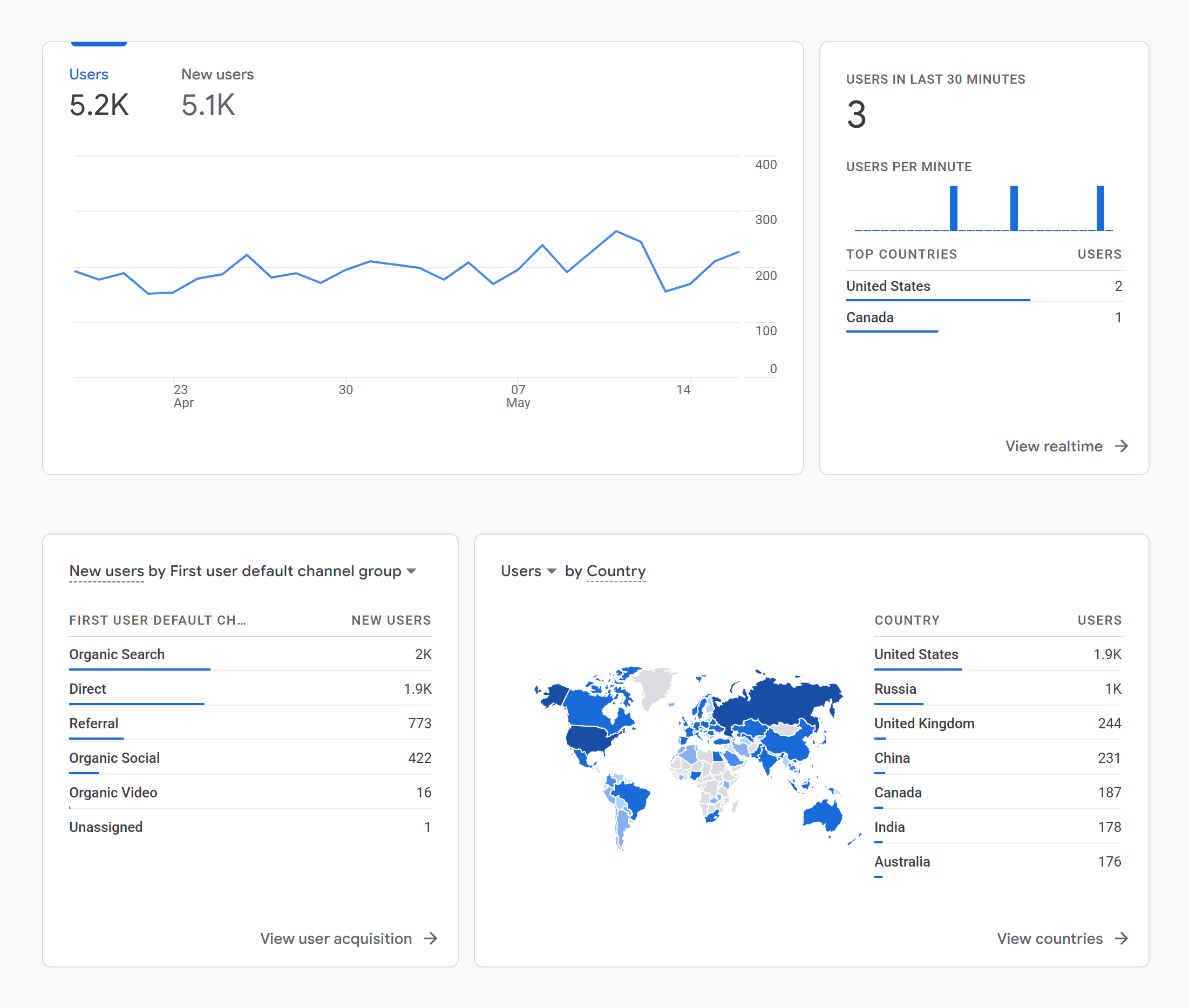
Google Analytics Report

Measuring the effectiveness of your offline promotion efforts is crucial to understand which strategies are driving traffic to your website and generating results. By implementing specific tracking methods and utilizing web analytics tools, you can gain valuable insight and make data-driven decisions to optimize your offline promotion strategies.

One effective way to track offline campaigns is by using unique URLs, promo codes, or QR codes. When promoting your website offline, create dedicated landing pages with unique URLs that are easy to remember and specific to each campaign. This allows you to track the traffic generated from different offline sources. Similarly, use exclusive promo codes or coupons for offline promotions. When customers redeem these codes on your website, you can attribute the conversions and sales to your offline efforts. Additionally, QR codes can be incorporated into printed materials, enabling users to scan the code with their smartphones and directly access your website.

Optimizing your offline promotion efforts requires flexibility and adaptation based on data and insights. Continuously monitor and track the performance of your offline campaigns, and be open to making adjustments and refinements to achieve the best results. Set up tools like Google Analytics to monitor the performance of your website. Create custom campaigns within your analytics platform to track the traffic from each offline promotion source. By leveraging the data provided by tracking mechanisms and web analytics tools, you can refine your strategies and invest in the most effective offline promotion methods.

Go Offline

Incorporating offline promotion alongside your online marketing efforts can significantly enhance your website’s visibility and attract more visitors. By utilizing traditional marketing techniques, you can reach a diverse audience beyond the confines of the digital space. Moreover, by tracking and measuring your offline campaigns, you can continuously improve and refine your strategies for optimal results.

Offline marketing can even be part of your SEO strategy. Seeing your marketing materials can trigger curiosity and get people searching to find out more. As more and more people start searching for your name and tagline, search engines will see that you have something people want, and will give your domain more authority.

So, don’t limit your website’s growth to online channels alone. Embrace the power of offline promotion and explore the multitude of opportunities it offers. Combine the best of both online and offline worlds to create a comprehensive marketing approach that drives traffic, boosts engagement, and propels your website towards success.

How to Choose the Best Web Designer for You

Choosing the right web designer is a crucial decision that can greatly impact the success of your online presence. A well-designed website not only attracts visitors but also engages and converts them into customers. With countless web designers available in the market, it’s essential to understand how to navigate through the options and find the perfect match for your project. From defining your project requirements to evaluating experience, communication skills, pricing, and more, here you will gain the knowledge and insights to make an informed decision. So, let’s dive in and discover the key elements that will help you choose the ideal web designer for your specific needs.

Defining Your Project Requirements

Before embarking on the journey of finding the right web designer, it’s crucial to have a clear understanding of your project requirements. This involves assessing your website needs and goals to ensure you find a designer who can effectively meet your expectations. Start by identifying the purpose of your website. Is it an e-commerce platform, a portfolio site, a blog, or something else entirely? Understanding the intended functionality and scope of your website will help you narrow down your search for a web designer with expertise in that particular area.

In addition to the overall purpose, it’s important to pinpoint specific features and requirements that your website should have. Consider aspects such as responsive design, SEO optimization, content management system (CMS) integration, e-commerce capabilities, and any other unique functionalities that are essential for your project. By defining these requirements upfront, you’ll be better equipped to evaluate potential web designers and ensure they have the necessary skills and experience to deliver on your vision. So take the time to assess your project needs thoroughly and make a detailed list of the features and functionalities you expect from your website.

Researching Potential Web Designers

Once you have a clear understanding of your project requirements, it’s time to start researching potential web designers who can bring your vision to life. There are several avenues you can explore to find suitable candidates.

  1. Online Platforms and Directories: Start by searching on reputable online platforms and directories that connect businesses with web designers. Websites like Behance and Dribbble showcase portfolios of talented designers, allowing you to browse through their work and get a sense of their style and expertise. Additionally, directories specific to web design, such as Clutch or Upwork, can provide you with a list of qualified professionals along with client reviews and ratings.
  2. Portfolio and Case Study Review: Take the time to review the portfolios and case studies of potential web designers. Look for examples of their previous work that align with your project requirements. Pay attention to the design aesthetics, functionality, and user experience of the websites they have developed. This will give you an insight into their capabilities and whether their style matches your preferences.
  3. Recommendations and Referrals: Reach out to peers, colleagues, and industry professionals for recommendations. Ask for referrals from individuals who have had positive experiences working with web designers in the past. Their firsthand feedback can provide valuable insights and help you gauge the reliability and professionalism of potential candidates.

As you conduct your research, make a list of promising web designers who align with your project requirements. Note their contact information, portfolio links, and any additional details that will aid in your evaluation process. Remember, thorough research is key to finding a web designer who can deliver the results you desire.

Evaluating Experience and Expertise

Once you have compiled a list of potential web designers, it’s essential to evaluate their experience and expertise to ensure they are well-equipped to handle your project. Here are some key factors to consider during the evaluation process:

  1. Industry Experience: Assess the web designer’s experience in the industry. Look for professionals who have worked on a diverse range of projects and have a proven track record of delivering successful websites. Experience within your specific niche or industry can be advantageous as they will be familiar with the unique requirements and challenges it presents.
  2. Technological Knowledge: Verify the web designer’s knowledge of relevant technologies and tools. Inquire about their proficiency in web development languages such as HTML, CSS, and JavaScript. Additionally, consider their familiarity with content management systems (CMS) like WordPress, e-commerce platforms, responsive design techniques, and other tools that may be essential for your project.
  3. Client Testimonials and References: Request client testimonials or references from the web designer. Reach out to their previous clients and inquire about their experience working with the designer. Ask about their communication, project management skills, adherence to deadlines, and overall satisfaction with the end result. This feedback can provide valuable insights into the designer’s professionalism and client satisfaction.

Evaluating the experience and expertise of potential web designers can give you the assurance that they have the necessary skills and knowledge to meet your project requirements. This process will help you narrow down your options and select a web designer who can deliver a high-quality website that aligns with your vision.

Considering Budget and Pricing

When choosing a web designer, it’s essential to consider your budget and pricing options. Web design pricing can vary depending on factors such as the complexity of the project, the scope of work, and the experience and reputation of the designer. Here are some key points to keep in mind when evaluating the budget and pricing aspects:

  1. Pricing Models: Web designers may use different pricing models for their services. The most common models include fixed pricing, hourly rates, and project-based pricing. Fixed pricing provides a set cost for the entire project, while hourly rates charge based on the time spent on the project. Project-based pricing offers a customized quote based on the specific requirements. Understand the pricing models used by the web designers you are considering to determine which one aligns best with your project and budget.
  2. Requesting Quotes: Contact multiple web designers and request quotes for your project. Provide them with detailed project requirements and ask for a breakdown of costs. This will help you understand what is included in the pricing and make an informed comparison among the different options. Keep in mind that the lowest price doesn’t always indicate the best value, so consider the overall value proposition and the designer’s capabilities along with the cost.
  3. Value-added Services: Consider the value-added services offered by the web designer within the proposed budget. These may include ongoing support, maintenance packages, training, or additional features. Assess the overall value proposition and consider the long-term benefits and return on investment that the designer can provide.

Remember, the budget should be viewed as an investment in your online presence and business growth. While it’s important to be mindful of costs, prioritize quality, expertise, and a good working relationship with the web designer. A well-executed web design project can yield significant returns and contribute to the success of your online presence.

Ongoing Support and Maintenance

After your website is launched, it’s important to consider the ongoing support and maintenance provided by the web designer. A well-maintained website is crucial for its optimal performance, security, and longevity. Here are some key factors to consider when assessing the web designer’s ongoing support and maintenance:

  1. Post-Launch Support: Inquire about the web designer’s post-launch support services. Will they be available to address any issues or questions that arise after the website is live? It’s important to have a reliable point of contact who can assist you in case of technical difficulties or updates.
  2. Website Maintenance and Updates: Discuss the web designer’s approach to ongoing maintenance and updates. Will they offer regular backups, performance optimizations, and address security vulnerabilities? Understanding how they proactively maintain and update websites will give you confidence in the long-term stability and security of your online presence.
  3. Communication Channels: Clarify the communication channels and response times for ongoing support and maintenance. Ensure that you have a clear understanding of how to reach the web designer in case of emergencies or urgent issues.

Ongoing support and maintenance are essential for a successful web design project. Choosing a web designer who offers reliable and efficient support services will give you peace of mind, knowing that your website is in good hands even after the initial development phase.

Checking for these services can ensure that the web designer is committed to the long-term success and smooth operation of your website. This level of support contributes to the overall value and satisfaction of your web design investment.

Additional Services and Specializations

When choosing a web designer, it’s important to consider their range of additional services and products. While their primary focus may be web design and development, many web designers offer supplementary services that can enhance your online presence. Here are some key points to consider:

  1. Search Engine Optimization (SEO): A well-designed website is only effective if it can be easily discovered by search engines. Inquire whether the web designer offers SEO services or collaborates with SEO professionals. Having a website that is optimized for search engines can significantly improve its visibility and organic traffic.
  2. Content Creation: Compelling and engaging content plays a vital role in attracting and retaining website visitors. Check if the web designer provides content creation services, such as copywriting, graphic design, photography, or multimedia production. Having a unified approach to both design and content creation can result in a cohesive and impactful online presence.
  3. Branding and Identity: Consider whether the web designer has expertise in branding and identity development. A strong brand identity is essential for creating a memorable and recognizable online presence. Assess if the web designer can help you establish a consistent brand image through the design elements and visual aesthetics of your website.

Depending on your specific needs and goals, these supplementary services can provide added value, convenience, and expertise to elevate your website’s performance and impact.

Making the Final Decision

After conducting thorough research, evaluating different aspects, and considering various factors, it’s time to make the final decision on choosing the right web designer for your project. Here are some key steps to help you make an informed decision:

  • Process the Data: Review all the information you have gathered throughout the evaluation process. Consider factors such as experience, expertise, client reviews, communication skills, pricing, additional services, and specializations. Determine which web designer aligns best with your project requirements, goals, and budget.
  • Conducting Interviews or Consultations: If possible, schedule interviews or consultations with the shortlisted web designers. This provides an opportunity to discuss your project in detail, ask specific questions, and gauge their understanding of your needs. Use this interaction to assess their communication skills, responsiveness, and ability to translate your vision into a tangible website.
  • Evaluating Proposals or Quotes: Review the proposals or quotes provided by the web designers. Pay attention to the scope of work, deliverables, timelines, and pricing details. Compare the proposals based on the value they offer and their alignment with your project requirements.
  • Seeking Referrals or Recommendations: If you’re having difficulty making a decision, consider seeking referrals or recommendations from clients or colleagues who have worked with the web designers you are considering. Their firsthand experiences and feedback can provide valuable insight to help you make a more informed choice.

By weighing all the factors, conducting interviews or consultations, evaluating proposals or quotes, seeking referrals, and trusting your instincts, you can confidently make the final decision on choosing the right web designer. Remember, selecting the right web designer is a critical step in ensuring the success of your website project and achieving your online goals.

While it’s important to analyze all the objective factors, don’t underestimate the power of your instincts. Trust your gut feeling when it comes to assessing the compatibility, trustworthiness, and enthusiasm of the web designer. A good working relationship and mutual understanding are crucial for a successful collaboration.

Once you have made your decision, communicate your choice to the selected web designer and initiate the project kick-off process. Maintain open lines of communication throughout the project to ensure a smooth and collaborative working relationship.

Good luck with your web designer selection journey, and may you find a skilled and reliable professional who can transform your ideas into a stunning website that exceeds your expectations.

The Anatomy of a Website

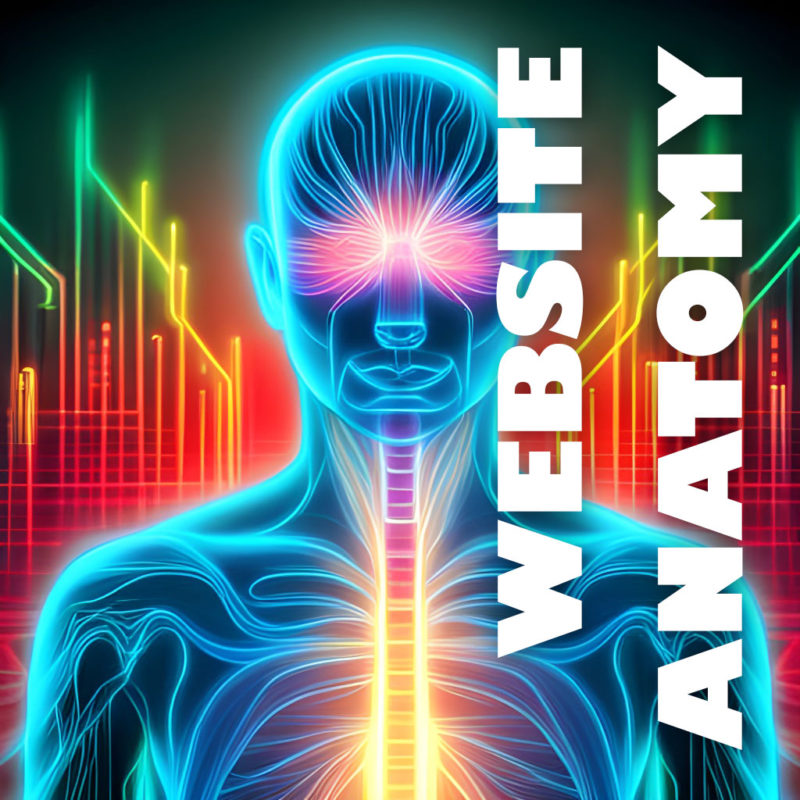
A website is made up of many components that all work together to create a functional and informative whole. Those components can be compared to the anatomy of a human body. Just like a human body is made up of different organs and systems that each perform specific functions, a website consists of various components that work together to deliver content and functionality to users. Let’s take a closer look at the anatomy of a website and how it compares to human anatomy.

Skeletal System

Just like how the skeletal system is the foundation of the human body, HTML (Hypertext Markup Language) serves as the foundation of a website. HTML provides the structure and organization for the content on a web page, defining the different elements and their relationships to each other. Just as the skeletal system provides support for the body, HTML provides the structure that supports the design, functionality, and usability of a website. Without a solid HTML structure, a website would lack the necessary foundation to be easily navigated and displayed across various devices and browsers.

Muscular System

In the analogy of comparing the parts of a website to human anatomy, the web server can be thought of as the muscular system. Just as the muscles provide movement and structure to the human body, web hosting provides the support and structure for a website to function. It is responsible for delivering the content of a website to its visitors and ensuring that it is always available and accessible. Without web hosting, a website cannot exist and function properly, just as the human body cannot function without its muscles. Therefore, it is crucial to choose a reliable and trustworthy web hosting provider to ensure the smooth functioning of a website.

Nervous System

Just as the nervous system is responsible for controlling and coordinating the body’s responses to stimuli, JavaScript plays a vital role in web development by controlling and coordinating the behavior of a website in response to user interactions. JavaScript is a high-level programming language that is often used to add interactivity, animations, and other dynamic features to a website. By manipulating HTML and CSS, JavaScript can create a rich user experience and improve the functionality of a website. This is what makes it the nerves of a website because it allows it to react and respond to the user’s actions, making it an essential part of modern web development.

A Content Management System (CMS) can be compared to the human brain. It is the control center of the website, where content is created, managed, and published. Just as the human brain is responsible for controlling the body’s functions, a CMS like WordPress is responsible for managing a website’s content.

The MySQL database is like the hippocampus of a website because it is responsible for storing and organizing memories, or in this case, website data. The hippocampus is a part of the human brain responsible for long-term memory storage and retrieval. Similarly, the MySQL database stores all the data for a website, such as user information, product details, and website content. It allows the website to quickly retrieve this information and present it to the user. Without the MySQL database, websites would not be able to store and organize large amounts of data efficiently.

The navigation of a website is like the spinal cord of the human body. Just as the spinal cord connects the various parts of the body, the navigation connects the different pages and sections of a website. It serves as a roadmap for users, guiding them to the content they want to find. A well-designed navigation system can make it easy for users to find what they are looking for and explore the website, while a poorly designed one can cause frustration and confusion. It is important to keep the navigation system simple, intuitive, and consistent throughout the website to ensure a smooth user experience.

Cardiovascular System

PHP (Hypertext Preprocessor) is a server-side programming language used to develop dynamic web pages and web applications such as WordPress. It can be considered as the cardiovascular system of a website as it is responsible for handling the flow of data between the server and client. PHP processes and manages requests, accesses and manipulates databases, and dynamically generates web pages. Just like the cardiovascular system carries blood and nutrients to all parts of the body, PHP handles and delivers information to all parts of the website, making it functional and interactive for the user. Without PHP or a similar architecture, a website would be static and lack the necessary functionalities to make it engaging and interactive.

The server CPU is like the heart of a website because it performs essential functions that keep the site running smoothly. The CPU (Central Processing Unit) is responsible for processing all of the requests made to the server, executing scripts, and handling other system-level tasks. Without a properly functioning CPU, a website may run slowly, suffer from errors, or even crash.

Immune System

Just like our immune system protects our body from viruses and diseases, website security protects the website from various cyber threats such as hacking, malware, and phishing attacks. Security measures include installing SSL certificates, implementing strong passwords, two-factor authentication, and regular software updates. Additionally, security plugins can be installed to further enhance website security. A strong immune system keeps us healthy, and a strong security system keeps the website safe and functional. Just as a disease can affect multiple parts of the body, a security breach can affect different areas of a website, including sensitive data, user information, and website functionality. Therefore, it is crucial to prioritize website security as part of website maintenance.

Skin

In comparing the parts of a website to the human body, CSS can be thought of as the skin. Just like how the skin gives a person’s body a certain look and feel, CSS is responsible for the visual appearance and style of a website. It allows web developers to change the color, font, layout, and overall design of a website, making it more appealing and user-friendly. CSS can also be used to create responsive designs that adjust the layout of the website to fit different screen sizes, making it accessible on a wide range of devices. Without CSS, websites would be limited to a default, plain appearance, making them less engaging and less likely to attract visitors.

Additional Components

  • Face: The homepage can be compared to a human body’s face. It is the first thing users see when they visit a website, and it sets the tone for the rest of the site. Just as a human face is the first thing people see and can leave a lasting impression, the homepage is the first thing users see and can determine whether they stay or leave.
  • Torso: The body of a website can be compared to a human body’s torso. It is the main part of the website that contains the content and functionality. Just as the torso contains the vital organs and performs important functions, the body of a website contains the content and performs the primary functions.
  • Arms: The sidebar can be compared to a human body’s arms. It is the part of the website that supports and enhances the body’s main functions. Just as the arms support and enhance the body’s functions, the sidebar supports and enhances the main content of the website.
  • Name: Just as a child is given a name and ID at birth, any new website requires a domain name. Similarly to how you would use your name to identify yourself, a domain name allows users to find and identify your website.

The same way the human body is made up of various parts that work together to create a cohesive and functional whole, a website is composed of different elements that work together to create a complete and effective online presence. By understanding the different parts of a website and how they relate to one another, website owners can create a site that is both visually appealing and user-friendly, and provides visitors with a positive experience.

Choosing a Web Hosting Provider

Choosing the right web hosting provider is an important decision that can affect the success of your website. The right provider can help you get your website up and running quickly and easily, and it can also help you keep your website secure and reliable. There are many different options available, and each one offers different features and benefits. With so many hosting options available, it can be overwhelming to determine the best choice for your needs. In this article, we will discuss important factors to consider when selecting a web hosting provider.

Types of Web Hosting

There are several different types of web hosting available, each with its own advantages and disadvantages. Some of the most popular types of web hosting include:

  • Shared hosting: Shared hosting is the most affordable type of web hosting. With shared hosting, your website shares resources with other websites on the same server. This can be a good option for small websites with low traffic.
  • VPS hosting: VPS hosting is a more expensive option than shared hosting, but it offers more resources and flexibility. With VPS hosting, your website has its own virtual server, which means it doesn’t share resources with other websites. This can be a good option for medium-sized websites with moderate traffic.
  • Dedicated hosting: Dedicated hosting is the most expensive type of web hosting, but it offers the most resources and flexibility. With dedicated hosting, your website has its own dedicated server, which means it doesn’t share resources with any other websites. This can be a good option for large websites with high traffic.

Speed and Performance

Website speed and performance play a significant role in user experience and search engine optimization. A hosting provider that offers fast loading times, low latency, and high performance can positively impact your website’s search engine rankings.

Solid State Drives (SSD) are a type of storage device that uses flash memory to store data. They are much faster than traditional hard disk drives (HDD) because they have no moving parts, which means they can read and write data much more quickly. SSDs (and even faster NVMe SSDs) are now standard at most quality hosts because they provide faster load times for websites, which can improve user experience and search engine rankings. When choosing a web hosting provider, it’s important to consider whether they offer SSD hosting, as this can make a significant difference in website performance.

Security

Web security is essential to protect your website and user data. A hosting provider should offer an array of robust security features to protect your website and its visitors from hackers and other bad actors. When shopping for a web host, take a look at their security features to see what they offer.

SSL (Secure Socket Layer) certificates encrypt the data that is transferred between the website and the user’s browser, making it more difficult for hackers to intercept and read the information. This is especially important for websites that collect sensitive information such as login credentials, credit card information, or personal data. Many web hosting providers offer free SSL certificates or make it easy to purchase and install them on your website, so it’s important to consider a host that offers this level of security for your website and your users.

DDoS (Distributed Denial of Service) attacks can cripple a website, making it inaccessible to users. It is important to choose a web hosting provider that offers DDoS protection to safeguard your website from such attacks. A good hosting provider will offer a variety of DDoS mitigation techniques, such as firewalls, traffic filtering, or blocking malicious IP addresses. Some providers may offer DDoS protection as part of their hosting plans, while others may charge extra for it. When choosing a hosting provider, be sure to inquire about their DDoS protection policies and ask for details on how they handle such attacks.

Another important feature to consider when choosing a web hosting provider is daily backups. Backups are critical for protecting your website and its data in case of data loss or a security breach. Daily backups ensure that if anything happens to your website, you can quickly restore it to a previous state without losing much data. Some web hosting providers offer daily backups as a standard feature, while others may charge an additional fee for this service. It is essential to make sure that your web hosting provider offers backups and to understand how they manage and store your backup files. Additionally, you may want to consider how easy it is to access and restore your backups in case you need them.

Pricing and Features

Web hosting providers offer various hosting plans with different features and pricing options. Consider your budget and the features that you need for your website, such as storage, bandwidth, email accounts, and website builder tools. Compare the pricing of different web hosting providers and look for a provider that offers good value for money. Keep in mind that the cheapest option may not always be the best.

Different web hosting providers offer different features, so it’s important to find a provider that offers the features you need. Some of the most important features to consider include:

  • Disk Space: How much storage space do you need for your website?
  • Bandwidth: How much monthly bandwidth will you need for your website?
  • Email Accounts: Some hosts limit the number of email addresses you can create.
  • Installation Wizards: Many providers offer the ability to install software such as WordPress with one click.

Uptime and Reliability

The uptime of a web hosting provider is a critical factor to consider. The hosting provider should offer a reliable service that is available 24/7. A reliable web hosting provider should offer a minimum uptime guarantee of 99.9%. Even 99.9% still allows almost nine hours of downtime per year, so look closely at what the guarantee actually promises.

Customer Support

It is essential to choose a hosting provider that offers excellent customer support. In case of any issues, you need to have a reliable support team that can help you promptly. Look for 24/7 support options such as live chat, email, and phone support.

Scalability

Consider how your website may grow over time and choose a web hosting provider that can accommodate your needs. This may include the ability to upgrade your hosting plan, add more resources, or handle increased traffic. Ensure that the hosting provider offers scalable options that allow you to upgrade seamlessly as your website traffic and needs increase.

Reputation

It is essential to research the hosting provider’s reputation to ensure that they offer a reliable and trustworthy service. Look for reviews and testimonials from other users to get an idea of the web hosting provider’s reputation. Check online forums, social media, and review sites to see what others are saying about the provider.

Once you’ve considered all of these factors, you can start comparing web hosting providers. After you’ve found a few providers that you’re interested in, you might consider signing up for a trial. This will give you a chance to test out the provider’s services before you commit to a long-term plan.

Selecting a web hosting provider can be overwhelming, but taking the time to consider these factors can help you make an informed decision. Ultimately, you need to choose a hosting provider that offers reliable uptime, fast performance, robust security, and scalable options at an affordable price.

Homepage Design: Take a Second to Consider Your First Impression

Your website’s homepage is often the first impression a visitor has of your brand, so it’s essential to make it count. A well-designed homepage can capture your visitor’s attention and guide them towards taking the desired action, whether it’s making a purchase, signing up for your newsletter, or browsing your content. Here are some tips and best practices to help you create a functional and eye-catching website homepage.

  • Make a plan with wireframing. Before you start designing and coding your homepage, brainstorm using wireframes and mockups to begin imagining what your final product can be.
  • Start with a strong header. The header is the first thing that visitors will see, so it’s important to make a good impression. Include your logo, a headline or tagline, and a call to action. Your headline should be clear, concise, and attention-grabbing. It should give visitors a good idea of what your website is about and what they can expect to find on it.
  • Create a strong visual identity. Your homepage should be visually appealing and should reflect the overall branding of your website. This means using consistent fonts, colors, and imagery throughout your homepage.
  • Know your audience. Understanding your target audience is crucial when creating a homepage that resonates with them. Consider their interests, values, and pain points and design your homepage accordingly to create a good user experience.
  • Keep it simple. A cluttered homepage can be overwhelming and confusing for visitors. Keep your homepage design simple, with a clear hierarchy of information that guides the visitor’s eye.
  • Use eye-catching visuals. Visuals can help capture your visitor’s attention and make your brand more memorable. Use high-quality images and videos that are relevant to your brand and message.
  • Keep your content organized and easy to scan. Use clear headings, subheadings, and bullet points to make your content easy to read and understand. You can also use white space to create visual breaks and make your content more visually appealing.
  • Make your value proposition clear. Your homepage should communicate your unique selling proposition and what sets your brand apart from the competition. Make sure your message is prominently displayed and easy to understand.
  • Make it easy to navigate. Visitors should be able to easily find the information they’re looking for on your homepage. Use a clear and concise navigation system and make sure all of your links are working properly.
  • Use clear and concise copy. Your homepage copy should be simple and to-the-point. Use clear headlines and subheadings to break up the text and make it easier to scan.
  • Optimize for mobile. With the majority of website traffic coming from mobile devices, it’s essential to optimize your homepage for mobile devices. Make sure your design is responsive and loads quickly on mobile devices.
  • Use calls-to-action (CTAs). Your homepage should encourage visitors to take action, whether it’s signing up for a newsletter or making a purchase. Use a clear and prominent CTA to guide visitors towards the desired action.
  • Optimize for search engines. Your front page is likely the page you want to rank highest in search engines. Use relevant keywords throughout your homepage content. This includes your headline, meta descriptions, and body text. Keep your homepage content fresh and up-to-date. Google loves fresh content, so make sure you’re updating your homepage regularly with new information and updates.
  • Test and iterate. Once you’ve created your homepage, it’s important to test it and iterate on it based on user feedback. This will help you to create a homepage that is both functional and eye-catching.

By taking these guidelines into account, you can create a useful and enticing website homepage that captures your visitor’s attention and guides them towards taking the desired action. Hopefully this translates to closing more sales, or getting more sign-ups. Remember to keep your homepage design simple, communicate your value proposition clearly, and use calls-to-action to funnel visitors through your desired path. And always keep it up-to-date with fresh and engaging content. This will help keep visitors happy and coming back for more.

WordPress: The Platform that Powers the Web

WordPress is the world’s most popular content management system (CMS) used for building websites. Over 40% of all websites are powered by this flexible and versatile platform. It’s a free and open-source software, which means that it is free to use and modify, and it enables users to create and manage websites without needing to know how to code.

At its core, WordPress is an SEO-friendly publishing platform built on PHP that allows users to create and publish content, including pages, articles, blog posts, and much more. It offers a user-friendly and familiar interface that makes it easy for anyone to manage their website. WordPress can be used to create a wide variety of websites, including blogs, business sites, and online stores.

WordPress works by combining a collection of core files, a MySQL database, and additional files that you upload or install. The core files are the foundation of WordPress and provide the basic functionality of the system. The database is where all of your content and settings are stored. The files that you add or install augment WordPress with new features and functionality, as well as customize the appearance of the front end of your website.

To use WordPress, you will need to purchase web hosting and a domain name. Web hosting is where your website files will be stored, and your domain name is the address of your website on the internet. Once you have purchased web hosting and a domain name, you can install WordPress on your hosting account. This will require uploading the core WordPress files over FTP and creating a MySQL database. Of if you prefer the easy button method, some web hosts have a handy one click install feature.

Once you have WP installed on your server, you can start customizing the look and feel of your website by choosing a theme. WordPress themes are pre-made designs that you can install and activate on your website. There are thousands of free and premium themes available, so there’s a good chance you can find one that suits most of your needs. Or if you’re ambitious, you can design and build one yourself.

In addition to themes, you can also add new features and functionality to your website by installing plugins. Plugins are small pieces of software that can be installed to extend the capabilities of WordPress. One of the key benefits of WordPress is its vast library of plugins, which allows users to add complex functionality to their website without needing to hire a developer. Users can install plugins to add nearly any feature you can think of, such as e-commerce functionality, social media sharing buttons, or search engine optimization tools.

In addition, WordPress is highly customizable, meaning developers can write custom code to add even more advanced features or modify existing ones. It’s also secure and regularly updated with security patches. This helps to protect your website from hackers and malware, and makes it a safe and reliable option for users who want to protect their online data.

The WordPress admin dashboard is easy to use and navigate. You can use it to add pages, posts, media, and other content to your website. You can also use the dashboard to manage your website’s settings, security, and performance.

Overall, WordPress is a powerful and versatile CMS that makes it easy for anyone to create and manage a website. Its flexibility, ease of use, and wide range of customization options have made it a popular choice for businesses, bloggers, and individuals alike.

Why should I hire a web designer instead of just doing it myself?

In this connected and competitive world, having a website is essential for any business or organization that wants to establish an online presence. While there are plenty of DIY website builders and templates available, there are many advantages to hiring a professional web developer to create your website. So, what are the benefits of hiring a professional website designer instead of doing it yourself?

Professionalism and Quality

One of the main advantages of hiring a web designer is that you can be sure that you are getting a professional and high-quality website. A professional web designer has the expertise, skills, and experience to create a website that is visually appealing, functional, and user-friendly. They can ensure that your website is optimized for search engines, loads quickly, and works across all devices and browsers. Their experience should help to create a strong user experience and ensure that your website doesn’t annoy and turn away users. Or even build more advanced features like animation, interactive WebGL experiences, or other new web technologies. This level of professionalism and quality can be difficult to achieve with a do-it-yourself website builder or template.

Customization and Flexibility

Another advantage of hiring a web designer is that you can customize and tailor your website to your specific needs and goals. A professional web designer can work with you to understand your brand identity, target audience, and business objectives, and then create wireframes and mockups to help you visualize the possibilities. They can then create a custom website that meets your unique requirements and showcases your products, services, or content. This level of customization and flexibility can be challenging to achieve with a DIY website builder or template.

Time and Efficiency

It will be love at first site

Creating a website can be a time-consuming and complex process, especially if you are new to web design. By hiring a web designer, you can save time and focus on other aspects of your business or organization. A professional web designer can work efficiently to create your website, ensuring that it is completed within your desired timeframe. They can also provide ongoing support and maintenance, ensuring that your website stays up-to-date and secure.

Support and Expertise

A professional web designer can also provide ongoing support and expertise, helping you to make the most of your website. They can provide advice on web design trends, search engine optimization, and user experience best practices. They can also troubleshoot any technical issues that arise, ensuring that your website runs smoothly and efficiently. Think of a website as a living and breathing organism. Without constant updates and maintenance, a website can become insecure, stale, or stop working altogether. With a DIY website builder or template, you may not have access to this level of support and expertise.

Return on Investment

Finally, hiring a web designer can provide a strong return on investment for your business or organization. A professional and affordable website can help to establish credibility and trust with your audience, leading to increased traffic, engagement, and sales. It can also help you stand out from your competitors and establish a strong brand identity. While there is a cost associated with hiring a web designer, the ROI can be significant, making it a worthwhile investment for many businesses and organizations.

While DIY website builders and templates can be a tempting option, there are many advantages to hiring a professional web designer. By choosing someone with experience, you can ensure that your homepage is professional, customized, efficient, and future-proof. Ultimately, hiring a web designer can provide a strong ROI and help your business or organization succeed in today’s digital age.

A custom website can be more affordable than you think. Get a quote today!

Why do I need a website when I can just use social media?

In today’s digital age, having a website is essential for any business or organization that wants to establish an online presence. While social media platforms like Facebook, Instagram, and X (formerly Twitter) are great for promoting content and connecting with your audience, having a website provides a range of benefits that social media alone cannot match. Here we’ll explore some of the reasons why having a website is better than relying solely on social media.

A Custom Website Gives You Complete Control

One of the biggest advantages of a website vs social media is that you have greater control over your online presence. With social media platforms, you are at the mercy of the platform’s algorithms and policies. Your content may not always be shown to your followers, and you may be limited in terms of the type and format of content you can share. With a website, you have complete control over the design, content, and functionality of your site. This means you can tailor your website to your specific needs and goals, without being constrained by the limitations of social media platforms.

Your Website, Your Branding

A website is an opportunity to establish a strong brand identity that is unique to your business or organization. With social media, you are limited to using the platform’s pre-designed templates and themes. While you can customize your profile picture, header image, and bio, you may not be able to fully express your brand’s personality and values. With a website, you can design your site to match your brand’s colors, typography, and overall aesthetic. This can help you stand out from your competitors and create a more memorable impression on your audience.

Improved Credibility and Professionalism

KEEP CALM
and
HYPER LINK

Having a website can also improve your credibility and professionalism. A well-designed homepage shows that you are serious about your business or organization, and that you have invested time and resources into creating a professional online presence. A well-designed website can also establish trust with your audience, as it provides a platform to showcase your expertise, products, or services. This can be particularly important for businesses or organizations that are looking to build a loyal customer base and establish a long-term presence in their industry.

More Prominent Placement and Appearance in Search Engines

Another advantage of having a website is that it can be easier to find through search engines like Google. While social media profiles can be indexed by search engines, they may not always rank as highly as a well-designed website. A website can be optimized for search engines through techniques like keyword optimization, meta descriptions, and backlinks. This can help your website display higher in search engine results pages, making it easier for potential customers to find you.

Greater Flexibility

Finally, having a website provides greater flexibility in terms of the type of content you can share. While social media is great for sharing short-form content like photos, videos, and status updates, a website allows you to create and share long-form content like blog posts, articles, and white papers. This can help you establish yourself as an authority in your industry, and can also help attract a wider audience who are interested in your niche.

Outsmart Social Media Scammers

Another significant advantage of having a website is that it can help protect your audience from social media scammers. Unfortunately, social media is a hotbed for scams, with many fake accounts and fraudulent pages popping up daily. These bad actors often impersonate legitimate businesses and organizations, trying to trick people into giving away their personal information or money. By having a website, you can establish an authentic online presence that is less susceptible to scams. Your audience can visit your website and know that they are interacting with the real deal, without having to worry about the risk of getting scammed on social media.

So, while social media can be a valuable tool for promoting and sharing content, having a custom website provides a range of benefits that social media alone cannot match. With a website, you have greater control over your online presence, better branding opportunities, improved credibility, increased visibility, and greater flexibility in terms of the type of content you can share. By investing in a well-designed website, you can establish a strong online presence that helps you achieve your business or organizational goals.

Find a talented and experienced web developer with an artistic eye, and get a quote today!