Make It Function: Unlocking the Power of CSS Custom Functions

You know that one calc() you keep copy-pasting? The one with three nested var()s, a magic number, and a comment that says /* don't touch */? It lives in eleven places in your stylesheet, and every one of them is a slightly different mutation. CSS finally has a cure: CSS custom functions. You write the logic once with the @function at-rule, give it a name like --fluid-type(), and call it anywhere a value goes. No Sass build step, no JavaScript, no /* don't touch */.

When this draft was first written, custom functions were a spec-shaped rumor. They’re not anymore: Chrome shipped @function in version 139, and the syntax has settled enough to learn for real. Here’s how they work, where they’re supported, and how to use them today without breaking the site for everyone on Firefox.

What Are CSS Custom Functions?

A CSS custom function is a reusable recipe that takes inputs and returns a value. If CSS custom properties are labeled jars in your pantry (--brand: #7b2ff7), a custom function is the recipe card taped inside the cabinet door. The jar holds one thing. The recipe card says, “give me any color and an amount, and I’ll hand you back a perfectly tinted version.” Same kitchen, way less chopping.

They’re defined in the CSS Working Group’s CSS Functions and Mixins Module, which is still an Editor’s Draft. Here’s the smallest useful one, straight from the shipped syntax:

Basic @function:

@function --double(--value) {
  result: calc(var(--value) * 2);
}

.card {
  --space: 12px;
  padding: --double(var(--space)); /* 24px */
}

Three things to notice. The function name starts with two dashes, just like a custom property. Parameters are custom properties too (--value), which you read inside the body with plain old var(). And there’s no return keyword: the output is set with the result descriptor. If you learned this from the old speculative examples floating around, with $params and return, toss that recipe card. That was Sass cosplay.

Anatomy of a Recipe Card

Real recipes specify ingredients precisely, and so can you. Parameters can declare a type, a default value, and the function itself can declare what it returns:

Typed parameters, defaults, and return type:

@function --tint(--color <color>, --amount <percentage>: 20%) returns <color> {
  result: color-mix(in oklch, var(--color), white var(--amount));
}

.button {
  --brand: #7b2ff7;
  background: --tint(var(--brand));        /* uses the 20% default */
  border-color: --tint(var(--brand), 45%); /* overrides it */
}

The type sits right after the parameter name (<color>, <length>, <number>, and friends), the default comes after a colon, and returns goes before the opening brace. Need to accept more than one type? Use type(), as in --alpha type(<number> | <percentage>). Per MDN, if you pass an invalid argument to a parameter that has a default, the default is used instead. Pass a bad one to a parameter without a default, and the whole value goes invalid at computed-value time.

You can also stash locally scoped custom properties inside the body as constants. They stay in the function, like the secret ingredient Grandma never wrote down.

Local constants:

@function --anim-1s(--name, --count: 1) {
  --duration: 1s;
  --easing: ease-out;
  result: var(--name) var(--duration) var(--count) var(--easing);
}

.badge { animation: --anim-1s(pop, 2); }

Logic Inside: @media and if()

Here’s where it stops being fancy calc(). A function body can contain conditional at-rules like @media, and you can write several result descriptors. Normal cascade rules apply: the last one that applies wins. There are no early returns, so put your default first and the overrides after.

Responsive result with @media:

@function --narrow-wide(--narrow, --wide) {
  result: var(--wide);
  @media (width < 700px) {
    result: var(--narrow);
  }
}

.layout {
  grid-template-columns: --narrow-wide(1fr, 2fr 1fr);
}

That’s a media query tucked inside a value, which pairs beautifully with CSS Grid layouts. The same idea can be written with the new inline if() function, which Chrome shipped in version 137:

Same thing with if():

@function --narrow-wide(--narrow, --wide) {
  result: if(media(width < 700px): var(--narrow); else: var(--wide));
}

Note the syntax: condition, colon, value, then a semicolon before the next branch. No space between if and the parenthesis. if() can also test supports() and style() queries, which makes it a handy partner for theme switches like light and dark modes.

Recipes Worth Taping to the Cabinet

A few functions that earn their keep on real projects:

Fluid type helper:

@function --fluid(--min <length>, --max <length>, --vw <number>: 4) returns <length> {
  result: clamp(var(--min), calc(var(--min) + var(--vw) * 1vw), var(--max));
}

h1 { font-size: --fluid(2rem, 3.5rem); }
h2 { font-size: --fluid(1.5rem, 2.25rem, 3); }

That wraps clamp() so your responsive typography scale reads like a spec sheet instead of an algebra exam.

Transparent brand colors:

@function --alpha(--color <color>, --a <number>: 0.5) returns <color> {
  result: oklch(from var(--color) l c h / var(--a));
}

.card {
  box-shadow: 0 12px 32px --alpha(var(--brand), 0.25);
}

That one uses relative color syntax to make any token see-through, which is perfect for tinted CSS shadows that match your color palette instead of muddy gray.

Where Browser Support Stands

As of late October 2026, according to MDN’s browser compatibility data:

  • Chrome and Edge: @function supported since version 139; if() since 137.
  • Safari: @function is in Safari Technology Preview only; if() is not supported yet.
  • Firefox: neither @function nor if() is supported yet.

MDN still labels @function experimental and “Limited availability,” meaning it isn’t Baseline. And the “Mixins” half of the module, @mixin and @apply, is still being worked out in the draft spec and hasn’t shipped in any stable browser. So: real, usable, but not something every visitor gets. Time for some progressive enhancement.

Use Them Today Without Breaking Anything

The simplest fallback is the oldest trick in CSS: write the boring value first, then the fancy one. Browsers that don’t understand a dashed function treat that declaration as invalid and skip it, keeping the value above.

Cascade fallback:

.button {
  background: #9a5cf9;                /* everyone */
  background: --tint(var(--brand), 20%); /* browsers with @function */
}

For bigger chunks of styling, gate them behind @supports using a feature that shipped alongside functions. Since Chrome shipped if() before @function, testing for if() alone doesn’t prove functions work, so the per-declaration fallback above stays your safety net either way:

@supports gate for if():

@supports (color: if(else: red)) {
  .layout {
    grid-template-columns: if(media(width < 700px): 1fr; else: 2fr 1fr);
  }
}

Keep core layout and readability on the baseline path. Let functions polish things: nicer tints, smoother type scales, fewer repeated values. If the polish disappears in Firefox, nobody should notice anything except slightly less sparkle.

Pitfalls to Watch For

  • Silent failure. In supporting browsers, a type mismatch makes the value invalid at computed-value time, so you get the property’s initial or inherited value, not your fallback line. Check DevTools when a color suddenly goes transparent.
  • Order of results. Last applicable result wins. Put the default first, conditions after.
  • Commas in arguments. Passing a list like 1px, 7px, 2px as one argument? Wrap it in curly braces: --max-plus-x({1px, 7px, 2px}, 3px).
  • Scope surprises. Functions can see custom properties on the element where they’re called, and parameters override those. Name things clearly so --size doesn’t mean three things.
  • Name collisions. If two functions share a name, the one in the stronger cascade layer wins, then the later one in source order.
  • Not Sass. Functions run in the browser at computed-value time, per element. That’s the superpower (they react to the live cascade), but don’t expect loops, string building, or compile-time tricks.

Make It Function

CSS custom functions turn your stylesheet’s repeated math into named, typed, reusable recipes, and they’re already live in Chromium browsers. Learn the real syntax (@function, --name(), result), lean on fallbacks, and keep an eye on Safari and Firefox as they catch up. Your future self, the one who no longer has to edit eleven calc()s, says thanks.

Building a new site and want it engineered with modern, maintainable CSS from day one? Get a custom web design quote and let’s cook up something great.
CSS Gradients: Elevate Your Web Design with Visual Depth

Imagine a world of vibrant and captivating web designs, where instead of flat solid solid colors with no depth, colors seamlessly blend and transition, evoking emotions and engaging users. In the modern web, this is made possible and easy with CSS gradients. From subtle fades to bold color combinations, CSS gradients offer endless possibilities for creating visually stunning and dynamic web experiences.

Get ready to dive into the world of colors and gradients as we explore the principles, techniques, and creative applications of CSS gradients. We’ll cover everything from linear and radial gradients to gradient angles and color stops. Discover how CSS gradients can elevate your web designs to new heights.

What Are CSS Gradients?

CSS gradients are powerful tools that allow web designers to create smooth and seamless color transitions within their websites. By specifying a starting and ending color, gradients enable the blending of colors in a gradient pattern, resulting in visually appealing backgrounds and elements. Whether you want to achieve a subtle fade or a striking color combination, CSS gradients provide the means to accomplish it.

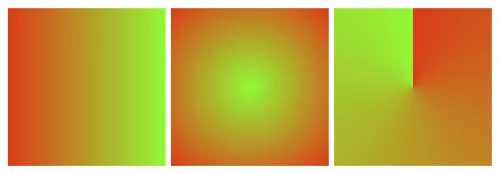
Linear gradient, Radial gradient, Conic gradient

There are various types of CSS gradients at your disposal. Linear gradients create a transition along a straight line, allowing you to control the angle and direction of the gradient. Radial gradients, on the other hand, radiate from a central point and create a circular or elliptical color transition. Conic gradients, the newest addition to CSS, produce a radial-like gradient that wraps around a center point, resembling a color wheel. Each gradient type offers unique possibilities for creating captivating visual effects.

The benefits of using CSS gradients extend beyond their aesthetic appeal. Utilizing gradients instead of background images can significantly reduce file sizes, leading to faster loading times and improved website performance. Additionally, CSS gradients provide unparalleled flexibility in design, as they can be easily customized and adjusted to achieve the desired visual effect. With CSS gradients, you have the freedom to experiment with colors, angles, and opacity, allowing for endless creativity and innovation in your web designs.

Creating CSS Gradients

To create CSS gradients, you’ll need to utilize specific properties and syntax. The primary property for applying gradients is background-image, which allows you to specify the gradient type and color stops. Additionally, the background-gradient property can be used for certain gradient variations. By understanding and utilizing these properties effectively, you can bring your gradient visions to life.

Let’s walk through the step-by-step process of creating different types of CSS gradients. To create a linear gradient, you’ll need to specify the gradient angle or direction using the “to” keyword or precise degrees. Radial gradients require defining the shape, size, and position of the gradient. For conic gradients, you can set the starting angle and control the number of color stops.

Let’s start with a basic example:

background-image: linear-gradient(to right, red, green);

This creates a simple linear gradient that transitions horizontally from red to green.

Defining color stops is a crucial aspect of CSS gradients. Color stops determine the transition points between colors in the gradient. You can specify color stops using various formats, such as hexadecimal, RGB, HSL, or even color keywords. Additionally, you can use techniques like color interpolation and transparency to achieve more intricate effects within your gradients. Experimentation with color stops and formats will allow you to achieve the desired visual outcome.

Advanced Gradient Techniques

CSS gradients offer a vast array of possibilities beyond basic linear and radial color transitions. With advanced techniques, you can take your gradient game to the next level and create visually stunning and engaging effects. Let’s explore some of these techniques and unleash your creativity in web design.

Creating Gradient Overlays and Blend Modes

One way to enhance the visual impact of gradients is by applying them as overlays on images or other elements using the background-blend-mode property. This allows you to blend gradients with other backgrounds or images to achieve captivating effects. Experiment with different blend modes like overlay, multiply, or screen to create unique and eye-catching compositions.

Gradient Transitions and Animations

Transitions and animations breathe life into web designs, and gradients are no exception. By utilizing CSS transitions and animations, you can smoothly transition between different gradients, creating dynamic and captivating visual effects. For example, you can animate color stops or the direction of gradients to add movement and depth to your designs. These subtle yet engaging transitions can greatly enhance the user experience.

Gradient Patterns and Multiple Gradients

Gradient patterns open up a world of possibilities for creating intricate and complex background designs. With repeating gradient patterns, you can achieve stunning visual effects that go beyond simple linear or radial gradients. Additionally, multiple gradients allow you to layer or blend gradients together, creating unique and visually appealing compositions. These techniques give you the freedom to experiment and create backgrounds that are truly one-of-a-kind.

Future Trends and Innovations

As web design continues to evolve, so do the possibilities and innovations surrounding CSS gradients. Let’s explore some emerging trends and advancements that are shaping the future of gradients in web design.

Gradient Generators and Advanced Effects

With the rise of online gradient generators, creating complex and visually appealing gradients has become more accessible than ever. These tools allow designers to experiment with various color schemes, angles, and shapes to generate unique gradient combinations effortlessly. Furthermore, advancements in CSS and browser capabilities have paved the way for advanced gradient effects, such as animated gradients, gradient transitions, and even 3D gradients. These cutting-edge techniques add a new dimension to the visual storytelling potential of gradients.

Gradient Libraries and Frameworks

To streamline the process of implementing gradients, developers and designers can take advantage of gradient libraries and frameworks. These resources offer pre-designed gradient styles, reusable code snippets, and convenient utilities for easy integration into web projects. Leveraging these libraries and frameworks can save time and effort while maintaining consistency and enhancing productivity in gradient implementation.

As technology advances and creativity knows no bounds, CSS gradients will continue to evolve and inspire new possibilities in web design.

CSS gradients have revolutionized the way we design and style websites, offering a wide range of possibilities for creating visually stunning and engaging user experiences. With the power of CSS gradients, web designers and developers can add depth, richness, and dynamism to their designs.

However, it is important to consider the performance implications of using CSS gradients. While gradients can greatly enhance the aesthetic appeal of a website and are more performant than background images, they can still impact page load times and page rendering, especially if they are complex or used excessively. It is crucial to optimize gradients by keeping them as lightweight as possible, using appropriate color stops, and considering the overall impact on website performance.

As with any design element, it is essential to strike a balance between visual impact and performance. Optimizing gradients and taking performance into consideration can ensure that your website not only looks stunning but also performs optimally across various devices and network conditions.

So, as you dive into the world of CSS gradients, remember to be mindful of performance considerations and strive to find the perfect harmony between creativity, aesthetics, and optimal website performance. With a careful approach, CSS gradients can elevate your web designs to new heights, providing memorable and engaging experiences for your users.

6 Tips for Visually Appealing Web Design

Picture a website that instantly grabs your attention with its stunning visuals, seamlessly blending colors, typography, and imagery to create an immersive experience. In web design, aesthetics hold immense power. They can captivate users, communicate brand identity, and leave a lasting impression. It’s no wonder that designing a visually appealing website is a top priority for every web designer.

Here we will explore some of the top tips and best practices that will empower you to craft designs that not only look stunning but also enhance user engagement and create a memorable digital presence. With the perfect blend of aesthetics, functionality, and user experience, your website can leave visitors awestruck and craving for more.

Use a Consistent and Cohesive Color Scheme

When it comes to creating a visually appealing website, color is a powerful tool that can evoke emotions, convey meaning, and establish a strong brand identity. Choosing a consistent and cohesive color scheme is essential for creating a harmonious visual experience.

Start by understanding your brand’s personality and the emotions you want to evoke in your audience. Are you aiming for a bold and energetic vibe, or perhaps a calm and serene atmosphere? Once you have clarity on your brand’s essence, carefully select a color palette that reflects these qualities.

Consider using colors that complement each other and create a sense of visual harmony. A good rule of thumb is to choose a primary color as the foundation and then select a few complementary or analogous colors to accompany it. Remember to strike a balance between using bold, attention-grabbing colors and more subtle shades that provide balance and contrast.

Use colors strategically to guide users’ attention and create visual hierarchy. For instance, make important elements, such as call-to-action buttons or key headings, stand out by using a contrasting color that draws the eye. Use more subdued colors for secondary elements to ensure they don’t compete for attention.

With a consistent and cohesive color scheme, you not only create an aesthetically pleasing website but also establish a strong brand presence that resonates with your audience. Let your colors speak for your brand and create an immersive visual experience that leaves a lasting impression.

Choose Complementary Fonts

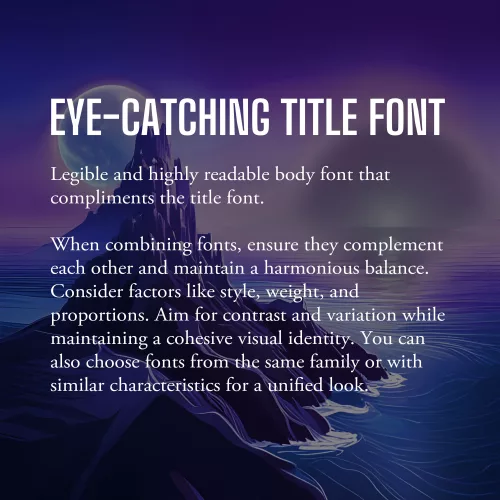
Example font pairing

Fonts play a significant role in web design, as they contribute to the overall look and feel of your website. When selecting fonts, it’s essential to choose ones that are not only legible but also visually appealing and complementary to your design aesthetic.

The first consideration when choosing fonts is legibility. Ensure that the fonts you select are easy to read, even at smaller sizes or on different devices. Legible fonts have clear and distinct letterforms, appropriate spacing between characters, and consistent stroke widths. Test the fonts across various screen sizes and devices to ensure they maintain their readability.

Once you have identified legible fonts, it’s time to think about the visual appeal and creating a harmonious typography scheme. Consider using a combination of fonts to add visual interest and establish a clear hierarchy within your design. One popular approach is to pair a sans-serif font with a serif font.

Sans-serif fonts, with their clean and modern appearance, are often used for headings and titles. They provide a contemporary and straightforward look that grabs attention and makes a bold statement. Serif fonts, on the other hand, have decorative strokes at the ends of characters, giving them a more traditional and elegant feel. They are commonly used for body text as they enhance readability and create a sense of familiarity.

When combining fonts, ensure that they complement each other and create a harmonious balance. Consider their overall style, weight, and proportions. Aim for contrast and variation between the fonts while maintaining a cohesive visual identity. Pairing fonts from the same font family or fonts that share similar characteristics can also create a cohesive and unified look.

Additionally, be mindful of the number of fonts you use on your website. Using too many fonts can lead to visual clutter and confusion. Stick to a limited number of fonts (typically two or three) to maintain consistency and a polished appearance throughout your website.

As with all design choices, it’s crucial to consider your target audience and the message you want to convey. Fonts can evoke different emotions and associations, so choose fonts that align with your brand personality and the overall tone of your website.

Incorporate Whitespace

Whitespace, or negative space, is a powerful yet often underutilized element. It refers to the empty space between elements on a webpage, and it plays a crucial role in creating a visually appealing and user-friendly design.

Whitespace is not just empty space; it is a deliberate design choice that brings balance, clarity, and elegance to your website. Incorporate ample white space to give your content room to breathe, allowing it to stand out and capture the user’s attention. This clean and uncluttered layout creates a sense of organization and makes it easier for visitors to navigate and digest your content.

One of the key benefits of whitespace is enhanced readability. The absence of visual clutter allows users to focus on the important elements and absorb information more easily. Whitespace also helps guide the user’s eye and establish a clear visual hierarchy, making it easier to prioritize content and highlight key messages.

Aesthetically, whitespace creates a sense of elegance and sophistication in your design. It gives your website a modern and spacious feel, conveying a sense of professionalism and attention to detail. When used strategically, whitespace can evoke a sense of luxury, simplicity, and elegance that resonates with your audience.

When incorporating whitespace, consider the overall layout and spacing between elements. Give generous margins around text blocks, images, and buttons. Be mindful of the spacing between different sections and elements on the page. Experiment with different layouts and proportions to find the right balance that suits your content and design aesthetic.

Use High-quality and Relevant Images

Incorporating visually appealing images is a powerful way to enhance the overall aesthetic of your website and captivate your audience. Well-chosen and carefully curated images can communicate your brand message, evoke emotions, and provide valuable context to your content.

First and foremost, prioritize high-quality images. Blurry or pixelated images can significantly impact the visual appeal of your website and create an unprofessional impression. Invest in high-resolution images that are crisp, clear, and vibrant. If you’re using photographs, ensure they are well-lit and properly composed.

Relevance is another crucial aspect to consider when choosing images. Select visuals that are closely aligned with your brand identity, content, and target audience. The images you choose should enhance the message you’re trying to convey and resonate with your visitors. For example, if you’re designing a website for a travel agency, incorporating captivating images of beautiful destinations can inspire and entice potential travelers.

Consider the placement and context of images within your website design. Images should be strategically positioned to support and complement your content. Use them to break up text, highlight key points, or create visual interest. For example, you can use images as background elements or hero banners to make a strong visual statement. The right images have the power to leave a lasting impression on your visitors and make your website truly visually appealing.

Create a Balanced Layout

Creating a balanced layout is crucial in web design as it contributes to the overall visual appeal and user experience of a website. When elements are evenly distributed and placed thoughtfully, they create a sense of visual equilibrium and harmony.

To achieve a balanced layout, consider the placement and arrangement of text, images, and other design elements on the page. Distribute them strategically, ensuring that no single element overpowers or dominates the others. This can be achieved through techniques such as symmetry, asymmetry, or a grid-based layout.

Symmetrical balance involves arranging elements in a mirrored or evenly distributed manner, creating a formal and harmonious feel. It is often used in more traditional and conservative designs. Asymmetrical balance, on the other hand, involves arranging elements in an intentionally unbalanced but visually pleasing way. This approach adds a sense of dynamism and can be used to create more modern and creative designs.

With careful consideration of the placement, size, and visual weight of each element, you can create a balanced layout that guides the user’s eye, communicates hierarchy, and enhances the overall visual appeal. A well-balanced layout not only creates a visually pleasing design but also improves readability and usability, making it easier for visitors to navigate and engage with your website’s content.

Apply Visual Hierarchy

Visual hierarchy is a fundamental principle in web design that helps guide users’ attention and prioritize information effectively. By strategically applying various design elements such as size, color, contrast, and placement, you can establish a clear visual hierarchy on your website.

One of the key aspects of visual hierarchy is utilizing size appropriately. Larger elements tend to attract more attention, so use larger fonts for headings or important sections to make them stand out. Similarly, consider increasing the size of buttons or interactive elements to encourage user engagement. With contrasting sizes, you create a distinction between different elements and help users understand their relative importance.

Color is another powerful tool in establishing visual hierarchy. Use color strategically to draw attention to key elements. Vibrant or contrasting colors can make important elements stand out, while more muted or harmonious colors can be used for less prominent elements. Additionally, consider using color to create consistency and coherence with your brand identity.

Honorable Mentions

Designing a visually appealing website is essential for capturing the attention of users and creating a memorable browsing experience.

While we’ve covered some of the key aspects of visual design, there are some honorable mentions worth talking about. Visual multimedia elements, such as videos, animations, and interactive components, can enhance engagement and add an interactive dimension to your design. However, it’s important to use them judiciously and ensure they contribute to the overall user experience.

Additionally, responsive design deserves a special mention. Ensuring your website is responsive and adapts seamlessly to different screen sizes and devices is crucial. Responsive design guarantees that your website looks visually appealing and functions optimally across a range of devices, providing a consistent experience for users.

Remember, creating a visually appealing website goes beyond aesthetics—it also contributes to user satisfaction, brand perception, and ultimately, the success of your online presence. Take some time to think about how you can implement these tips into your design workflow. Standing on the shoulders of design giants, you can create a website that not only looks visually stunning but also delivers an exceptional user experience.

Brand Identity: Developing a Unique Business Image and Personality

In today’s fiercely competitive business landscape, developing a strong brand image and personality is more important than ever. A brand’s identity goes far beyond just a name and logo – it encompasses the essence of what the business stands for and how it is perceived by customers. A well-defined brand image and personality have the power to differentiate businesses from their competitors and forge a deep emotional connection with their target audience.

When customers interact with a brand, they form perceptions and associations based on various elements, including visual identity, messaging, values, and overall experience. These elements collectively shape the brand’s image and personality. A carefully crafted brand image can convey professionalism, trustworthiness, innovation, or any other desired attribute that resonates with the target market.

A strong brand personality humanizes the business and allows customers to relate to it on a personal level. It creates a distinct voice, tone, and character that set the brand apart and make it memorable. By developing a brand personality, businesses can infuse their communication with authenticity, charm, and relatability, fostering deeper connections and customer loyalty.

What Does it Mean to Have a Brand Image and Personality?

Brand Image: At its core, brand image refers to the overall impression and perception customers have of a brand. It is the collective result of various elements such as the brand’s visual identity, messaging, reputation, and customer experiences. A strong brand image effectively communicates the values, qualities, and unique attributes that distinguish a business from its competitors. It sets the tone for customer interactions and forms the foundation for building brand loyalty.

Brand Personality: Brand personality is the distinctive character and identity that a brand assumes, akin to a human personality. It humanizes the brand, making it relatable and enabling customers to form emotional connections. Just like individuals have different personalities, brands can have their own unique personality traits that align with their target audience. These traits can be communicated through the brand’s tone of voice, messaging style, and visual elements. For example, a brand may be seen as friendly, authoritative, playful, or sophisticated, based on the personality traits it embodies.

To develop a compelling brand image and personality, businesses need to consider several key elements. First, defining the brand’s core values is essential. These values represent what the brand stands for and guide its actions and decisions. Aligning the brand’s values with those of its target audience can help a business establish a deeper connection and build trust.

The brand’s tone of voice is another aspect of its personality. It encompasses the language, style, and attitude used in brand communications. A friendly and conversational tone may appeal to a younger audience, while a professional and authoritative tone may be more suitable for a business targeting a corporate clientele. Consistency in tone of voice across all brand touchpoints reinforces the brand’s personality and enhances brand recognition.

Visual identity also plays a significant role in shaping brand image and personality. Elements such as logos, color palettes, typography, and imagery contribute to the overall visual representation of the brand. Consistency in visual branding fosters recognition and helps convey the brand’s personality visually.

Identifying Your Target Audience

Finding your target audience

Understanding your target audience is significant because it allows you to create a brand identity that aligns with their preferences and needs. It enables you to speak directly to their interests and desires, increasing the likelihood of establishing a meaningful connection. By catering to their specific demographics, such as age, gender, location, and income level, you can develop a brand image that appeals directly to their unique characteristics.

Psychographics, on the other hand, delve into the psychological and emotional aspects of your audience. This includes their attitudes, beliefs, values, and lifestyle choices. Uncovering their motivations, challenges, and aspirations can help you shape your brand personality to align with their desires and create a more authentic connection.

Conducting thorough market research is key to gaining this valuable knowledge about your target audience. Surveys, interviews, and online research can provide a wealth of information about their preferences, behaviors, and pain points. Analyzing data from social media platforms, website analytics, and market research reports can also uncover patterns and trends that further refine your understanding of your audience.

Defining and Refining Your Brand Identity

A strong and distinctive brand identity is the foundation of a successful business. It goes beyond just a logo or a catchy tagline—it encompasses the core values, mission, and unique characteristics that set your brand apart from competitors.

Core Values

To begin, it’s essential to establish your brand’s core values. These are the fundamental beliefs and principles that guide your business and shape its identity. Core values serve as the compass that steers your brand’s decisions, actions, and interactions. Think about what your brand stands for—whether it’s innovation, sustainability, authenticity, or any other values that align with your mission and resonate with your audience. These values become the pillars upon which your brand identity is built.

Mission Statement

Crafting a compelling mission statement is the next step in defining your brand identity. A mission statement encapsulates your brand’s purpose and why it exists. It communicates the impact you aim to make and the value you bring to your customers. A well-crafted mission statement reflects your brand’s passion, vision, and commitment to delivering exceptional products or services. It should be concise, memorable, and aligned with the needs and aspirations of your target audience.

Defining your brand identity is not only about articulating it internally but also about effectively communicating it to your target audience. Ensure that your brand’s visual elements, such as logo, color palette, typography, and imagery, reflect and reinforce your brand identity. Consistency in tone of voice, messaging, and customer interactions also helps to build a cohesive brand image that resonates with your audience.

Developing Visual Brand Elements

Using images and video to enhance your website

Visual brand elements play a deep role in shaping your brand’s image and creating a lasting impression on your audience. They are the tangible elements that visually represent your brand and communicate its personality. When developing your brand’s visual identity, there are several key components to consider:

  1. Designing a memorable logo: Your logo is the face of your brand and often the first thing people associate with your business. It should be distinctive, memorable, and reflect your brand’s personality. A well-designed logo captures the essence of your brand and communicates its values, positioning, and uniqueness. Ensure that it is visually appealing, versatile, and scalable across different platforms and mediums.
  2. Choosing an appropriate color palette: Colors have a powerful impact on human emotions and perceptions. When selecting a color palette for your brand, consider the emotions and associations you want to evoke. Each color has its own meaning and symbolism, so choose colors that align with your brand’s personality and resonate with your target audience. A harmonious color palette not only enhances brand recognition but also conveys a consistent and cohesive brand image.
  3. Selecting typography: Typography plays a vital role in conveying your brand’s voice and tone. Choose fonts that align with your brand’s personality and are legible across various platforms and devices. Consider pairing different font styles to create a visual hierarchy and evoke specific emotions. The typography you choose should be consistent with your brand identity and reinforce the overall message you want to convey.
  4. Incorporating relevant imagery: Images and visuals add depth and personality to your brand. They evoke emotions, tell stories, and capture attention. Choose imagery that aligns with your brand’s values, target audience, and messaging. Whether it’s original photography, illustrations, or curated visuals, ensure that they are high-quality, relevant, and consistent with your brand identity. Visual consistency helps establish a cohesive brand experience across different touchpoints.

When developing your brand’s visual elements, it’s important to strike a balance between creativity and consistency. Your visual identity should be unique and captivating, while also aligning with your brand’s personality and resonating with your target audience. Consistency in design elements across your website, social media profiles, marketing materials, and other touchpoints is key to creating a cohesive and recognizable brand image.

Crafting Your Brand’s Tone of Voice

Your brand’s tone of voice is the way you communicate and express your brand’s personality through written and spoken language. It plays a crucial role in establishing a strong and consistent brand image, connecting with your target audience, and differentiating your brand from competitors.

To effectively craft your brand’s tone of voice, it’s essential to have a deep understanding of your target audience. Research their demographics, values, preferences, and communication styles. Consider their language preferences, the level of formality they respond to, and the emotions and aspirations that resonate with them. This understanding will help you tailor your brand messaging to effectively engage and connect with your audience.

Consistency is vital in maintaining a strong and recognizable brand image. Establish guidelines for your brand’s tone of voice to ensure consistent messaging across various marketing channels. Define the key attributes that reflect your brand’s personality, such as friendly, authoritative, playful, or professional. Consider creating a brand style guide that outlines specific dos and don’ts, preferred vocabulary, sentence structures, and grammar rules. This guide will serve as a reference for anyone creating content or communicating on behalf of your brand.

Additionally, consider these tips to further enhance your brand’s tone of voice:

  • Be authentic: Let your brand’s personality shine through in your communication. Be true to your brand values and avoid sounding generic or overly promotional. Authenticity builds trust and fosters meaningful connections with your audience.
  • Use storytelling: Storytelling is a powerful tool for engaging your audience and conveying your brand’s values and purpose. Incorporate storytelling elements into your brand messaging to create emotional connections and make your content more relatable.
  • Adapt to different channels: Your tone of voice should be adaptable to different marketing channels, including your website, social media, email marketing, and customer support. Tailor your messaging to suit each platform while maintaining consistency in the overall brand personality.
  • Listen to feedback: Pay attention to how your audience responds to your brand’s tone of voice. Monitor feedback, comments, and conversations to understand what resonates with your audience and make adjustments if necessary.

Evoking Emotions through Brand Storytelling

Storytelling is a powerful tool for capturing the hearts and minds of customers. By harnessing the innate human love for stories, brands can create emotional connections that go beyond mere transactions. Effective brand storytelling allows you to engage, inspire, and leave a lasting impact on your audience. Here’s how you can incorporate storytelling into your brand’s communication strategy:

  1. Identify Your Brand Narrative: Start by understanding the essence of your brand and what makes it unique. Uncover the stories behind your brand’s founding, its values, and its journey. These stories form the foundation of your brand narrative, providing a compelling backdrop that resonates with your target audience.
  2. Connect on an Emotional Level: Successful brand storytelling goes beyond facts and figures; it taps into emotions. Craft stories that evoke emotions aligned with your brand identity and values. Whether it’s joy, nostalgia, empathy, or inspiration, the key is to create an emotional connection with your audience. Think about how your brand’s story can evoke those emotions and align them with the aspirations and desires of your target audience.
  3. Show, Don’t Just Tell: Bring your brand’s story to life through visuals, multimedia, and immersive experiences. Consider using videos, images, and interactive content to engage your audience and make your brand story more memorable. Visual elements can amplify the emotional impact of your storytelling and create a deeper connection with your audience.
  4. Make Your Audience the Hero: A powerful storytelling technique involves making your audience the hero of the story. Position your brand as the guide or mentor that helps your audience overcome challenges and achieve their goals. By putting your audience at the center of the narrative, you empower them and create a sense of personal relevance.
  5. Consistency and Authenticity: Ensure that your brand storytelling aligns with your overall brand identity and remains consistent across all channels. Authenticity is key – your audience should feel a genuine connection with your brand’s story. Avoid clichés or contrived narratives and strive for a genuine, honest portrayal of your brand’s values and journey.
  6. Engage and Involve Your Audience: Encourage user-generated content and invite your audience to share their own stories related to your brand. This not only fosters a sense of community but also adds depth and diversity to your brand narrative.

Conclusion

Developing a strong brand image and personality is a continuous journey that requires ongoing tracking, evaluation, and adaptation. As your brand evolves, it’s essential to monitor its performance and make adjustments based on customer feedback, market trends, and emerging opportunities.

Regularly track key performance indicators related to your brand’s perception, customer engagement, and overall business growth. Analyze metrics such as brand recognition, customer satisfaction, social media engagement, website traffic, and sales. This data will provide valuable insights into how your brand image and personality are perceived and how they impact your bottom line.

Developing a compelling brand image and personality is a key driver of success in today’s competitive business landscape. Track your brand’s performance and be willing to adapt to ensure your brand remains relevant and resonates with your audience. With dedication and a thoughtful approach, your brand has the potential to make a lasting impression and drive business success.

CSS Variables: The Power of Custom Properties in Web Design

CSS custom properties, also known as CSS variables, were introduced in CSS3 as a way to make it easier to reuse and maintain styling across a website. With CSS custom properties, you can define a value once and use it throughout your stylesheet, making it easier to make global changes to your website’s design without having to edit multiple places. In this article, we’ll explore how to use CSS custom properties and some of the benefits they provide.

To create a custom property, you simply define it with a double hyphen prefix, followed by a name and a value:

:root {
    --primary-color: #0088cc;
}

In this example, we’ve defined a variable named “--primary-color” and given it a value of “#0088cc“. We’ve placed this definition in the :root selector to make it global to the entire document.

Once you’ve defined a custom property, you can use it throughout your stylesheet by referencing its name with the var() function:

a {
    color: var(--primary-color);
}

In this example, we’re setting the color of all anchor tags to the value of our custom property, “--primary-color“. This makes it easy to change the color of all links on our website by simply changing the value of the custom property. You can also use this same variable to color other highlighted elements like buttons, borders, and backgrounds.

One of the key benefits of CSS custom properties is that they make it easier to maintain a consistent design across your website. By defining global values in custom properties, you can make sure that your colors, fonts, and other design elements are consistent across all pages.

Custom properties can also make it easier to create responsive designs. Let’s say you have a navigation menu on your website that collapses into a hamburger menu on smaller screens. You want to change the background color of the navigation menu when it’s in its collapsed state to make it more visible. You can use CSS variables to define the background color for different screen sizes.

First, define a custom property for the background color:

--menu-bg-color: #ffffff;

Next, use media queries to change the value of the custom property for different screen sizes:

@media screen and (max-width: 768px) {
    :root {
        --menu-bg-color: #333333;
    }
}

Finally, use the custom property to style the navigation menu:

.nav-menu {
    background-color: var(--menu-bg-color);
}

In this example, the background color of the navigation menu will be white by default, but will change to dark gray when the screen width is 768px or less. This makes the menu more visible and easier to use on smaller screens. By using CSS custom properties and media queries, you can create responsive designs that adapt to different screen sizes and provide a better user experience.

In addition to making it easier to maintain a consistent design and create responsive layouts, CSS custom properties can also help reduce the size of your stylesheets. By using custom properties to define global values, you can avoid repeating the same values throughout your stylesheet, which can help reduce the file size and make your site faster. This is especially beneficial when using long values like gradients and clip paths.

Here’s an example where CSS variables can save a considerable amount of time and file size. Instead of defining your font families on each element, you can define custom properties for each style:

--title-font: Impact, 'Helvetica Neue Condensed', 'Arial Narrow', sans-serif;
--body-font: Helvetica, Tahoma, Arial, sans-serif;

Now you can use the title font variable to style each of your headings, and the body font property to style your paragraphs and list items.

So, instead of entering a long list of font families dozens of times throughout your document, you can define one list to be used any number of times throughout your document. Any time you decide to change your title font or body font, you only have to enter it once.

CSS custom properties can be used to save values for any property, from simple margins, to binary images. They can also be used to store complex values, such as the results of CSS calculations. Here’s an example of using the calc() function in a variable:

--box-width: calc(100vw - 20px);

This custom property can then be used to set the width of any element:

.box {
    width: var(--box-width);
}

This would set the width of all .box elements to 20 pixels smaller than the width of the viewport.

Here are some additional tips and techniques for using CSS custom properties:

  • Use descriptive names. This will make your code more readable and easier to understand down the road.
  • Use consistent naming conventions. This will help you to keep track of your custom properties and make it easier to find them when you need them.
  • Group related variables together. This will help to keep your code organized and easier to read.
  • Use custom properties to store complex values. This can be useful for things like storing the results of calculations or storing data that needs to be reused throughout a stylesheet.
  • Combine with other CSS features. CSS custom properties can be used in conjunction with other advanced CSS features such as calc(), media queries, and animations to create complex and dynamic designs.
  • Use custom properties to create accessible designs. You can use custom properties to store values that can be used to make your designs more accessible, such as the color of text or the contrast between text and background. This can help people with disabilities to use your website more easily.
  • Use fallback values. CSS custom properties can be nested, so it’s possible to set a fallback value for a property in case the browser doesn’t support custom properties. This ensures that the website will still be functional and styled even on browsers that don’t support CSS custom properties.

CSS custom properties are a hugely powerful new web technology that changes the game for web designers. They make it easier to create consistent designs and responsive layouts, as well as reducing the size of your stylesheets. By using custom properties to define global values, you can make it easier to maintain and update your website’s design, saving you time and effort in the long run.

Color Theory: Speak the Language of Hue

Color is a crucial and influential element in web design, as it can evoke emotions, convey a brand’s personality, and guide users’ attention. Color theory is the study of how colors interact with each other and how they affect the human eye and brain. It is a complex and fascinating subject, and it can be used to create a wide variety of effects in design. So how does color theory apply to web design and how do you choose the right colors for your website?

The first thing to consider when choosing colors for your website is your brand’s personality and message. Think about the emotions you want to convey to your audience and what your brand stands for. For example, blue is often associated with trust and reliability, while red is associated with energy and excitement. Once you have a clear understanding of your brand’s personality, you can choose colors that align with it.

When choosing colors for a website, it is important to consider the overall mood or atmosphere you want to create. For example, if you want to create a website that is calming and relaxing, you might choose soft, muted colors like blues and greens. If you want to create a website that is exciting and energetic, you might choose brighter, more vibrant colors like reds and oranges.

It is also important to consider the target audience for your website. For example, if your website is aimed at children, you might choose bright, playful colors. If your website is aimed at adults, you might choose more subdued colors.

In addition to the overall mood or atmosphere, you should also take into consideration the specific elements of your website when choosing colors. For example, the text should be easy to read against the background, and the call-to-action buttons should stand out from the rest of the page.

Color theory can be a complex subject, but it is an essential part of web design. By understanding the basics of color theory, you can create websites that are visually appealing and effective.

Color Wheel

Color Wheel
Color Wheel

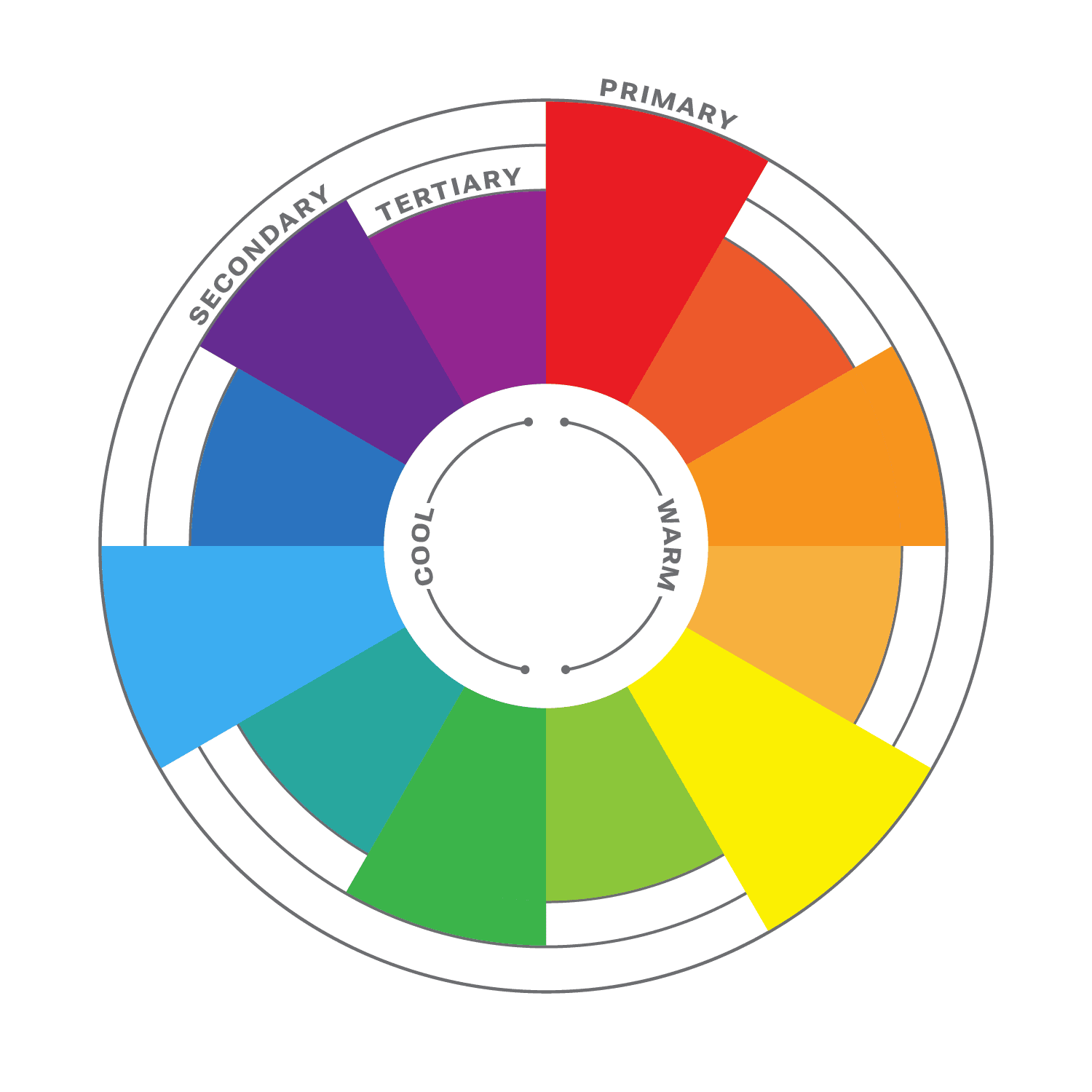
The color wheel is a circular diagram that shows the relationships between colors. It is a useful tool for understanding how colors work together and how to create pleasing color schemes.

The color wheel is divided into three primary colors: red, yellow, and blue. These colors cannot be created by mixing other colors together. When two primary colors are mixed together, they create a secondary color. The secondary colors are orange, green, and purple. When a primary color and a secondary color are mixed together, they create a tertiary color. There are six tertiary colors: red-orange, yellow-orange, yellow-green, green-blue, blue-purple, and red-purple.

The color wheel is often divided into warm colors (like red, orange, and yellow) and cool colors (like blue, green, and violet). Warm colors are associated with passion, energy, and excitement, while cool colors are associated with calmness and peace.

Color Harmony

Another important aspect of color theory is color harmony. This refers to how colors work together to create a visually appealing design. It is a subjective concept, as different people have different preferences for color. However, there are some general principles of color harmony that can be followed to create pleasing color schemes.

Complementary Colors

There are many different ways to create color harmony, but some of the most common methods include:

  • Monochromatic: A monochromatic color scheme uses variations of one color. This can be a very effective way to create a calm and sophisticated look.
  • Analogous: Analogous color schemes use three colors that are close to each other on the color wheel. This can be a very harmonious and pleasing color palette.
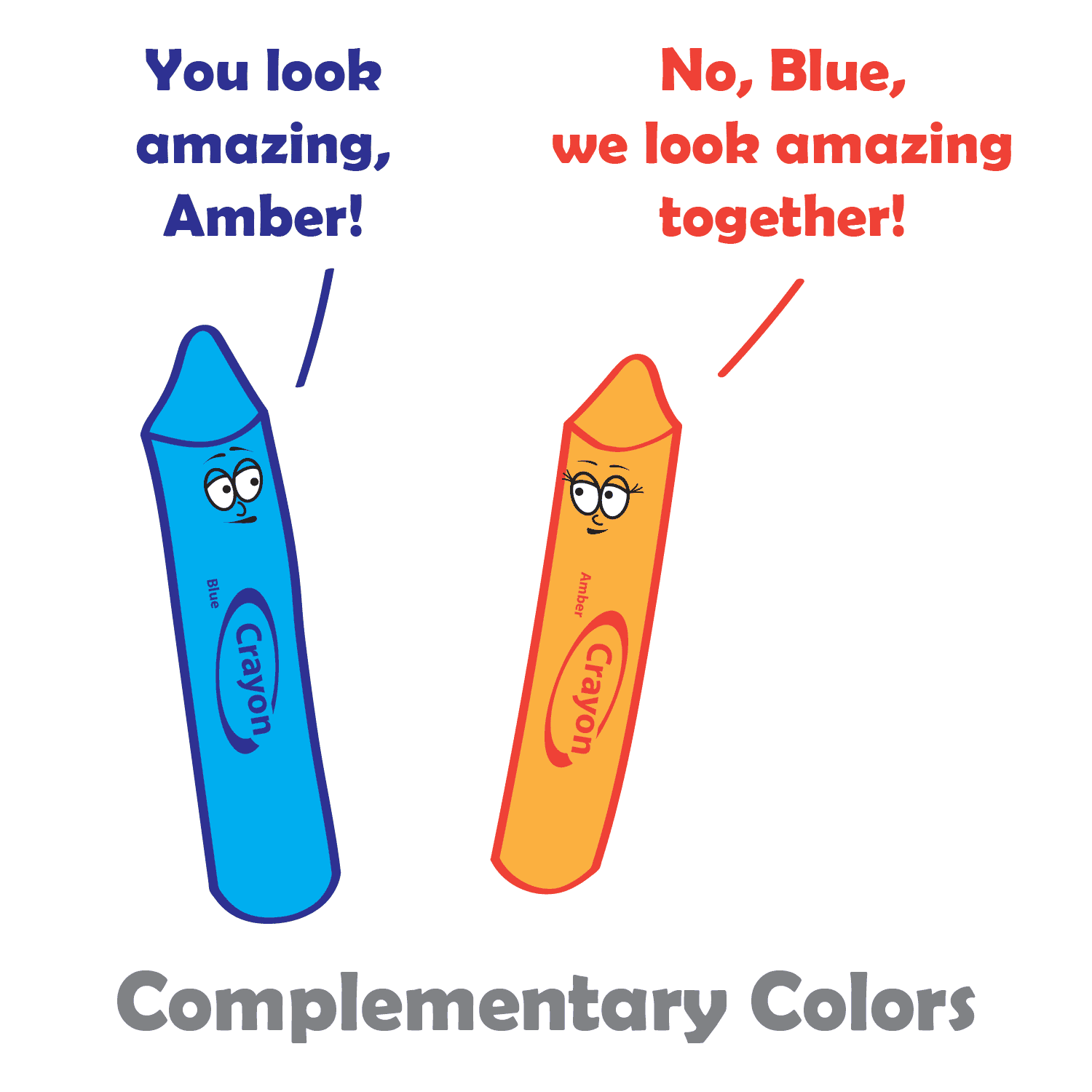
  • Complementary: Complementary colors are two colors that are opposite each other on the color wheel. This can be a very striking and eye-catching pair.
  • Split-complementary: Split-complementary color schemes use the color opposite the primary color, as well as the two colors on either side of the complementary color. This can be a very sophisticated and elegant color combination.
  • Triadic: A triadic color theme uses three colors that are evenly spaced around the color wheel, creating a very balanced and dynamic look.
  • Tetradic: Tetradic color schemes use four colors that are evenly spaced around the color wheel. This can be a very complex and interesting way to use color.

When choosing colors in your design process, it is important to consider the overall effect that you want to create. If you want to create a calm and relaxing design, you might want to use a monochromatic or analogous color scheme. If you want to create something more dramatic and eye-catching, you might want to use a complementary or triadic color scheme.

No matter which method you choose, it is important to use colors that you like and that work well together, and to experiment with different color combinations until you find one that you like. And remember, there are no hard and fast rules when it comes to color harmony. The most important thing is to use colors that you find pleasing and that create the effect you want. When you choose colors that are pleasing to the eye, you can create art that is both beautiful and functional.

Color Principles

One of the most important principles of color harmony is contrast. Contrast is the difference between the lightness and darkness, or the warmth and coolness, of colors. A high-contrast color scheme uses colors that are very different from each other, while a low-contrast color scheme uses colors that are similar to each other.

Contrast is important in web design, as it helps guide users’ attention and create visual interest. High contrast colors, such as black and white, create a strong visual impact and are useful for highlighting important information. Low contrast colors, such as pastels, create a softer and more subdued effect.

Another important principle of color harmony is unity. Unity is the feeling that all of the colors in a design work together. There are a number of ways to create unity, such as using a limited color palette, repeating colors throughout a design, or using a color scheme that is based on a natural phenomenon, such as a sunset or a rainbow.

In addition, consider the cultural associations of colors. Different cultures may have different meanings and associations with colors, so it’s important to research the cultural context of your audience. For example, in western cultures, white is often associated with purity and innocence, while in some eastern cultures it is associated with mourning.

Color Psychology

While color theory and color psychology are related, they are not the same thing. Color theory focuses on the principles and concepts of color and how they interact with each other. It is concerned with the visual effects of color combinations, such as contrast, harmony, and balance. On the other hand, color psychology studies the emotional and behavioral effects of colors on human beings. It explores how different colors can affect mood, perception, and behavior, and how they can be used to communicate different messages and create different experiences. While color theory is important in creating effective and visually pleasing designs, color psychology can help to further enhance the message and impact of a design by understanding how colors are perceived and experienced by the audience.

According to color psychology, different colors evoke different emotions and can have different effects on the human brain. For example, red is often associated with excitement and passion, while blue is often associated with calmness and peace. When choosing colors for your website, it’s important to consider the message you want to convey and the emotions you want to evoke in your users.

Here are some additional tips for using color in web design:

  • Use a limited color palette. Too many colors can be overwhelming and distracting.
  • Use white space to create contrast and make your colors pop.
  • Use color to highlight important elements of your website, such as the call to action buttons.
  • Use color consistently throughout your website. This will help create a cohesive and professional look.
  • Test your colors on different devices and browsers to make sure they look good everywhere.

When used effectively, color can be a powerful tool for web design. Color theory is an important aspect of web design that can greatly impact the success of your website. By understanding the principles of color theory, and considering your brand’s personality, you can choose the right colors to evoke the emotions and convey the message you want to communicate to your audience.

Rules and Guidelines of Web Design

In photography, there are rules or guidelines such as the rule of thirds, to assist in composing an image. But what rules are there in web design? There are actually several laws and principles that are commonly used in website design to create aesthetically pleasing and effective websites. Here are some of the most important rules-of-thumb in web design.

The Rule of Thirds

Believe it or not, the rule of thirds can even apply to web design as well, or any art form where you are composing a frame. The rule of thirds is a compositional guideline that divides an image into nine equal parts by two equally spaced horizontal lines and two equally spaced vertical lines. The important compositional elements of a design should be placed at the intersections of these lines, or along the lines themselves. The idea is that this creates a more balanced and visually appealing composition.

The rule of thirds can be used in web design to improve the aesthetics of your layouts. By placing important elements at the intersections of the rule of thirds grid, you can create a more dynamic and interesting composition.

For example, you could place your logo at the intersection of the top horizontal line and the left vertical line, and your call to action button at the intersection of the bottom horizontal line and the right vertical line. You could also use the rule of thirds to place your navigation bar, header, footer, and other important elements on your website.

Of course, the rule of thirds is just a guideline. You don’t have to follow it slavishly. But if you find that your designs are feeling a bit static or boring, try using the rule of thirds to see if it helps to create a more visually interesting and engaging design.

Use White Space

White space, also known as negative space, refers to the blank areas around and between design elements on a web page. It can be just as important as the content itself, as it can help to create a clean, organized, and visually pleasing design.

One of the benefits of white space is that it can make important content stand out. By leaving some areas of a page empty, the eye is naturally drawn to the content that is present. This can be particularly useful when trying to emphasize a call-to-action or other important information.

Another benefit of white space is that it can improve readability. By spacing out paragraphs, headers, and other text elements, it becomes easier for the reader to distinguish between them and to follow the flow of the content. This can be particularly important on mobile devices where screen space is limited.

When using white space, it’s important to strike a balance between too much and too little. Too much white space can make a page look sparse and unfinished, while too little can make a page look cluttered and overwhelming. It’s important to consider the purpose of the page, the content that will be included, and the overall design aesthetic when deciding how much white space to incorporate.

Be Consistent

Consistency is essential in web design, as it provides the necessary structure and organization to help users navigate through a website with ease. Consistency in design means that similar elements on different pages have the same look and feel, including typography, color, layout, and navigation. This not only makes the website more visually appealing, but it also helps users quickly recognize and understand how to interact with different components on the site.

When designing a website, consistency should be applied not only to the visual design but also to the user experience. This means that the website should be consistent in terms of functionality, such as the placement of navigation menus and buttons, the use of icons and symbols, and the overall flow of the website. Consistency in user experience ensures that users know what to expect from the website and how to navigate it, which leads to a better overall UX.

Another benefit of consistency in web design is that it can help establish a brand identity. A consistent visual style can help users identify and connect with a brand, making it easier for the brand to build brand recognition and loyalty.

Consider Contrast

Contrast is a crucial element of web design that can help to create visual interest and guide users’ attention to the most important content on a page, as well as improve it’s accessibility. Contrast can be achieved through the use of different colors, typography, shapes, and sizes.

One way to use contrast effectively in web design is to create a visual hierarchy. This involves using contrasting elements to differentiate between different levels of information on a page. For example, the use of bold, large typography for headlines can create contrast and draw the user’s attention to important information.

Another way to use contrast is to create a sense of depth and dimensionality in a design. By using contrasting colors and shades, web designers can create the illusion of layers and depth, which can make a design more visually engaging and memorable.

When using contrast in web design, it’s important to be mindful of accessibility. For example, using colors with insufficient contrast can make it difficult for users with visual impairments to read content. Designers should always ensure that their designs meet accessibility guidelines and are accessible to all users.

Limit the Number of Fonts

Using too many different fonts in web design can be a common mistake that can make a website look cluttered and unprofessional. It’s important to remember that typography is an art form and should be treated as such. When using multiple fonts, they should be carefully selected and paired in a way that is visually appealing and harmonious.

One approach to using multiple fonts in web design is to limit the number of fonts used to two or three, with each font serving a distinct purpose. For example, a website might use one font for headlines and another for body text. When selecting fonts, it’s also important to consider their style and how they complement each other. Fonts that are too similar can create confusion and make it difficult for users to distinguish between different sections of a website.

In addition to limiting the number of fonts used, it’s also important to consider font size, spacing, and hierarchy. Proper use of font size and spacing can help guide the user’s eye and make it easier to scan and read content. Hierarchy, or the order of importance of text on a page, can also be communicated through the use of font weight and style.

Using multiple fonts in web design can add visual interest and depth, but it’s important to do so in a thoughtful and intentional way. By limiting the number of fonts used and considering their style, size, spacing, and hierarchy, designers can create a cohesive and professional look for their website.

Don’t Let These Rules Cripple Your Creativity

These principles and rules help web designers create websites that are visually appealing, functional, and user-friendly. But these rules are just guidelines, and there are times when it’s okay to break them. For example, if you have a strong focal point, sometimes you may want to place it in the center of the frame. There is no one right way to build a website. Experiment with different layouts to see what works best for you and your brand. Ultimately, the best way to compose your design is to use your intuition.

Color Psychology and its Impact on Web Design

Color is a fundamental aspect of web design that can have a significant impact on user experience. Color psychology is the study of how color affects human behavior, mood, and emotion. When used effectively, color can help convey a message, evoke emotions, and guide users through a website.

Color psychology suggests that different colors can evoke different emotions in people. For example, red can symbolize passion, energy, and excitement, while blue is often associated with trust, calmness, and security. By using colors strategically, web designers can create a specific mood or emotion within their website visitors.

One important consideration is to choose colors that are appropriate for the brand and the target audience. Bright and bold colors may work well for a children’s website, but may not be appropriate for a financial institution. Neutral and muted colors may be better suited for a professional website.

Another factor to consider is color contrast. High contrast between background and foreground colors can make it easier for users to read text and navigate the site. It’s important to also consider color accessibility and make sure that the site is accessible to users with visual impairments. Tools like the WCAG color contrast checker can help ensure that color contrast meets accessibility standards.

In addition, it’s also important to consider the overall visual hierarchy of the website. Colors can be used to draw attention to important elements, such as calls to action or navigation menus. Using color consistently throughout the website can also help create a cohesive and memorable brand identity.

Color theory is the study of how colors interact with each other and the human eye. It involves understanding the color wheel, color harmony, and color contrast. By applying color theory principles in web design, designers can create harmonious color palettes that communicate the intended emotions and messages to the users.

Here are some examples of how color can be used in web design:

  • Red: Red is a powerful color that can be used to create a sense of urgency or excitement. It’s often used on websites that sell products or services that people need right away, such as restaurant and delivery websites or emergency services websites.
  • Orange: Orange is a warm and inviting color that can be used to create a sense of excitement or happiness. It’s often used on websites that sell products or services that people want to enjoy, such as recipe or travel websites.
  • Yellow: Yellow is a bright and cheerful color that can be used to grab attention or create a sense of optimism. It’s often used on websites that have products or services that people want to buy, such as retail websites or online stores.
  • Green: Green is a calming and relaxing color that can be used to create a sense of peace or relaxation. It’s popular on environmental and outdoors sites.
  • Blue: Blue is a cool and calming color that can be used to create a sense of trust or reliability. It’s commonly used on websites where people need to feel safe and secure, such as banking websites or government websites.

Color psychology is a powerful tool that can help web designers create an effective and engaging user experience. Remember, too much color can be overwhelming and distracting. It’s important to use color sparingly and to choose colors that complement each other. By choosing appropriate colors, considering contrast and accessibility, and using color strategically, designers can enhance the user experience and create a memorable brand identity.