Website Notifications: Engaging and Retaining Your Audience

Capturing and retaining users’ attention is paramount for the success of any website. This is where website notifications come into play. Web notifications are powerful tools that can significantly enhance user experience and engagement. They serve as a means to deliver timely and relevant information directly to users, keeping them informed, engaged, and connected. Whether it’s a promotional offer, important updates, or personalized content, notifications have become an integral part of modern web design.

Types of Web Notifications

Website notifications come in various forms, each serving a specific purpose and catering to different communication channels. Let’s explore some of the most common types of website notifications and the benefits they offer:

  1. Push Notifications: Push notifications are real-time messages sent directly to users’ devices, even when they are not actively browsing the website. These notifications appear as toast pop-ups or banners and can deliver important updates, personalized offers, or reminders. The key advantage of push notifications is their instant delivery and ability to engage users even when they are not on the website.
  2. Email Notifications: Email notifications have long been a staple of online communication. They are sent to users’ email addresses and are effective in delivering personalized messages, transactional updates, or newsletters. Email notifications allow for more detailed and comprehensive content, making them ideal for conveying in-depth information and maintaining ongoing communication with users.
  3. In-App Notifications: In-app notifications are specifically designed for mobile applications. They appear within the app interface and provide users with relevant information, updates, or interactions. In-app notifications can enhance user engagement, encourage specific actions, and deliver personalized content based on user behavior and preferences.

Each type of notification offers unique benefits and can be strategically employed based on the desired outcome. Push notifications excel at delivering time-sensitive information, email notifications are effective for detailed and personalized communication, and in-app notifications enhance the user experience within mobile applications.

Designing Effective Website Notifications
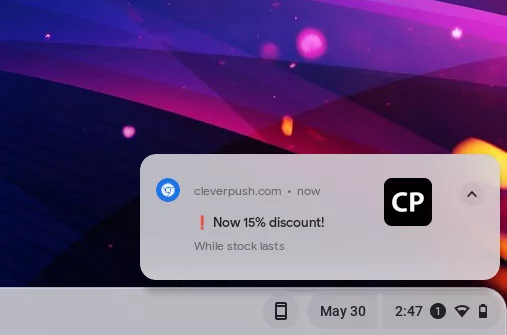
An example of website toast notifications

To make website notifications impactful and engaging, careful attention should be paid to their design and presentation. Here are some best practices for designing effective website notifications:

  • Visually Appealing Design: A visually appealing notification catches the user’s attention and encourages them to take action. Use eye-catching colors, attractive typography, and appropriate icons or images that align with your brand identity. Ensure that the design elements are consistent with the overall website aesthetics to maintain a cohesive user experience.
  • Clear and Concise Messages: Notifications should deliver the intended message quickly and effectively. Keep the content concise, using short and compelling copy that conveys the purpose of the notification clearly. Users should be able to understand the notification at a glance without having to read lengthy paragraphs.
  • Placement and Timing: Consider where and when the notifications should appear to maximize their impact. Place notifications in a prominent location on the screen where users’ attention is naturally drawn. Avoid obstructing important content or causing frustration. Additionally, time the notifications appropriately to avoid interrupting the user’s flow or appearing too frequently, which can lead to annoyance.
  • Personalization and Relevance: Tailor your notifications to the user’s preferences and behavior whenever possible. Leverage user data and segmentation to deliver personalized and relevant notifications. By understanding their interests and needs, you can increase the likelihood of users engaging with the notifications.

Implementing Website Notifications

When it comes to implementing website notifications, there are various tools and plugins available that can simplify the process and offer a range of customization options. Here are some considerations for implementing website notifications effectively:

  • Notification Plugins and Tools: Depending on your platform, there are dedicated notification plugins and tools that can streamline the integration process. For example, if you are using WordPress, you can explore plugins like “OneSignal” or “PushEngage” that provide comprehensive notification capabilities. If you have an e-commerce website on Shopify, you can leverage built-in notification features or explore Shopify apps like “Firepush” or “PushOwl” for enhanced functionality.
  • Integration with Content Management Systems and E-commerce Platforms: Ensure that the chosen notification system integrates seamlessly with your content management system (CMS) or e-commerce platform. This integration allows you to leverage user data, customer behaviors, and events to trigger relevant and personalized notifications. For example, integrating a notification system with a CMS like WordPress or a platform like Magento can provide a unified solution for managing and sending notifications.
  • Customization Options: Look for notification systems that offer customization options to align with your branding and design requirements. This includes the ability to customize notification templates, colors, icons, and positioning. The more flexibility you have in customizing the appearance and behavior of your notifications, the better you can tailor them to fit your website’s unique style and user experience.
  • Targeting and Segmentation: Effective notification systems allow you to target specific user segments or audience groups with relevant notifications. This targeting can be based on factors such as user preferences, demographics, past behavior, or even geographic location. By delivering notifications that are highly relevant and personalized, you can increase their impact and engagement.

Conversion and Engagement

Website notifications offer a valuable opportunity to drive conversions and increase user engagement. The strategic use of these notifications can encourage users to take desired actions and make the most of their visit to your website. Here are some strategies to optimize conversion and engagement through website notifications:

  • Effective Call-to-Action Buttons: Incorporate clear and compelling call-to-action buttons within your notifications. Make sure the buttons are visually prominent and use action-oriented language to entice users to click. For example, instead of a generic “Learn More” button, use more specific and persuasive phrases like “Get Your Exclusive Discount” or “Start Your Free Trial Today.” Well-designed and attention-grabbing call-to-action buttons can significantly increase click-through rates and conversions.
  • Enticing Offers and Personalization: Use website notifications to deliver exclusive offers, discounts, or personalized recommendations to your users. Tailor these offers based on user preferences, past behavior, or purchase history. Personalized notifications that provide relevant incentives have a higher likelihood of driving engagement and conversions. Experiment with different offers and messaging to determine what resonates best with your audience.
  • Tracking and Analyzing Performance: Implement tracking mechanisms to measure the impact of website notifications on user behavior and website performance. Use analytics tools to monitor metrics such as click-through rates, conversion rates, and revenue generated from notification-triggered actions. By analyzing this data, you can gain insights into the effectiveness of your notification strategies and make informed decisions for optimization.
  • Balancing Frequency and Relevance: Find the right balance between the frequency of notifications and their relevance to your users. Bombarding users with too many notifications can lead to annoyance and opt-outs, while infrequent notifications may result in missed opportunities. Regularly assess the relevance and value of your notifications to ensure they align with user expectations and interests.

Managing User Preferences and Opt-In/Opt-Out Options

Respecting user preferences and providing them with control over their notification experience is crucial for maintaining a positive user relationship. Here are some strategies for effectively managing user preferences and opt-in/opt-out options:

  • Clear and Transparent Notification Settings: Design intuitive and user-friendly notification settings within your website or application. Provide a dedicated section where users can easily manage their preferences, including the types of notifications they wish to receive and the channels through which they prefer to receive them (e.g., email, push notifications). Clearly label each option and provide concise descriptions to help users make informed decisions.
  • Granular Notification Customization: Offer fine-tuned customization options that allow users to personalize their notification preferences based on their interests and needs. For example, provide category-specific subscriptions or the ability to choose the frequency of notifications. Tailoring the notification experience to individual preferences helps to enhance user satisfaction and reduce the likelihood of opt-outs.
  • Opt-In/Opt-Out Mechanisms: Ensure that users explicitly opt-in to receive notifications, rather than automatically subscribing them. Make the opt-in process clear and transparent, clearly stating the benefits of subscribing to notifications and obtaining user consent. Additionally, provide an easy and accessible opt-out mechanism that allows users to unsubscribe from notifications at any time. Include clear instructions on how to manage notification preferences and make the process hassle-free.
  • Compliance with Data Protection Regulations: Adhere to data protection regulations, such as the General Data Protection Regulation (GDPR), when managing user notification preferences. Ensure that you collect and process user data in accordance with applicable laws, and obtain proper consent for storing and using user information for notification purposes. Provide a privacy policy that clearly explains how user data is handled and reassure users that their privacy is protected.
  • Communication and Education: Educate users about the benefits and value of your notifications. Clearly communicate how notifications enhance their experience, provide relevant information, or offer exclusive offers. Regularly engage with users through email or other channels to remind them of the value they receive from your notifications and give them the opportunity to update their preferences if needed.

Optimizing Website Notifications for Mobile Devices

With the ever increasing use of mobile devices, it is essential to optimize website notifications for mobile users. Here are some considerations and strategies for delivering effective and engaging notifications on mobile devices:

  • Responsive Design: Ensure that your notification design is responsive and adapts well to various mobile screen sizes and orientations. Optimize the layout, font sizes, and button sizes to provide a seamless experience across different devices. Test the appearance and functionality of notifications on multiple mobile devices and browsers to ensure consistent performance.
  • Mobile-Friendly Content: Craft notification messages that are concise, clear, and mobile-friendly. Mobile users often have limited attention spans and smaller screens, so it is crucial to deliver your message efficiently. Use simple and engaging language, and consider using visuals, such as icons or images, to make notifications more visually appealing.
  • Timing and Frequency: Be mindful of the timing and frequency of notifications on mobile devices. Respect users’ mobile browsing behaviors and consider their time zones and daily routines. Sending notifications at appropriate times and avoiding excessive frequency can help maintain a positive user experience and prevent users from feeling overwhelmed.
  • Mobile Push Notifications and In-App Messaging: Explore the use of mobile push notifications and in-app messaging to reach mobile users effectively. Push notifications allow you to deliver messages directly to users’ mobile devices, even when they are not actively using your website or app. In-app messaging provides an opportunity to engage users within the app interface itself, delivering timely and contextual information or updates.

Push Those Notifications

Website notifications play a crucial role in enhancing user experience, driving engagement, and increasing conversions. Implementing effective notification strategies can keep your audience informed, engaged, and connected to your website. Remember, a well-designed and well-executed notification system can significantly impact user behavior and contribute to the overall success of your website. However, it is essential to strike a balance between providing valuable notifications and respecting user preferences and privacy.

Regularly monitor and measure the performance of your notifications using analytics and tracking tools, focusing on key metrics such as click-through rates, conversion rates, and user engagement. Use A/B testing and continuous optimization techniques to refine your notification strategies and improve their effectiveness over time. Additionally, gather user feedback to gain insights into their preferences and experiences, allowing you to make data-driven decisions for further improvement.

As you integrate website notifications into your web design and marketing strategies, strive to create a balance between providing valuable information and maintaining a positive user experience. By following the best practices outlined in this article and continuously optimizing your notification system, you can enhance user engagement, drive conversions, and deliver a seamless and personalized user experience on your website.


Front-end Frameworks and Libraries: Level-up Your Web Design Game

Web designers and developers are constantly seeking ways to streamline their workflow and create stunning websites more efficiently. This is where front-end frameworks and libraries come into play, offering a plethora of tools and resources to level up your web design game. By harnessing the power of these versatile tools, you can enhance your productivity, unleash your creativity, and build exceptional websites with ease.

Front-end frameworks and libraries provide a solid foundation for web design projects, allowing you to leverage pre-built components, responsive layouts, and cross-browser compatibility. They offer a wide range of ready-to-use styles, templates, and functionalities, enabling you to rapidly prototype and develop robust websites. Whether you are a seasoned web designer or just starting out, these tools can significantly boost your efficiency and elevate the quality of your work.

By using front-end frameworks and libraries, you no longer need to reinvent the wheel with each project. Instead, you can focus on crafting unique and engaging user experiences, without getting bogged down by repetitive tasks. These tools abstract away the complexities of web development, providing intuitive APIs and comprehensive documentation, making it easier for designers of all levels to create modern, responsive, and visually appealing websites.

Understanding Front-End Frameworks and Libraries

Front-end frameworks are comprehensive, pre-designed libraries of HTML, CSS, and JavaScript components that facilitate rapid web development. They provide a structured and standardized approach to building websites, streamlining the design and coding process. By incorporating a set of reusable UI components, such as buttons, forms, navigation menus, and grids, frameworks offer a solid foundation that promotes consistency and saves valuable development time.

Frameworks and libraries bring numerous advantages to the table. One of the primary benefits is accelerated development speed. By leveraging pre-built components and templates, designers can quickly prototype and assemble interfaces, significantly reducing the time and effort required to create a polished website. Additionally, these tools promote consistency in design and code, ensuring a cohesive user experience across different pages and devices.

Many libraries and frameworks also support responsive web design out of the box. They offer responsive grids, media queries, and CSS classes that automatically adapt the layout and appearance of websites to fit various screen sizes and resolutions. This flexibility is crucial now that users access websites from a wide range of devices, from smartphones and tablets to desktop computers.

Additionally, these tools help address cross-browser compatibility issues. Frameworks and libraries implement CSS resets, normalization techniques, and browser-specific workarounds, ensuring consistent rendering across different web browsers. This saves developers from the arduous task of manually fine-tuning their code to work seamlessly across various browser environments.

Exploring Popular Front-End Frameworks and Libraries

When it comes to front-end frameworks, several options have gained significant popularity in the web design community. Let’s dive into some of the most widely used frameworks and explore their features, capabilities, and real-world applications.

  • Bootstrap, developed by Twitter, is arguably the most popular front-end framework to date. It provides a comprehensive set of CSS and JavaScript components, making it easy to build responsive and mobile-first websites. Bootstrap offers a grid system, pre-styled UI components, responsive utilities, and a wealth of customization options. It is suitable for a wide range of projects, from simple landing pages to complex web applications.
  • jQuery is a JavaScript library whose widespread adoption and versatility make it a valuable asset for web designers. jQuery simplifies tasks like DOM manipulation, event handling, and AJAX requests, allowing developers to write concise and efficient code. Its extensive plugin ecosystem further extends its capabilities, offering solutions for various UI components, animations, and interactive features. With its intuitive syntax and wide-ranging support, jQuery remains a valuable tool for web designers seeking to enhance their projects with interactive and dynamic elements.
  • Angular, developed by Google, is a full-featured front-end framework that enables the development of robust and scalable applications. It provides a comprehensive set of tools and features for building complex web projects. Angular follows the component-based architecture and uses TypeScript as its programming language. It offers features like two-way data binding, dependency injection, and powerful routing capabilities.
  • React, developed by Facebook, is a JavaScript library widely known for its component-based architecture. It allows you to build reusable UI components and efficiently manage their state. React’s virtual DOM (Document Object Model) enables faster rendering and efficient updates, making it ideal for building complex and interactive user interfaces.
  • Materialize CSS is inspired by Google’s Material Design principles. It provides a rich set of components, animations, and styles that enable developers to create modern and visually appealing interfaces. Materialize CSS is known for its ease of use and offers comprehensive documentation. (Heads up: the original Materialize project is no longer actively maintained, so check on its status or a maintained fork before using it for a new build.)

These are just a few of the front-end frameworks available, but they come equipped with a rich set of features and capabilities, enabling designers to expedite the web development process while maintaining a professional and polished outcome. By leveraging these frameworks, you gain access to a ready-made toolkit of UI components, responsive grids, and CSS styling options, allowing you to focus on crafting engaging user experiences rather than reinventing the wheel.

Front-end libraries such as these offer a wide range of use cases, from building simple interactive elements on a webpage to developing complex single-page applications. They provide the building blocks necessary to create engaging user experiences, streamline development processes, and improve overall productivity.

Streamlining Web Design Workflow with Frameworks and Libraries

Front-end frameworks and libraries are not only powerful tools for creating visually appealing and interactive web designs, but they also offer numerous benefits when it comes to streamlining your web design workflow. In this section, we will explore how these tools can enhance your productivity and make the development process more efficient.

  • Enhancing Productivity
    Front-end frameworks and libraries provide a foundation of pre-built components, styles, and functionality that can significantly reduce development time. Instead of starting from scratch, you can leverage these tools to kickstart your projects and focus more on customizing and fine-tuning the design to meet your specific requirements. By using established patterns and best practices offered by frameworks and libraries, you can avoid reinventing the wheel and speed up the development process.
  • Templating Systems and Component Libraries
    Many front-end frameworks and libraries come with their own templating systems and component libraries. These allow you to create reusable and modular code components, enabling efficient development and easier maintenance. Templating systems provide a structured approach to designing layouts and organizing content, ensuring consistency across your website. Component libraries offer a collection of pre-designed UI elements that can be easily integrated and customized, saving you time and effort in designing and styling common interface elements.
  • Integration with Build Tools and Task Runners
    Front-end frameworks and libraries can seamlessly integrate with popular build tools and task runners such as Vite, webpack, or Gulp. These tools automate repetitive tasks, such as bundling and minifying CSS and JavaScript files, optimizing image assets, and live-reloading the browser during development. By incorporating frameworks and libraries into your build process, you can harness the power of automation and streamline your workflow, allowing you to focus more on design and functionality.

By utilizing front-end frameworks and libraries, you can simplify your web design workflow, increase productivity, and deliver projects more efficiently. These tools provide a solid foundation and offer a wide range of resources, documentation, and community support, which can further enhance your development experience.

Best Practices for Using Front-End Frameworks and Libraries

To make the most of these powerful tools in your web design projects, it’s important to follow some best practices. These practices will help you choose the right framework or library, balance customization with maintenance and updates, and stay up-to-date with the latest releases and best practices.

  • Choosing the Right Framework or Library
    When selecting a front-end framework or library, consider the specific requirements of your project. Evaluate factors such as the project’s complexity, scalability, and desired functionality. Research and compare different options based on their features, documentation, community support, and compatibility with your existing tech stack. Consider the learning curve associated with each option and the availability of resources and tutorials.
  • Balancing Customization with Maintenance and Updates
    Front-end frameworks and libraries offer a wide range of customization options, allowing you to tailor your design to your specific needs. However, it’s important to strike a balance between customization and the long-term maintenance and updates of your project. Avoid excessive customization that could lead to difficulties in upgrading to newer versions or maintaining compatibility with future releases. Follow best practices and adhere to the established conventions of the framework or library to ensure easier maintenance and smoother updates.
  • Staying Up-to-Date with New Releases and Best Practices
    Frameworks and libraries are continuously evolving, with new features, enhancements, and bug fixes being released regularly. It’s crucial to stay up-to-date with these releases and the best practices associated with them. Subscribe to newsletters, follow relevant blogs and social media accounts, and actively participate in developer communities to stay informed about the latest updates and developments. Regularly update your chosen framework or library to benefit from improved performance, security patches, and new features.

Potential Challenges and Considerations

While front-end libraries offer numerous advantages, there are some challenges and considerations to keep in mind. By addressing these challenges and following best practices, you can optimize performance, minimize code bloat, and ensure accessibility in your web design projects.

When working with frameworks and libraries, some common challenges may arise. These include a steep initial learning curve, potential limitations in customization, and increased file sizes due to the inclusion of framework-specific code. It’s important to allocate time for learning and familiarizing yourself with the chosen tool to maximize its potential.

Strategies for Optimizing Performance and Minimizing Code Bloat
To optimize performance when using front-end frameworks and libraries, consider the following strategies:

  • Evaluate and remove unnecessary dependencies or features to reduce the overall file size and improve loading times.
  • Minify and compress your CSS and JavaScript files to minimize their size.
  • Utilize code splitting and lazy loading techniques to load only the required components and resources.
  • Optimize images and assets by compressing them without compromising quality.
  • Implement caching mechanisms and utilize Content Delivery Networks (CDNs) to improve response times.

Accessibility Considerations when Working with Frameworks and Libraries
Accessibility is a crucial aspect of web design. When using front-end frameworks and libraries, it’s essential to ensure that your designs are accessible to all users. Consider the following:

  • Use semantic HTML elements appropriately and apply proper labeling to make your content accessible to screen readers and assistive technologies.
  • Ensure that interactive elements and components are keyboard accessible and have appropriate focus states.
  • Test your designs for color contrast and provide alternative text for images to accommodate users with visual impairments.
  • Follow accessibility guidelines and best practices provided by the framework or library you’re using.

If you take the time to address these challenges and considerations upfront, you can mitigate potential issues and create web designs that are performant, lightweight, and accessible to all users.

Start Building

As you’ve seen, front-end frameworks and libraries play a vital role in modern web design, offering numerous benefits that can enhance your development process and improve the overall user experience. Using these libraries, you gain access to pre-built components, responsive grids, and powerful JavaScript libraries that expedite development and ensure consistency across projects. These tools empower you to build visually stunning and feature-rich websites while maintaining code organization and scalability.

Now it’s time to explore, experiment, and embrace the vast landscape of front-end frameworks and libraries. By immersing yourself in their features and functionalities, you can elevate your web design projects to new heights. So, dive in, stay curious, and let these tools empower you to create exceptional web experiences.

The Plethora of Possibilities that PHP Provides

Prepare to plunge into the profound paradigm of PHP, a programming powerhouse that presents a plethora of practical and prolific possibilities. In this practical post, we peruse the immense power and potential that PHP provides to programmers of all proportions. From its robust frameworks and seamless integration with databases to its security measures and e-commerce capabilities, PHP prevails as a force to be reckoned with in the realm of web development. Join us as we unravel the many opportunities and unveil the plethora of possibilities that PHP brings to the table. Whether you’re a seasoned developer or a curious beginner, this article will equip you with valuable insights and knowledge to harness the true potential of PHP. So, let’s proceed with this exciting pilgrimage together and explore the multifaceted world of PHP.

Preparing for the Powerhouse of PHP

When it comes to server-side scripting languages, PHP stands tall as a powerhouse that has shaped the modern web. With its versatile and dynamic nature, PHP opens up a world of possibilities for developers and businesses alike. In this part, we dive deeper into understanding the true essence of PHP and the incredible potential it possesses.

PHP, which stands for Hypertext Preprocessor, boasts an array of key features that make it a top choice for web development projects. Its simplicity and ease of use allow developers to quickly grasp its syntax and start building robust applications. Plus, PHP offers extensive database support, enabling seamless integration with popular database management systems like MySQL. This capability empowers developers to create dynamic and data-driven websites and applications.

The popularity of PHP is evident in its usage statistics, with millions of websites and applications powered by this versatile language. From small personal blogs to enterprise-level applications, PHP caters to diverse needs and scales effortlessly. Its compatibility with different operating systems and web servers adds to its flexibility and makes it an ideal choice for various hosting environments.

PHP’s Preeminence in Powering Dynamic Web Pages

When it comes to web development, PHP proves itself as one of the preeminent programming languages. Its versatility and ease of use have made it a go-to choice for building dynamic and interactive web pages. In this pile of paragraphs, we’ll explore how PHP excels in server-side scripting and its compatibility with various databases and content management systems (CMS).

Server-Side Scripting: PHP performs perfectly in the realm of server-side scripting, enabling developers to generate dynamic content and interact with databases and other resources. With PHP, you can seamlessly embed PHP code within HTML, allowing you to mix dynamic functionality with static web pages. This makes it possible to create personalized user experiences, process form data, authenticate users, and perform other server-side tasks.

PHP’s syntax is intuitive and straightforward, making it accessible to developers of all skill levels. It offers a vast array of built-in functions and libraries that simplify common web development tasks, such as handling file uploads, sending email, working with dates and times, and performing string manipulations.

Compatibility with Databases: PHP’s compatibility with various databases is one of its strengths. Whether you’re working with MySQL, MongoDB, SQLite, or other popular database systems, PHP provides robust database connectivity options. It offers APIs and extensions that allow seamless integration and efficient querying of databases, making it easier to store, retrieve, and manipulate data.

Plus, PHP frameworks like Laravel, Symfony, and CodeIgniter provide a solid foundation for building web applications with advanced features and scalability.

By harnessing PHP’s server-side scripting capabilities and its compatibility with databases and CMS platforms, developers have the tools at their disposal to create dynamic, data-driven websites that cater to a variety of needs. Tap into the vast PHP ecosystem and unlock new dimensions of web development prowess.

PHP and Performance Proficiency

In the world of web development, performance is paramount. Visitors expect fast-loading web pages and seamless user experiences. PHP, being a versatile and powerful language, offers various optimization techniques to ensure optimal website performance.

Caching Mechanisms in PHP: Caching is a crucial aspect of performance optimization. By storing frequently accessed data in a cache, you can significantly reduce the load on your server and improve response times. PHP provides several caching mechanisms, including in-memory caching with tools like Memcached and Redis. These caching solutions enable you to store data in memory, eliminating the need for repeated database queries or expensive computations.

Additionally, PHP frameworks and CMS platforms often come with built-in caching features. These caching systems generate static HTML files or cache the output of dynamic pages, serving them to subsequent visitors without the need for extensive processing.

Optimization Practices: Alongside caching, there are various optimization practices you can employ to enhance PHP performance. These include:

  • Code Optimization: Writing efficient and optimized code plays a crucial role in improving PHP performance. This involves techniques such as minimizing the use of global variables, reducing function calls, and optimizing loops and conditionals.
  • Database Optimization: When working with databases, optimizing queries, using proper indexing, and minimizing unnecessary database calls can have a significant impact on performance. PHP provides tools and libraries to interact with databases efficiently, allowing you to optimize queries and manage database connections effectively.
  • Resource Management: Proper resource management is essential to prevent memory leaks and optimize performance. PHP offers features like garbage collection and resource cleanup to ensure efficient memory utilization.

Protecting your Precious Property with PHP’s Prudent Privacy

PHP personified as a powerful protagonist protecting the people

When it comes to web development, security is of paramount importance. PHP provides a range of security measures and best practices to help safeguard your applications and protect your valuable assets.

Common Security Vulnerabilities: Understanding the common security vulnerabilities in PHP is essential for building secure applications. Some of the vulnerabilities you need to be aware of include:

  • Cross-Site Scripting (XSS): XSS attacks occur when malicious scripts are injected into web pages, compromising the security of users’ browsers. PHP provides built-in functions like htmlspecialchars to escape user-supplied data when you output it and help prevent XSS attacks.
  • SQL Injection: SQL injection attacks occur when an attacker manipulates SQL queries to gain unauthorized access to a database. Preventing SQL injection involves using parameterized queries or prepared statements and validating user input.
  • Session Hijacking: Session hijacking involves an attacker stealing a user’s session data to impersonate them. PHP offers session management mechanisms and functions like session_regenerate_id to prevent session hijacking.

Best Practices in PHP Development: Following best practices is crucial for maintaining the security of your PHP applications. Some essential practices to consider include:

  • Input Validation: Always validate and sanitize user input to prevent malicious data from compromising your application.
  • Password Hashing: Store passwords securely by using strong hashing algorithms like bcrypt or Argon2. Avoid storing plain text passwords or using weak encryption methods.
  • Secure File Uploads: Implement measures to prevent unauthorized execution of uploaded files. Validate file types, set appropriate file permissions, and store uploaded files in a secure location.
  • Error Handling and Logging: Proper error handling and logging help identify and address potential vulnerabilities or security breaches. Displaying detailed error messages to users should be avoided to prevent sensitive information leakage.

Powering the Publishing Populace: PHP for CMS

WordPress

PHP’s versatility and flexibility have made it a popular choice for developing content management systems (CMS). PHP excels in powering CMS platforms, such as WordPress, Drupal, and Joomla.

PHP-based CMS Platforms: PHP serves as the backbone for several leading CMS platforms, enabling the creation and management of dynamic websites and content. Let’s take a closer look at some popular PHP-based CMS platforms:

  • WordPress: Known for its user-friendly interface and extensive plugin ecosystem, WordPress powers millions of websites worldwide. Its core functionality, themes, and plugins are built using PHP, allowing users to easily create, publish, and manage content.
  • Drupal: Drupal is a robust CMS platform that offers powerful content management features and extensive customization capabilities. Built on PHP, Drupal enables the development of highly scalable and flexible websites, making it a preferred choice for complex projects.
  • Joomla: Another PHP-based CMS, Joomla provides a balance between ease of use and flexibility. It offers a wide range of built-in features, templates, and extensions, making it suitable for both simple websites and more sophisticated applications.

Extending CMS Functionality with PHP: One of the strengths of PHP-based CMS platforms is their ability to be extended and customized through PHP code. This allows developers to tailor CMS functionality to specific requirements. Here are some ways to leverage PHP for extending CMS functionality:

  • PHP Plugins: CMS platforms offer plugin architectures that allow developers to create and integrate custom PHP plugins. These plugins can add new features, enhance existing functionality, and integrate with external services and APIs.
  • Theme Development: PHP plays a vital role in developing custom themes for CMS platforms. By writing PHP code within theme templates, developers can control the presentation and behavior of websites, creating unique designs and layouts.

Pool of Proficient Professionals: PHP’s Passionate Public

In addition to its technical capabilities, PHP boasts a vibrant and supportive community that plays a significant role in its continuous growth and evolution. This programming powerhouse possesses a wealth of resources, forums, and developer communities that make PHP a thriving ecosystem for developers.

  • Accessible Online Resources: The PHP community has contributed to an abundance of online resources that cater to developers of all skill levels. From official documentation to tutorials, blogs, and video courses, there is a wealth of information available to learn and enhance PHP development skills. Online platforms like PHP.net, which serves as the central hub for PHP documentation, provide comprehensive and up-to-date resources.
  • Developer Forums and Communities: PHP’s popularity has fostered the creation of vibrant online communities and forums where developers can connect, seek guidance, and share knowledge. These platforms, such as Stack Overflow, Reddit’s PHP community, and PHP Freaks, allow developers to ask questions, exchange ideas, and find solutions to coding challenges. Engaging with these communities not only helps developers expand their knowledge but also provides opportunities for collaboration and networking.

The collective knowledge and passion of the PHP community make it an invaluable resource for developers. Whether you are a beginner seeking guidance or an experienced developer looking to stay current with PHP’s evolving landscape, the supportive PHP community ensures you have access to the assistance and resources needed to thrive.

Deploy the Potency of PHP

As you embark on your PHP journey, remember to continually expand your knowledge and stay connected with the thriving PHP community. Take advantage of the numerous learning materials, tutorials, and documentation available to enhance your skills and keep up with the latest trends.

By harnessing the power of PHP, you open yourself to a world of possibilities. From building dynamic web pages to creating custom plugins and extending CMS functionality, PHP empowers you to bring your ideas to life. Its flexibility, performance optimization techniques, and robust security measures ensure that your projects are not only efficient but also safeguarded.

So, ponder the plentiful possibilities that PHP produces. Plunge into its prodigious panorama, partake in the proliferation of frameworks and CMS platforms, and persistently polish your proficiencies. With PHP, you possess the potential to produce captivating web apps, prepare peerless user experiences, and propel towards your paramount development pursuits.

Supercharging Web Design with JavaScript

JavaScript is a powerful tool that can be used to add interactivity and dynamic functionality to web design. It is a programming language that is widely used in web development, and has become an essential tool for creating engaging, interactive websites. JavaScript can be used to create animations, add form validation, create responsive designs, and much more.

One of the most common uses of JavaScript in web design is for creating animations and effects. This can include scrolling effects, hover effects, and other dynamic animations that can make a website more visually appealing and engaging. JavaScript can also be used to create responsive designs that adjust to different screen sizes and orientations.

Another important use of JavaScript in web design is for form validation. JavaScript can be used to validate user input on web forms, ensuring that data is entered correctly and preventing errors that could cause frustration for users. This can include checking for required fields, validating email addresses and phone numbers, and ensuring that passwords meet certain requirements.

JavaScript can also be used to create interactive elements on a website, such as sliders, tabs, lightboxes, and other types of user interface elements. This can make it easier for users to navigate a website and find the information they need. JavaScript can even be used to build web apps, browser-based games, and other interactive experiences on a website, making it possible to create engaging and entertaining content that keeps users coming back.

Here are some additional tips for using JavaScript in web design:

  • Use JavaScript sparingly. Too much JavaScript can slow down your website and make it less user-friendly.
  • Use JavaScript to add value to your website. Don’t use JavaScript just for the sake of using it. Make sure that the JS you add is actually adding value to your website.
  • Use progressive enhancement: Progressive enhancement is a technique that involves using JavaScript to add features to a web page, but not requiring it for the site to function properly. This ensures that users who do not have JavaScript enabled can still view and use the web page.
  • Test your JavaScript thoroughly. Make sure that your code is working properly without any errors before you publish your website.
  • Keep your JavaScript up-to-date. JavaScript is constantly evolving, so make sure that you are using the latest version of JavaScript.
  • Use a JavaScript framework. A JavaScript framework is a collection of pre-written code that can help you to create interactive web pages more quickly and easily. Some popular JavaScript frameworks include jQuery, React, Angular, and Vue.
  • Document your JavaScript with instructional comments. This will make it easier for you to maintain your code in the future.

Overall, JavaScript is an incredibly versatile tool that can be used in many different ways in web design. Whether you’re looking to create animations, add form validation, or create interactive elements, JavaScript can help you achieve your goals and create websites that are engaging, interactive, and easy to use. With its broad range of capabilities, it’s no wonder that JavaScript has become such an essential part of modern web design.

Get Your App Together with Progressive Web Applications

In the constantly changing world of web development, Progressive Web Apps (PWAs) are becoming increasingly popular. But what exactly are they, and why are they so important? Let’s take a closer look at PWAs and explore their uses and benefits.

What Are Progressive Web Apps?

PWAs are web applications that are designed to work seamlessly across all devices and platforms, from desktop to mobile. They are built using web technologies like HTML, CSS, and JavaScript, and can be accessed through a web browser, just like any other website. They are fast, reliable, and installable on mobile devices, and they can offer a richer user experience than traditional mobile websites.

But what sets PWAs apart is their ability to function like a native mobile app, even without being downloaded from an app store. This is made possible through the use of Service Workers, a powerful web technology that allows PWAs to cache data and work offline, as well as receive push notifications. Combined with other modern web APIs, PWAs can also access device hardware like the camera, microphone, and accelerometer.

Another key advantage of PWAs is their fast and responsive performance. Because they are designed to work offline and load quickly, PWAs can provide a seamless user experience even on slow or unstable network connections.

But perhaps the most compelling reason to consider building a PWA is their ability to engage and retain users. PWAs can be installed directly onto a user’s home screen, just like a native app, and can offer features like push notifications and offline functionality that keep users coming back.

How Do You Develop a PWA?

  1. Start with a responsive web design: Before you can create a PWA, you need to have a responsive web design that works well on all devices and platforms. This means designing your website to automatically adapt to different screen sizes, whether on a desktop, tablet, or mobile device.
  2. Use a Service Worker: A Service Worker is a JavaScript file that runs in the background of a PWA and enables offline functionality, push notifications, and other features. You’ll need to write a Service Worker script that can cache key files, so the app can still function even if the user loses internet connection.
  3. Implement an App Shell: The App Shell is a lightweight HTML, CSS, and JavaScript framework that loads quickly and serves as the foundation of the PWA. It provides the basic layout and design of the app, which can then be updated dynamically with content.
  4. Use HTTPS: HTTPS is required for PWAs to ensure secure and encrypted data transfer. Make sure to install an SSL certificate on your website to enable HTTPS.
  5. Add a Web App Manifest: The manifest is a JSON file that provides metadata about the PWA, including its name, icons, and launch settings. This file helps the browser understand that the app is a PWA and enables installation to the user’s home screen.
  6. Test and Optimize: Finally, you’ll want to test your PWA across different devices and platforms to ensure it works properly and delivers a great user experience. Use tools like Lighthouse or WebPageTest to analyze your app’s performance and identify areas for improvement.

Building a PWA requires a combination of web development skills, including HTML, CSS, JavaScript, and web APIs. However, there are also many frameworks and tools available, such as Google’s Workbox, that can simplify the process and help you create a PWA more quickly and easily.

Overall, PWAs are a powerful and flexible tool in web development, providing the best of both worlds when it comes to web and mobile app functionality. Whether you’re building a new web application or looking to improve an existing one, considering a PWA could be a great way to enhance your user experience and engagement.

What’s new with the web in 2023?

The web is constantly evolving, and there are always new trends and developments to keep up with. Here are some of the most exciting new things happening on the web in 2023:

The Rise of Artificial Intelligence

AI is already having a major impact on the web, and its influence is only going to grow in the years to come. AI is being used to power everything from chatbots and virtual assistants to personalized recommendations and search results. As AI becomes more sophisticated, it will have an even greater impact on the way we interact with the web.

The Continued Growth of Mobile Devices

Smartphones and tablets are now the primary way that people access the internet, and this trend is only going to continue. This means that web developers need to make sure that their websites are optimized for mobile devices. In addition, mobile devices are opening up new opportunities for businesses to reach their customers. For example, businesses can now use mobile apps to provide customer service, offer loyalty programs, and sell products.

Blockchain

Blockchain is a distributed ledger technology that is used to record transactions in a secure and transparent way. In 2023, we can expect to see more businesses using blockchain to power their online transactions, as it offers a number of advantages over traditional payment methods. Blockchain is enabling new applications, such as decentralized finance (DeFi) and non-fungible tokens (NFTs). Decentralized technology is still in its early stages, but it has the potential to revolutionize the web.

Progressive Web Applications

PWAs are a type of web app that combines the best of both worlds from websites and mobile apps. They are fast, reliable, and work offline, making them a great option for businesses that want to provide their users with a seamless experience across all devices.

Metaverse

The metaverse is a hypothesized iteration of the internet as a single, universal, and immersive virtual world that is facilitated by the use of virtual reality and augmented reality headsets. The metaverse is still in its early stages of development, but it has the potential to change the way we interact with the internet.

New web technologies are constantly being developed, and these technologies are changing the way that we use the web. For example, WebXR (the successor to the now-deprecated WebVR) allows users to experience virtual and augmented reality content on the web. WebGL is growing in popularity, a JavaScript API that enables developers to produce interactive and immersive experiences for the web. The development of new web technology has enabled many features that were previously impossible or prohibitively difficult to implement.

These are just some of the most exciting new things happening on the web in 2023. The web is a constantly evolving platform, and there are always new trends and developments to keep up with. By staying informed about the latest trends, web developers can ensure that their websites are up-to-date and relevant to their users. As technology advances, it will be interesting to see what new trends and technologies emerge in the years to come.