

So your website is live, it looks great, and Google has noticed it. Unfortunately, so has everyone else with a mailing list and no conscience.
Within weeks of launching a site (or after a big SEO win), many business owners start getting official-looking letters, urgent emails, and phone calls from people who “just happened” to find their website. They did not just happen to find it. Domain registration data, business directories, and website scrapers make it easy to build a target list, and a fresh, visible site goes straight to the top.
Here is a field guide for what to expect, and what to do about it.
The “Domain Expiration Notice” Letter
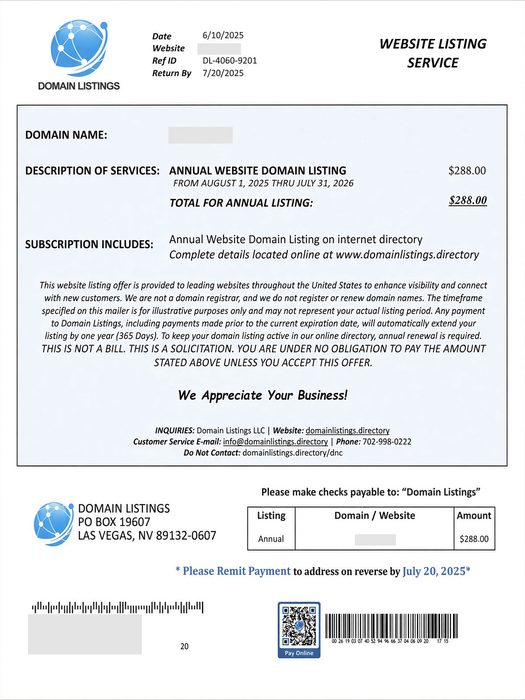
This one arrives in the mail and looks very official. It lists your real domain name, an expiration date, a deadline, a payment slip, and often a QR code. It warns that you could lose your online identity if you do not act now. Recent versions ask for around $265 for a five-year “renewal.”
Here is the catch: it usually is not from your registrar at all. It is a solicitation to transfer your domain to the sender, often at several times the going rate. The fine print tends to say something like “this is not a bill.” This tactic is called domain slamming, and the FTC went after one of its best-known practitioners years ago. The copycats never left.
How to check: Log in to the registrar where you actually bought your domain (GoDaddy, Namecheap, Squarespace, etc.) and look at the expiration date there. If the sender is not that company, you owe them nothing. Not sure where your domain is registered, or who handles your DNS records? Ask your web developer before you pay anyone.
Bonus move: Turn on registrar lock (transfer lock) and auto-renew for your domain.
The Friendly SEO Email
You know the one:
- “I took a look at your website and found several issues hurting your ranking.”
- “We can get you on page one of Google in 30 days. Guaranteed.”
- “Your competitors are outranking you.”
The tells: The email never mentions anything specific about your site, your town, or your keywords. The list of “problems” is vague jargon (missing meta tags, poor image optimization) that could be pasted into any email to any business. And nobody, anywhere, can guarantee a ranking. Google says so itself.
If you get one, ask two questions: Which keywords, in which city, against which competitors? And can I see a client you have worked for? Real SEO professionals can answer. Mass-mailers go quiet.
Want to know how your site is really doing? You can see it for yourself, for free, in Google Search Console and Google Analytics. No cold email required.
(Quick sanity check: if you search your own business name and you are already on page one, congratulations, that is not a service you need to buy.)
The “Google Listing” Phone Call

The caller says they are with Google, or “Google Business Services,” and that your listing is about to be removed, needs verification, or can be bumped to the top of the map results. A robot voice may tell you to press 1 to continue.
What’s more, the call may even come from your local area code.
Google’s own guidance is clear: they will never ask for payment to keep, verify, or reinstate your Business Profile, and they will never guarantee you a special spot in search or Maps. They also will not ask for a PIN or one-time code.
What to do: Hang up. Do not press any buttons, even if the voice tells you to. If someone insists they work at Google, ask them to email you from an @google.com address. (They will not.)
The Fake Invoice and the “Free” Directory Listing
The FTC warned small businesses about this in May 2026: fake invoices for things you never ordered, like domain registration, SEO, or tech support. Some arrive as “past due.” Some look like they are from big names. Whoever handles your bills is the target, hoping they will just pay it.
A close cousin is the directory listing scam. A call or letter says you are being listed (for free, or as a “renewal”) in a business directory. A bill shows up later, along with a claim that you agreed to it. If you never agreed, do not pay.
Rule of thumb: Do not pay any invoice for a service you cannot connect to a person who actually sold it to you. Search the company name plus “scam,” “review,” or “complaint” first.
Someone Pretending to Be Your Web Designer or Host
Scammers can read a web designer’s portfolio page, collect the contact email from each client’s site, and send messages that look like they came from the designer. They say your site “is not compliant,” your plugins or hosting are “due for renewal,” or your account will be suspended in 48 hours. The goal is payment, or your WordPress or hosting login.
What to do: Do not click the link or call the number in the message. Contact your designer or host using a phone number or email address you already have. And never enter your credentials on a page you reached from an email.
Spoofed email is a big part of this one. It is worth reading up on securing your domain email with SPF, DKIM, and DMARC, and on protecting your WordPress site from hackers. Regular website maintenance also means you will know what is actually due and when.
The Quick Red Flag Checklist
- Urgency. “Act now,” “final notice,” “48 hours.”
- Guarantees. Rankings, results, or “priority” with Google.
- Payment pressure. Gift cards, wire transfers, QR codes, or “pay to avoid suspension.”
- Vague specifics. No mention of your actual site problems, or generic “errors.”
- Wrong sender. Not the company you actually do business with.
- Fine print that contradicts the headline. “This is not a bill.”
What to Do When One Shows Up
- Pause. Scammers rely on you reacting before thinking.
- Verify independently. Log in to your registrar, host, or Google account directly. Do not use links or phone numbers from the message.
- Do not engage. Replying, pressing buttons, and scanning QR codes confirm that your contact info is live.
- Tell whoever pays the bills. A one-line policy helps: we never pay anything domain-, SEO-, or Google-related unless it goes through our known vendors.
- Report it.
- FTC: ReportFraud.ftc.gov (phone scams and fake invoices)
- Phishing emails: [email protected]
- Scam texts: forward to 7726 (SPAM)
- Fake Google calls: report through Google Business Profile Help
- Do Not Call Registry: donotcall.gov (it will not stop scammers, but it is worth having)
Not Sure About Something?
When in doubt, do not pay, click, or call back. Send it to your web developer, your IT person, or a trusted friend who knows their way around the internet and ask for a second opinion first. A quick look usually settles it, and it is a lot cheaper than a five-year “renewal” from a company you have never heard of.