Congrats on the New Website — Now Brace for the Spam

So your website is live, it looks great, and Google has noticed it. Unfortunately, so has everyone else with a mailing list and no conscience.

Within weeks of launching a site (or after a big SEO win), many business owners start getting official-looking letters, urgent emails, and phone calls from people who “just happened” to find their website. They did not just happen to find it. Domain registration data, business directories, and website scrapers make it easy to build a target list, and a fresh, visible site goes straight to the top.

Here is a field guide for what to expect, and what to do about it.

The “Domain Expiration Notice” Letter
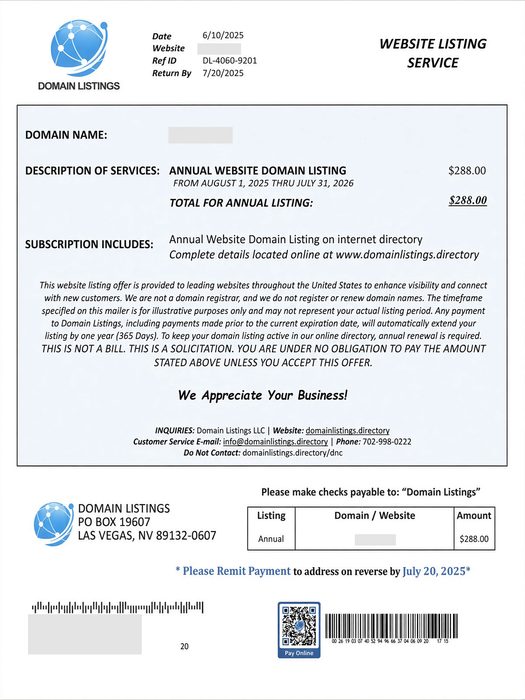
Domain registration solicitation

This one arrives in the mail and looks very official. It lists your real domain name, an expiration date, a deadline, a payment slip, and often a QR code. It warns that you could lose your online identity if you do not act now. Recent versions ask for around $265 for a five-year “renewal.”

Here is the catch: it usually is not from your registrar at all. It is a solicitation to transfer your domain to the sender, often at several times the going rate. The fine print tends to say something like “this is not a bill.” This tactic is called domain slamming, and the FTC went after one of its best-known practitioners years ago. The copycats never left.

How to check: Log in to the registrar where you actually bought your domain (GoDaddy, Namecheap, Squarespace, etc.) and look at the expiration date there. If the sender is not that company, you owe them nothing. Not sure where your domain is registered, or who handles your DNS records? Ask your web developer before you pay anyone.

Bonus move: Turn on registrar lock (transfer lock) and auto-renew for your domain.

The Friendly SEO Email

You know the one:

  • “I took a look at your website and found several issues hurting your ranking.”
  • “We can get you on page one of Google in 30 days. Guaranteed.”
  • “Your competitors are outranking you.”

The tells: The email never mentions anything specific about your site, your town, or your keywords. The list of “problems” is vague jargon (missing meta tags, poor image optimization) that could be pasted into any email to any business. And nobody, anywhere, can guarantee a ranking. Google says so itself.

If you get one, ask two questions: Which keywords, in which city, against which competitors? And can I see a client you have worked for? Real SEO professionals can answer. Mass-mailers go quiet.

Want to know how your site is really doing? You can see it for yourself, for free, in Google Search Console and Google Analytics. No cold email required.

(Quick sanity check: if you search your own business name and you are already on page one, congratulations, that is not a service you need to buy.)

The “Google Listing” Phone Call

Google business listing telemarketing call

The caller says they are with Google, or “Google Business Services,” and that your listing is about to be removed, needs verification, or can be bumped to the top of the map results. A robot voice may tell you to press 1 to continue.

What’s more, the call may even come from your local area code.

Google’s own guidance is clear: they will never ask for payment to keep, verify, or reinstate your Business Profile, and they will never guarantee you a special spot in search or Maps. They also will not ask for a PIN or one-time code.

What to do: Hang up. Do not press any buttons, even if the voice tells you to. If someone insists they work at Google, ask them to email you from an @google.com address. (They will not.)

The Fake Invoice and the “Free” Directory Listing

The FTC warned small businesses about this in May 2026: fake invoices for things you never ordered, like domain registration, SEO, or tech support. Some arrive as “past due.” Some look like they are from big names. Whoever handles your bills is the target, hoping they will just pay it.

A close cousin is the directory listing scam. A call or letter says you are being listed (for free, or as a “renewal”) in a business directory. A bill shows up later, along with a claim that you agreed to it. If you never agreed, do not pay.

Rule of thumb: Do not pay any invoice for a service you cannot connect to a person who actually sold it to you. Search the company name plus “scam,” “review,” or “complaint” first.

Someone Pretending to Be Your Web Designer or Host

Scammers can read a web designer’s portfolio page, collect the contact email from each client’s site, and send messages that look like they came from the designer. They say your site “is not compliant,” your plugins or hosting are “due for renewal,” or your account will be suspended in 48 hours. The goal is payment, or your WordPress or hosting login.

What to do: Do not click the link or call the number in the message. Contact your designer or host using a phone number or email address you already have. And never enter your credentials on a page you reached from an email.

Spoofed email is a big part of this one. It is worth reading up on securing your domain email with SPF, DKIM, and DMARC, and on protecting your WordPress site from hackers. Regular website maintenance also means you will know what is actually due and when.

The Quick Red Flag Checklist

  • Urgency. “Act now,” “final notice,” “48 hours.”
  • Guarantees. Rankings, results, or “priority” with Google.
  • Payment pressure. Gift cards, wire transfers, QR codes, or “pay to avoid suspension.”
  • Vague specifics. No mention of your actual site problems, or generic “errors.”
  • Wrong sender. Not the company you actually do business with.
  • Fine print that contradicts the headline. “This is not a bill.”

What to Do When One Shows Up

  1. Pause. Scammers rely on you reacting before thinking.
  2. Verify independently. Log in to your registrar, host, or Google account directly. Do not use links or phone numbers from the message.
  3. Do not engage. Replying, pressing buttons, and scanning QR codes confirm that your contact info is live.
  4. Tell whoever pays the bills. A one-line policy helps: we never pay anything domain-, SEO-, or Google-related unless it goes through our known vendors.
  5. Report it.
  6. FTC: ReportFraud.ftc.gov (phone scams and fake invoices)
  7. Phishing emails: [email protected]
  8. Scam texts: forward to 7726 (SPAM)
  9. Fake Google calls: report through Google Business Profile Help
  10. Do Not Call Registry: donotcall.gov (it will not stop scammers, but it is worth having)

Not Sure About Something?

When in doubt, do not pay, click, or call back. Send it to your web developer, your IT person, or a trusted friend who knows their way around the internet and ask for a second opinion first. A quick look usually settles it, and it is a lot cheaper than a five-year “renewal” from a company you have never heard of.


DNS Records: From A to SRV

DNS, or the Domain Name System, is essentially the phonebook of the internet. It’s what turns those catchy, memorable domain names into the long strings of numbers that computers use to talk to each other. Think of it as the magic that transforms “example.com” into “192.0.2.1” – because who could remember all those numbers?

The Basics of DNS

What is DNS? At its core, DNS is like the internet’s GPS. You type in a web address, and DNS figures out where that site is actually located in the digital universe. It’s not just about finding websites; it’s about making the internet navigable for humans. Without DNS, we’d be lost in a sea of IP addresses, trying to remember if it’s “192.168.1.1” or “179.124.41.136” for our favorite cat video site.

Think about it: would you rather remember “easytoremember.com” or “2606:4700:4700::1111”? Exactly. DNS saves us from a world where every URL looks like a password you’d forget immediately. It’s the unsung hero of our daily internet adventures, making the web accessible, memorable, and just a bit more magical.

Types of DNS Records

  • A Record: This is the basic mapping of your domain name to an IPv4 address. Think of it as your website’s home address on the internet.
  • AAAA Record: For those embracing the future, AAAA records do the same as A records but for IPv6 addresses, which are longer and look like they’re from a sci-fi movie.
  • CNAME: Acts like an alias for your domain. If you want blog.example.com to point to the same place as example.com (or to a hosted service like yourstore.myshopify.com), CNAME is your tool. Just remember, it points to another hostname, not to a specific path like /blog, and it’s not for the main domain.
  • MX: Essential for email, MX records tell the world where to send your emails. Without them, your digital mail would be lost in cyberspace.
  • TXT: Originally for text, now used for various security and verification purposes like SPF and DKIM for email authentication.
  • NS: These records delegate authority for your domain to specific name servers, essentially saying, “These guys are in charge here.”
  • SRV: Less common but important for services like VoIP, SRV records specify which server to use for a particular service.

How DNS Records Work

  • The DNS Query Process:
    1. Browser Request: You type a URL, your browser asks your local DNS resolver for the IP.
    2. Recursive Query: If the resolver doesn’t know, it starts asking root servers, then TLD servers, and finally the authoritative servers for the domain.
    3. Answer: The resolver gets the IP and sends it back to your web browser.
    4. Connection: Your browser uses this IP to connect to the web server.
  • Propagation:
    • When you update a DNS record, it doesn’t change everywhere instantly. DNS servers cache information, and this cache has a TTL (Time To Live). Changes can take from minutes to 48 hours to propagate globally, depending on the TTL set. Patience is key when making DNS changes.

Real-World Applications

Load Balancing: Imagine you’re hosting a massive party, but your house can only fit so many guests at once. DNS load balancing is like setting up multiple party venues across town. When someone types in your domain, DNS decides which venue (server) they’ll visit based on availability and load. It’s like having a bouncer who’s also a traffic cop, ensuring no server gets overwhelmed, and everyone gets to the party.

Geo-Targeting: Ever wonder why you see ads for local pizza when you’re in New York but not when you’re in Tokyo? That’s geo-targeting at play, and DNS can play a part in it too. It’s like having a global concierge service that knows where you are and gives you the local version of your site. DNS can route requests to servers based on the user’s location, serving up content tailored to where they’re standing on the planet.

Security: DNS isn’t just about finding websites; it’s also your first line of defense. Think of DNSSEC (DNS Security Extensions) as the bodyguard for your DNS records. It ensures that the DNS data you receive hasn’t been tampered with, like making sure your party invitations haven’t been forged by party crashers. DNSSEC adds an extra layer of trust, ensuring the internet’s phonebook isn’t just a list of numbers but a secure directory.

The Future of DNS

DNS over HTTPS (DoH) and DNS over TLS (DoT): The internet’s been getting more private, and DNS is no exception. DoH and DoT are like giving your DNS queries a cloak of invisibility. They encrypt your DNS traffic, ensuring that your browsing habits are as private as your secret stash of vintage CSS books. It’s like sending your DNS requests in a secure, encrypted envelope, making sure no one can peek at what you’re up to online.

Decentralized DNS: Decentralized DNS systems like Handshake and ENS (Ethereum Name Service) are like the internet’s version of a blockchain party. They aim to remove the central authority from DNS, making it more democratic. Imagine a world where you can own your domain name on the blockchain, free from the whims of traditional registrars.

Ready to take your DNS game to the next level? Start by auditing your DNS settings. Online DNS tools and services can be your new best friends. Remember, a well-tuned DNS setup not only ensures your site is accessible but also fortifies your digital footprint. So, go on, explore, tweak, and maybe even experiment with some of those advanced features we’ve covered. You’ll be much happier with your site’s performance and security, and your users will enjoy a smoother, safer online experience.

Securing Your Domain Email: DMARC, SPF, and DKIM Demystified

Think forgetting your password is scary? Imagine sending an important email and having it intercepted by cybercriminals, or worse, impersonated. In the world of digital communication, email security isn’t just a nice-to-have; it’s a must-have.

Securing your domain email is akin to locking your front door at night. Just as you wouldn’t leave your house open to intruders, you shouldn’t leave your email vulnerable to phishing, spoofing, and other malicious attacks. Securing your domain email with protocols like DMARC, SPF, and DKIM not only protects against these threats but also ensures your emails actually reach their intended recipients.

Email security isn’t just about keeping the bad guys out; it’s also about maintaining your reputation and trust with your audience. An email from your domain is a digital handshake, and ensuring it’s authentic is crucial. A secure email system can enhance deliverability, reduce the risk of your emails being marked as spam, and build trust with your recipients.

Understanding the Threat

Emails are the lifeblood of modern communication—essential, versatile, and, sadly, a magnet for cybercriminals. Let’s delve into the underworld of common email threats:

Keep Reading

Website Notifications: Engaging and Retaining Your Audience

Capturing and retaining users’ attention is paramount for the success of any website. This is where website notifications come into play. Web notifications are powerful tools that can significantly enhance user experience and engagement. They serve as a means to deliver timely and relevant information directly to users, keeping them informed, engaged, and connected. Whether it’s a promotional offer, important updates, or personalized content, notifications have become an integral part of modern web design.

Types of Web Notifications

Website notifications come in various forms, each serving a specific purpose and catering to different communication channels. Let’s explore some of the most common types of website notifications and the benefits they offer:

  1. Push Notifications: Push notifications are real-time messages sent directly to users’ devices, even when they are not actively browsing the website. These notifications appear as toast pop-ups or banners and can deliver important updates, personalized offers, or reminders. The key advantage of push notifications is their instant delivery and ability to engage users even when they are not on the website.
  2. Email Notifications: Email notifications have long been a staple of online communication. They are sent to users’ email addresses and are effective in delivering personalized messages, transactional updates, or newsletters. Email notifications allow for more detailed and comprehensive content, making them ideal for conveying in-depth information and maintaining ongoing communication with users.
  3. In-App Notifications: In-app notifications are specifically designed for mobile applications. They appear within the app interface and provide users with relevant information, updates, or interactions. In-app notifications can enhance user engagement, encourage specific actions, and deliver personalized content based on user behavior and preferences.

Each type of notification offers unique benefits and can be strategically employed based on the desired outcome. Push notifications excel at delivering time-sensitive information, email notifications are effective for detailed and personalized communication, and in-app notifications enhance the user experience within mobile applications.

Designing Effective Website Notifications

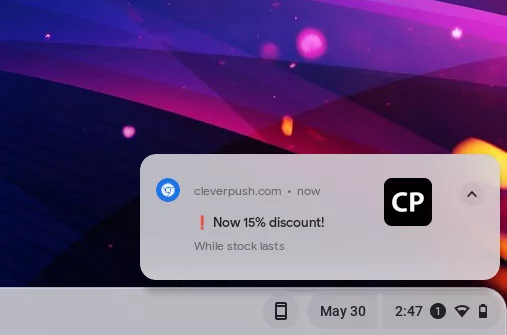
An example of website toast notifications

To make website notifications impactful and engaging, careful attention should be paid to their design and presentation. Here are some best practices for designing effective website notifications:

  • Visually Appealing Design: A visually appealing notification catches the user’s attention and encourages them to take action. Use eye-catching colors, attractive typography, and appropriate icons or images that align with your brand identity. Ensure that the design elements are consistent with the overall website aesthetics to maintain a cohesive user experience.
  • Clear and Concise Messages: Notifications should deliver the intended message quickly and effectively. Keep the content concise, using short and compelling copy that conveys the purpose of the notification clearly. Users should be able to understand the notification at a glance without having to read lengthy paragraphs.
  • Placement and Timing: Consider where and when the notifications should appear to maximize their impact. Place notifications in a prominent location on the screen where users’ attention is naturally drawn. Avoid obstructing important content or causing frustration. Additionally, time the notifications appropriately to avoid interrupting the user’s flow or appearing too frequently, which can lead to annoyance.
  • Personalization and Relevance: Tailor your notifications to the user’s preferences and behavior whenever possible. Leverage user data and segmentation to deliver personalized and relevant notifications. By understanding their interests and needs, you can increase the likelihood of users engaging with the notifications.

Implementing Website Notifications

When it comes to implementing website notifications, there are various tools and plugins available that can simplify the process and offer a range of customization options. Here are some considerations for implementing website notifications effectively:

  • Notification Plugins and Tools: Depending on your platform, there are dedicated notification plugins and tools that can streamline the integration process. For example, if you are using WordPress, you can explore plugins like “OneSignal” or “PushEngage” that provide comprehensive notification capabilities. If you have an e-commerce website on Shopify, you can leverage built-in notification features or explore Shopify apps like “Firepush” or “PushOwl” for enhanced functionality.
  • Integration with Content Management Systems and E-commerce Platforms: Ensure that the chosen notification system integrates seamlessly with your content management system (CMS) or e-commerce platform. This integration allows you to leverage user data, customer behaviors, and events to trigger relevant and personalized notifications. For example, integrating a notification system with a CMS like WordPress or a platform like Magento can provide a unified solution for managing and sending notifications.
  • Customization Options: Look for notification systems that offer customization options to align with your branding and design requirements. This includes the ability to customize notification templates, colors, icons, and positioning. The more flexibility you have in customizing the appearance and behavior of your notifications, the better you can tailor them to fit your website’s unique style and user experience.
  • Targeting and Segmentation: Effective notification systems allow you to target specific user segments or audience groups with relevant notifications. This targeting can be based on factors such as user preferences, demographics, past behavior, or even geographic location. By delivering notifications that are highly relevant and personalized, you can increase their impact and engagement.

Conversion and Engagement

Website notifications offer a valuable opportunity to drive conversions and increase user engagement. The strategic use of these notifications can encourage users to take desired actions and make the most of their visit to your website. Here are some strategies to optimize conversion and engagement through website notifications:

  • Effective Call-to-Action Buttons: Incorporate clear and compelling call-to-action buttons within your notifications. Make sure the buttons are visually prominent and use action-oriented language to entice users to click. For example, instead of a generic “Learn More” button, use more specific and persuasive phrases like “Get Your Exclusive Discount” or “Start Your Free Trial Today.” Well-designed and attention-grabbing call-to-action buttons can significantly increase click-through rates and conversions.
  • Enticing Offers and Personalization: Use website notifications to deliver exclusive offers, discounts, or personalized recommendations to your users. Tailor these offers based on user preferences, past behavior, or purchase history. Personalized notifications that provide relevant incentives have a higher likelihood of driving engagement and conversions. Experiment with different offers and messaging to determine what resonates best with your audience.
  • Tracking and Analyzing Performance: Implement tracking mechanisms to measure the impact of website notifications on user behavior and website performance. Use analytics tools to monitor metrics such as click-through rates, conversion rates, and revenue generated from notification-triggered actions. By analyzing this data, you can gain insights into the effectiveness of your notification strategies and make informed decisions for optimization.
  • Balancing Frequency and Relevance: Find the right balance between the frequency of notifications and their relevance to your users. Bombarding users with too many notifications can lead to annoyance and opt-outs, while infrequent notifications may result in missed opportunities. Regularly assess the relevance and value of your notifications to ensure they align with user expectations and interests.

Managing User Preferences and Opt-In/Opt-Out Options

Respecting user preferences and providing them with control over their notification experience is crucial for maintaining a positive user relationship. Here are some strategies for effectively managing user preferences and opt-in/opt-out options:

  • Clear and Transparent Notification Settings: Design intuitive and user-friendly notification settings within your website or application. Provide a dedicated section where users can easily manage their preferences, including the types of notifications they wish to receive and the channels through which they prefer to receive them (e.g., email, push notifications). Clearly label each option and provide concise descriptions to help users make informed decisions.
  • Granular Notification Customization: Offer fine-tuned customization options that allow users to personalize their notification preferences based on their interests and needs. For example, provide category-specific subscriptions or the ability to choose the frequency of notifications. Tailoring the notification experience to individual preferences helps to enhance user satisfaction and reduce the likelihood of opt-outs.
  • Opt-In/Opt-Out Mechanisms: Ensure that users explicitly opt-in to receive notifications, rather than automatically subscribing them. Make the opt-in process clear and transparent, clearly stating the benefits of subscribing to notifications and obtaining user consent. Additionally, provide an easy and accessible opt-out mechanism that allows users to unsubscribe from notifications at any time. Include clear instructions on how to manage notification preferences and make the process hassle-free.
  • Compliance with Data Protection Regulations: Adhere to data protection regulations, such as the General Data Protection Regulation (GDPR), when managing user notification preferences. Ensure that you collect and process user data in accordance with applicable laws, and obtain proper consent for storing and using user information for notification purposes. Provide a privacy policy that clearly explains how user data is handled and reassure users that their privacy is protected.
  • Communication and Education: Educate users about the benefits and value of your notifications. Clearly communicate how notifications enhance their experience, provide relevant information, or offer exclusive offers. Regularly engage with users through email or other channels to remind them of the value they receive from your notifications and give them the opportunity to update their preferences if needed.

Optimizing Website Notifications for Mobile Devices

With the ever increasing use of mobile devices, it is essential to optimize website notifications for mobile users. Here are some considerations and strategies for delivering effective and engaging notifications on mobile devices:

  • Responsive Design: Ensure that your notification design is responsive and adapts well to various mobile screen sizes and orientations. Optimize the layout, font sizes, and button sizes to provide a seamless experience across different devices. Test the appearance and functionality of notifications on multiple mobile devices and browsers to ensure consistent performance.
  • Mobile-Friendly Content: Craft notification messages that are concise, clear, and mobile-friendly. Mobile users often have limited attention spans and smaller screens, so it is crucial to deliver your message efficiently. Use simple and engaging language, and consider using visuals, such as icons or images, to make notifications more visually appealing.
  • Timing and Frequency: Be mindful of the timing and frequency of notifications on mobile devices. Respect users’ mobile browsing behaviors and consider their time zones and daily routines. Sending notifications at appropriate times and avoiding excessive frequency can help maintain a positive user experience and prevent users from feeling overwhelmed.
  • Mobile Push Notifications and In-App Messaging: Explore the use of mobile push notifications and in-app messaging to reach mobile users effectively. Push notifications allow you to deliver messages directly to users’ mobile devices, even when they are not actively using your website or app. In-app messaging provides an opportunity to engage users within the app interface itself, delivering timely and contextual information or updates.

Push Those Notifications

Website notifications play a crucial role in enhancing user experience, driving engagement, and increasing conversions. Implementing effective notification strategies can keep your audience informed, engaged, and connected to your website. Remember, a well-designed and well-executed notification system can significantly impact user behavior and contribute to the overall success of your website. However, it is essential to strike a balance between providing valuable notifications and respecting user preferences and privacy.

Regularly monitor and measure the performance of your notifications using analytics and tracking tools, focusing on key metrics such as click-through rates, conversion rates, and user engagement. Use A/B testing and continuous optimization techniques to refine your notification strategies and improve their effectiveness over time. Additionally, gather user feedback to gain insights into their preferences and experiences, allowing you to make data-driven decisions for further improvement.

As you integrate website notifications into your web design and marketing strategies, strive to create a balance between providing valuable information and maintaining a positive user experience. By following the best practices outlined in this article and continuously optimizing your notification system, you can enhance user engagement, drive conversions, and deliver a seamless and personalized user experience on your website.