Funniest Prank Links on the Internet

Prank links illustration with an endless loading spinner, captcha checkbox, and empty search results.

Most websites try to get you somewhere. These take the scenic route. Forever.

A loading screen that never finishes. A captcha that refuses to acknowledge your humanity. A password form with exactly zero correct answers. Some of the funniest prank links work because they look like things you already put up with online—just a little less cooperative.

That’s the idea behind the Forever Loading Website, our collection of browser-based pranks. You don’t need to install anything or borrow someone’s phone. Pick a prank, copy its link, and send it to a friend who appreciates a little mischief.

Here’s what each one does and how to use it.

Keep Reading

Which AI Crawlers to Block (and Which Ones Send Customers)

Picture your website as a small bakery. Most mornings, the people at the door are customers. Lately, though, there are other visitors. A food critic shows up, takes notes, and writes you into a guide that sends hungry people your way. A personal shopper comes in to grab one loaf for a customer who asked for it. A culinary school sends a student with a notebook to copy every recipe on the wall for a class you will never see. And every now and then, somebody walks in, asks to sample everything, and does it two thousand times an hour.

They are all “visitors.” Only some of them bring in business. That is the whole question behind whether you should block AI crawlers: not “AI, yes or no,” but which of these people you want in your bakery.

Why Your Logs Suddenly Look Like a Bot Convention

You are not imagining it. Cloudflare Radar put bots at 57.5% of requests for HTML pages across its network, the first time automated traffic outnumbered humans on that measure (as reported by Forbes). That is an aggregate across a huge slice of the web, not a promise about your site, but it explains why your server stats feel busier than your phone.

The anecdotes are more pointed. One small-site owner shared on X that Google read their site 43 times and sent 145 visitors, while AI bots read it 6,051 times and sent 16. Another said they blocked AI crawlers after watching ClaudeBot make more than 2,000 requests in an hour. Those are single sites, not studies. Still, they capture the frustration: a lot of reading, not much referring.

The fix is not to slam the door on everything with “bot” in its name. It is to sort the visitors.

Meet the Three Kinds of AI Bots

Most of the big AI companies now split their bots by job, and they document that split. Roughly, there are three kinds:

  1. Search crawlers (the food critics). These index pages so an AI search product can show and link to them. Blocking them can make you disappear from those answers.
  2. User-triggered fetchers (the personal shoppers). A person asks a chatbot about something, and it fetches a page right then. These aren’t broad crawls, and several vendors say robots.txt may not apply to them because a human started the request.
  3. Training crawlers (the culinary students). These collect content that may be used to train future AI models. Blocking them is an opt-out from training, and per the vendors, it doesn’t remove you from their search features.

Here is how the major names sort out, according to each company’s own documentation as of October 2026:

Keep these allowed if you want to be found:

  • Googlebot and Bingbot: classic search. Block these and you’re blocking your own SEO.
  • OAI-SearchBot: OpenAI says it is used to surface sites in ChatGPT’s search features, and opted-out sites won’t show in ChatGPT search answers.
  • ChatGPT-User: fetches pages when a ChatGPT user asks. OpenAI notes robots.txt rules may not apply, and it isn’t used to decide search inclusion.
  • Claude-SearchBot and Claude-User: Anthropic says disabling either may reduce your visibility in Claude’s search results and user-directed lookups.
  • PerplexityBot and Perplexity-User: Perplexity says PerplexityBot surfaces and links sites in its results and isn’t used to crawl content for AI foundation models. Perplexity-User generally ignores robots.txt since a person requested the fetch.
  • Applebot: powers search in Spotlight, Siri, and Safari, per Apple.

Your call (training crawlers):

  • GPTBot (OpenAI): crawls content that may be used to train its generative AI foundation models.
  • ClaudeBot (Anthropic): collects content that could contribute to model training.
  • CCBot (Common Crawl): builds an open web archive that a lot of researchers and AI developers draw from.
  • Google-Extended: not a separate crawler, just a robots.txt token. Google says it controls whether content may be used to train future Gemini models and for grounding in Gemini Apps and Vertex AI, and that it doesn’t affect Google Search inclusion or ranking.
  • Applebot-Extended: also a control token, not a crawler. It opts you out of training Apple’s foundation models while regular Applebot keeps you in Apple search.
  • meta-externalagent (Meta): Meta says it crawls for uses such as training AI models or indexing content directly.
  • Bytespider (ByteDance): appears in Cloudflare’s AI crawler analytics, but I couldn’t find a current official ByteDance page describing it, so treat it as an AI crawler you manage at the CDN.

GPTBot vs OAI-SearchBot: The Distinction That Matters Most

If you only remember one thing, make it this. GPTBot vs OAI-SearchBot is the difference between “train on my stuff” and “show my stuff to people searching in ChatGPT.” OpenAI’s docs say the two settings are independent, so you can disallow GPTBot and still allow OAI-SearchBot.

A lot of the “block AI bots” robots.txt snippets floating around list every AI-sounding name in one big Disallow block. That is the robots.txt equivalent of locking out the food critic because you were annoyed with the culinary student. If you want your business to show up when someone asks ChatGPT for a web designer in Davenport, a blanket block works against you.

A Robots.txt for ChatGPT (and Friends) That Keeps the Door Open

Here’s a sensible starting point for a small-business site that wants to stay findable in search and AI answers but opt out of model training. Your robots.txt lives at the root of your domain, right next to the XML sitemap it should point to.

robots.txt: opt out of training, stay in search

# Training crawlers and tokens: opted out
User-agent: GPTBot
User-agent: ClaudeBot
User-agent: CCBot
User-agent: Google-Extended
User-agent: Applebot-Extended
User-agent: meta-externalagent
Disallow: /

# Everyone else (Googlebot, Bingbot, OAI-SearchBot,
# Claude-SearchBot, PerplexityBot, Applebot...): welcome
User-agent: *
Allow: /

Sitemap: https://example.com/sitemap.xml

A few notes so this doesn’t bite you later:

  • Grouping several User-agent lines over one rule is valid, but a bot that matches a named group ignores the * group. If you also keep Disallow: /wp-admin/ style rules under *, copy them into any named group you add.
  • If you’d rather be in the training data (some brands want models to know them), delete that first block. That’s a legitimate choice, not a mistake.
  • On WordPress, the robots.txt is usually virtual. SEO plugins such as Yoast and Rank Math include a robots.txt editor, or your host can place a physical file. If you use Cloudflare, it also offers a managed robots.txt option.

robots.txt is a “Please Don’t Feed the Ducks” sign. Most visitors read it. The ducks were never going to.

Robots.txt Is a Request, Not a Lock

This is where people overestimate the file. robots.txt is a public, polite request. Well-behaved crawlers from OpenAI, Anthropic, Google, Apple, Common Crawl, and Meta say they honor it. Anything that ignores it, or simply pretends to be one of those bots by faking its user agent, walks right past. Common Crawl explicitly warns that some crawlers falsely identify themselves as CCBot.

Also note the fine print above: the user-triggered fetchers (ChatGPT-User, Perplexity-User, Meta-ExternalFetcher) may not follow robots.txt at all, because a person asked for that page. That’s usually fine. It’s one page, for one person, roughly like a browser visit.

So robots.txt handles intent. For behavior, like a crawler hammering your server, you need something that actually enforces. Same lesson as protecting your WordPress site from hackers: signs are nice, locks are better.

When a Bot Gets Greedy, Handle It at the CDN

If you’re behind a content delivery network like Cloudflare, the edge is where to deal with abusive traffic, before it ever reaches your server or your hosting bill.

Cloudflare AI Crawl Control shows which AI crawlers are hitting your site, how many requests they make, and, per Cloudflare’s docs, how often each one violates your robots.txt. You can set each crawler to Allow or Block, and blocking creates a WAF rule for you. The docs even suggest allowing crawlers that “provide value through citations, referrals,” which is the same food-critic logic.

If a bot you want to keep is simply too eager, rate-limit it instead of banning it. In Cloudflare, that’s a rate limiting rule with an expression like this:

Cloudflare rate limiting rule: expression (example)

(http.user_agent contains "ClaudeBot") or
(http.user_agent contains "Bytespider")

Pair it with a sensible threshold for a small site (say, a few dozen requests per minute) and an action like Block or Managed Challenge for the cooldown period. Pick numbers based on your own traffic, not mine.

Not on Cloudflare? Many hosts and security plugins offer rate limiting too. If your current hosting provider can’t tell you who’s eating your bandwidth, that is worth knowing on its own. Anthropic also supports the non-standard Crawl-delay line for ClaudeBot. Apple says Applebot doesn’t follow it, so don’t lean on it as your only control.

What to Expect After You Change Things

Nothing here is instant. Crawlers cache robots.txt: OpenAI says it can take about 24 hours for its search systems to adjust after a robots.txt change, Perplexity says up to 24 hours, and Meta says the same. Training opt-outs apply going forward, not retroactively, to content already collected.

And allowing search bots is not a guarantee. Being crawlable makes you eligible for AI citations, the same way being indexed makes you eligible to rank. Whether an assistant actually mentions you still depends on whether your pages answer the question clearly. Keep an eye on referrals in your analytics and in Google Search Console, and judge over months, not days.

The Short Version

  • Keep search and answer bots allowed: Googlebot, Bingbot, OAI-SearchBot, Claude-SearchBot, PerplexityBot, Applebot.
  • Decide on training crawlers on purpose: GPTBot, ClaudeBot, CCBot, Google-Extended, Applebot-Extended, meta-externalagent.
  • Use robots.txt to state your preferences, and your CDN or WAF to enforce them.
  • Rate-limit a greedy bot before you ban a useful one.

Keep the Critics, Mind the Notebooks

Your bakery doesn’t need a bouncer who turns away everyone in a lanyard. It needs a door policy: critics welcome, personal shoppers fine, recipe copiers by invitation, and the two-thousand-samples-an-hour guy gets walked out.

If you’d like a second set of eyes on your robots.txt, CDN settings, or whether AI search is actually sending you anyone, that’s the kind of thing we set up for clients at Photricity. Request a quote and we’ll take a look.

Search Upgraded: Supercharging Your WordPress Search

Let’s face it: the default WordPress search functionality is about as exciting as watching paint dry. Sure, it gets the job done, but in a world where users expect instant, relevant results served with a side of style, the vanilla search template just doesn’t cut it. So, how do we jazz it up? Get comfortable, because we’re about to turn that plain search bar into a powerhouse of user engagement!

Why Upgrade Your Search Experience?

Before we dive into the code, let’s chat about why you should care:

  • Enhanced User Experience: A better search helps visitors find what they need quickly.
  • Increased Engagement: Relevant results keep users on your site longer.
  • Competitive Edge: Stand out from the crowd with a search that doesn’t feel like an afterthought.

In other words, upgrading your search is like giving your website a secret weapon—minus the evil plan.

Tip 1: Customize the Search Form

First impressions matter. The default search form is, well, default. Let’s give it some personality!

Code Example: Custom Search Form Template

Create a searchform.php file in your theme’s root directory with the following code:

<form role="search" method="get" class="search-form" action="<?php echo esc_url( home_url( '/' ) ); ?>">
    <label>
        <span class="screen-reader-text"><?php echo _x( 'Search for:', 'label', 'your-textdomain' ); ?></span>
        <input type="search" class="search-field" placeholder="<?php echo esc_attr_x( 'Search &hellip;', 'placeholder', 'your-textdomain' ); ?>" value="<?php echo get_search_query(); ?>" name="s" minlength="3" required />
    </label>
    <button type="submit" class="search-submit">
        <?php echo esc_html_x( 'Search', 'submit button', 'your-textdomain' ); ?>
    </button>
</form>

Why This Works:

  • Accessibility: Proper labels and roles for screen readers.
  • Customization: Easy to style with CSS classes.

Now, style away in your style.css file. Make that search form so good-looking, it might just break the internet (not literally, of course).

Tip 2: Limit Search Scope

By default, WordPress searches all post types. Sometimes, less is more.

Code Example: Search Only Posts

Add this snippet to your functions.php file:

function wpb_search_filter( $query ) {
    if ( $query->is_search() && $query->is_main_query() && !is_admin() ) {
        $query->set( 'post_type', 'post' );
    }
    return $query;
}
add_action( 'pre_get_posts', 'wpb_search_filter' );

Explanation:

  • $query->is_search: Checks if it’s a search query.
  • !is_admin(): Ensures it doesn’t affect the admin dashboard.
  • Search Only Pages: Change post_type to ‘page’.

Tip 3: Highlight Search Terms in Results

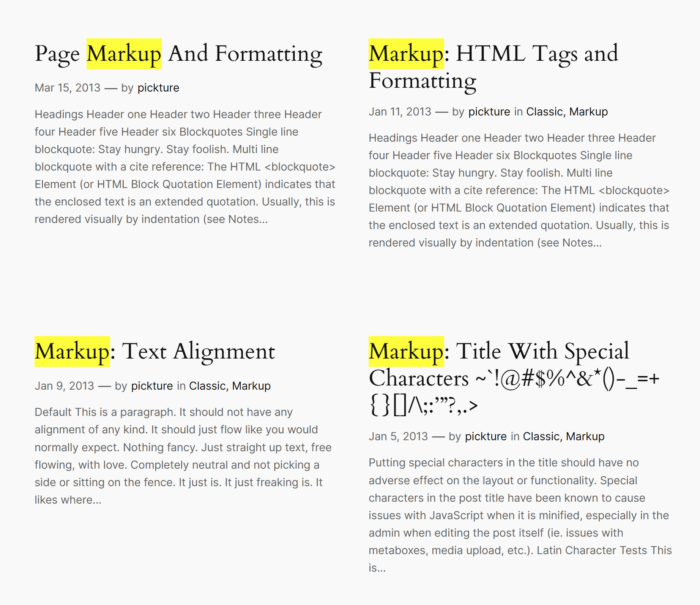
Highlighted search terms

Help users see exactly where their search terms appear.

Code Example: Highlight Function

In your functions.php, add:

function highlight_search_terms( $text ) {
    if ( is_search() ) {
        $search_query = get_query_var( 's' );
        $keys = array_map( 'preg_quote', explode( ' ', $search_query ) );
        $regex = '/(' . implode( '|', $keys ) . ')/iu';
        $text = preg_replace( $regex, '<span class="search-highlight">\0</span>', $text );
    }
    return $text;
}
add_filter( 'the_excerpt', 'highlight_search_terms' );
add_filter( 'the_title', 'highlight_search_terms' );

Add to your style.css:

.search-highlight {
    background-color: yellow;
}

Note: Adjust the highlight color to match your theme. We wouldn’t want any fashion disasters!

Tip 4: Implement AJAX Search for Instant Results

Because waiting for a page reload is so 2005.

Code Example: AJAX Search Implementation

Step 1: Enqueue Scripts

In functions.php:

function enqueue_ajax_search_scripts() {
    wp_enqueue_script( 'ajax-search', get_template_directory_uri() . '/js/ajax-search.js', array( 'jquery' ), null, true );
    wp_localize_script( 'ajax-search', 'ajax_search_params', array(
        'ajax_url' => admin_url( 'admin-ajax.php' ),
    ) );
}
add_action( 'wp_enqueue_scripts', 'enqueue_ajax_search_scripts' );

Step 2: Create JavaScript File

Create ajax-search.js in your theme’s js directory:

jQuery(document).ready(function($) {
    $('.search-field').on('keyup', function() {
        var searchTerm = $(this).val();
        $.ajax({
            url: ajax_search_params.ajax_url,
            type: 'post',
            data: {
                action: 'ajax_search',
                search_term: searchTerm
            },
            success: function(response) {
                $('.search-results').html(response);
            }
        });
    });
});

Step 3: Handle AJAX Request

In functions.php:

function ajax_search_handler() {
    $search_term = sanitize_text_field( $_POST['search_term'] );
    $args = array(
        's' => $search_term,
        'posts_per_page' => 5,
    );
    $search_query = new WP_Query( $args );
    if ( $search_query->have_posts() ) {
        echo '<ul>';
        while ( $search_query->have_posts() ) {
            $search_query->the_post();
            echo '<li><a href="' . get_permalink() . '">' . get_the_title() . '</a></li>';
        }
        echo '</ul>';
    } else {
        echo '<p>No results found</p>';
    }
    wp_die();
}
add_action( 'wp_ajax_nopriv_ajax_search', 'ajax_search_handler' );
add_action( 'wp_ajax_ajax_search', 'ajax_search_handler' );

Step 4: Update Search Form

Ensure your search form has a container for results:

<div class="search-results"></div>

Caution: This is a basic implementation. For production sites, consider security and performance optimizations. Or, you know, keep an eye out for any rogue search terms trying to crash the party.

Tip 5: Sort Search Results by Relevance

Make sure the most relevant content surfaces first.

Code Example: Relevance Sorting

In functions.php:

function search_by_relevance( $search, $wp_query ) {
    global $wpdb;
    if ( ! $wp_query->is_search || ! $wp_query->is_main_query() ) {
        return $search;
    }
    $search_terms = get_query_var( 's' );
    $search = '';
    $search = " AND (";
    $search_words = explode( ' ', $search_terms );
    $i = 0;
    foreach ( $search_words as $word ) {
        $search_word = esc_sql( $wpdb->esc_like( $word ) );
        if ( $i > 0 ) {
            $search .= " AND ";
        }
        $search .= "(($wpdb->posts.post_title LIKE '%$search_word%') OR ($wpdb->posts.post_content LIKE '%$search_word%'))";
        $i++;
    }
    $search .= ')';
    return $search;
}
add_filter( 'posts_search', 'search_by_relevance', 10, 2 );

This tells WordPress to prioritize posts where the search term appears in the title or content.

Tip 6: Add a No Results Found Message

Avoid the awkward silence when no results are found.

Code Example: Custom No Results Template

In your search.php template, add:

<?php if ( have_posts() ) : ?>
    <!-- Your loop code here -->
<?php else : ?>
    <h2><?php esc_html_e( 'Nothing Found', 'your-textdomain' ); ?></h2>
    <p><?php esc_html_e( 'Sorry, but nothing matched your search terms. Please try again with different keywords.', 'your-textdomain' ); ?></p>
    <?php get_search_form(); ?>
<?php endif; ?>

Because even when there’s nothing to show, you can still show you care.

Enhancing your WordPress search doesn’t require a magic wand—just a bit of code and a sprinkle of creativity. With these seek-rets of search, you’re well on your way to providing an exceptional user experience.

Optimizing Website Crawlability with XML Sitemaps

Imagine having a beautifully designed website with valuable content, but struggling to attract organic traffic from search engines. For many of us, it doesn’t take much of an imagination. In the ever-evolving world of web design and search engine optimization, it’s crucial to equip your website with the right tools to enhance its visibility and ensure it gets noticed by search engines. One such essential tool is the XML sitemap.

XML sitemaps are like the roadmaps of your website, guiding search engines through its intricate web of pages and content. By providing search engines with a structured and comprehensive overview of your website, XML sitemaps enable them to understand and index your content more effectively. They act as a bridge between your website and search engine crawlers, helping to boost your website’s discoverability and visibility in search results.

What Are XML Sitemaps?

XML sitemaps serve as a map that guides search engines through your website’s content. They act as a structured blueprint, presenting information about your website’s pages, their relationships, and their importance. XML sitemaps provide a concise and organized representation of your website’s architecture, ensuring that search engines can easily navigate and comprehend your content.

Sitemaps adhere to a specific structure and format. They are written in XML (Extensible Markup Language), a language that allows for the structured representation of data. XML sitemaps consist of various elements and tags that convey crucial information to search engines. These include the URL of each page, the date it was last modified, the frequency of changes, and the priority of each page relative to other pages on your website. While some tags are required, such as the <url> and <loc> tags, others are optional, allowing for additional details to be included, such as images, video content, or alternate language versions.

The benefits of using XML sitemaps are numerous. First, they facilitate the discovery and crawling of your website by search engine bots. By providing a comprehensive list of URLs, XML sitemaps ensure that no valuable pages are missed during the crawling process. This is particularly beneficial for large websites with complex structures, as it helps search engines efficiently navigate through the content hierarchy. Additionally, XML sitemaps enable search engines to understand the freshness of your content by indicating the last modification date, thus improving the indexing of your updated pages. You can also include priority information to signal which pages matter most, though Google has said it ignores the priority and changefreq values (other search engines may still read them). Overall, XML sitemaps serve as a powerful tool in enhancing the visibility and accessibility of your website’s content in search engine results.

Here’s an example of what an XML sitemap looks like:

<?xml version="1.0" encoding="UTF-8"?>
<urlset xmlns="http://www.sitemaps.org/schemas/sitemap/0.9">
  <url>
    <loc>https://www.example.com/</loc>
    <lastmod>2023-06-01</lastmod>
    <changefreq>weekly</changefreq>
    <priority>1.0</priority>
  </url>
  <url>
    <loc>https://www.example.com/about</loc>
    <lastmod>2023-06-02</lastmod>
    <changefreq>monthly</changefreq>
    <priority>0.8</priority>
  </url>
  <url>
    <loc>https://www.example.com/products</loc>
    <lastmod>2023-06-03</lastmod>
    <changefreq>daily</changefreq>
    <priority>0.6</priority>
  </url>
  <url>
    <loc>https://www.example.com/contact</loc>
    <lastmod>2023-06-04</lastmod>
    <changefreq>yearly</changefreq>
    <priority>0.4</priority>
  </url>
</urlset>

In this example, we have a basic XML sitemap that includes four URLs. Each URL is enclosed within <url> tags, and within each <url>, we have the following elements:

  • <loc>: This element specifies the URL of the page.
  • <lastmod>: This element indicates the last modification date of the page in YYYY-MM-DD format.
  • <changefreq>: This element defines how frequently the page is expected to change. Possible values include “always”, “hourly”, “daily”, “weekly”, “monthly”, “yearly”, and “never”.
  • <priority>: This element represents the priority of the URL relative to other URLs on the website. The value ranges from 0.0 to 1.0, with 1.0 being the highest priority.

Creating an XML Sitemap

Generating XML sitemaps can be done through various methods, depending on your website’s complexity and your preferred approach. One option is manual creation, where you construct the XML sitemap file from scratch using a text editor or XML editor. This method allows for complete control and customization, but it can be time-consuming and prone to errors, especially for larger websites.

Another approach is to utilize content management system plugins or extensions that automatically generate XML sitemaps for you. Many popular CMS platforms, such as WordPress, Joomla, and Drupal, offer plugins specifically designed for XML sitemap generation. These plugins simplify the process by dynamically generating and updating the XML sitemap based on your website’s content and structure.

For those who prefer an online tool, there are several XML sitemap generators available. These tools typically require you to provide your website’s URL or XML feed, and they will crawl your site to generate the XML sitemap file. Online sitemap generators are especially useful for websites with dynamic content that changes frequently or for large websites that have numerous pages and complex structures. They can handle the task efficiently, ensuring that all relevant pages are included in the XML sitemap.

Considerations for large websites and dynamically generated content should not be overlooked. If your website has a large number of pages, it may be necessary to split the XML sitemap into multiple files to accommodate the search engine’s limitations on file size. Additionally, if your website generates content dynamically or includes pages that are not easily discoverable through regular crawling, such as JavaScript-generated content or paginated pages, you should ensure that these pages are included in your XML sitemap.

XML Sitemap Best Practices

Google Search Console

Keeping your XML sitemaps up to date with the latest website content is crucial for maintaining their effectiveness. As you add or remove pages from your website, it’s important to update your XML sitemap accordingly to ensure that search engines have the most accurate and comprehensive view of your website’s structure and content.

Prioritizing and including relevant web pages in your sitemap is another best practice. Focus on including your most important and valuable pages, such as your homepage, key landing pages, and pages with unique or high-quality content.

Including metadata in your XML sitemap, such as last modification dates and change frequencies, provides valuable information to search engines. Specifying when a page was last modified helps search engines understand when to revisit and reindex that page. Similarly, indicating the change frequency (e.g., daily, weekly, monthly) helps search engines understand how often a particular page’s content is likely to change. While these metadata elements are not directly used for ranking purposes, they can inform crawl strategies. Google does use lastmod when it’s consistently accurate, but it ignores changefreq.

Submitting your XML sitemaps to search engines is an essential step in ensuring their visibility and accessibility. Most search engines, such as Google and Bing, provide webmaster dashboards where you can submit your sitemap. Submitting your sitemap through these tools notifies search engines of its existence and encourages them to crawl and index your web pages more quickly and effectively.

Remember to update your XML sitemaps whenever significant changes occur on your website, such as the addition of new pages, removal of outdated content, or modifications to existing pages. Regularly reviewing and optimizing your XML sitemap contributes to better search engine visibility, indexing efficiency, and overall website performance.

Advanced XML Sitemap Techniques

Enhancing XML sitemaps with additional features and techniques can further optimize their effectiveness. Consider adding alternate language versions to your XML sitemap to help search engines understand and index your content for different language audiences. Including image and video annotations within your XML sitemap can also improve the visibility of multimedia content in search results, providing an opportunity to attract more targeted traffic.

For large and multi-section websites, XML sitemap index files can be employed to manage the complexity. An XML sitemap index file acts as a directory that references multiple XML sitemaps, each representing a section or category of your website. This technique allows for better organization and scalability, making it easier for search engines to crawl and index your website’s extensive content.

Handling different types of web pages requires careful consideration. When dealing with paginated content, such as articles or product listings spread across multiple pages, it’s important to link the pages together with regular, crawlable links (Google stopped using rel=”prev” and rel=”next” pagination markup back in 2019). This helps search engines understand the structure and order of the paginated content.

Canonical URLs, which are used to address duplicate content issues, should be handled appropriately in XML sitemaps. Ensure that the canonical URLs included in the XML sitemap point to the preferred version of the duplicated pages, consolidating their visibility and avoiding content dilution.

Dynamically generated URLs, often seen in websites with user-generated content or personalized experiences, require special attention. You can use techniques such as parameter handling, URL rewriting, or custom scripts to generate dynamic URLs for inclusion in your XML sitemap. It’s essential to ensure that these dynamic URLs are search engine-friendly and provide accurate and relevant content.

TL;DR

XML sitemaps play a vital role in web design and search engine optimization. They serve as a valuable tool for organizing and presenting website content to search engines, improving visibility, indexation, and crawling. With these best practices, you can create effective XML sitemaps that enhance your website’s performance in search results.

However, it’s crucial to remember that XML sitemaps require regular testing and validation. Ensuring the accuracy and completeness of your sitemaps is essential to maximize their effectiveness. Use online tools and search engine console features to verify the integrity of your XML sitemaps and address any issues that arise.

XML sitemaps should be considered as part of a broader SEO strategy. They work in conjunction with canonical tags, helping consolidate duplicate content and direct search engines to the preferred versions of your web pages. Pairing your sitemaps with structured data markup on the pages themselves further enhances the understanding and visibility of your content in search results.

Remember to keep your XML sitemaps up to date, monitor search engine console reports for any errors or warnings, and stay informed about the latest developments in XML sitemap best practices. With this knowledge, you can harness the full potential of XML sitemaps to improve your website’s search engine performance, user experience, and overall online visibility.

Schema Markup: Enrich Your Search Engine Appearance With Structured Data

Web designers and SEO professionals are constantly seeking ways to optimize websites for search engines. One powerful technique that has gained significant traction is the implementation of schema markup and structured data. These innovative concepts not only enhance the way search engines understand and index web content but also improve the overall user experience.

Imagine if search engines had a better understanding of your website’s content, allowing them to display rich snippets, knowledge panels, and other visually appealing elements in search results. This is where schema markup comes into play. It provides search engines with structured information, making it easier for them to interpret and present your web content accurately.

What is Schema Markup and Structured Data?

Schema markup is a specific vocabulary or code language that allows webmasters to provide structured information about their web content. It helps search engines understand the meaning and context of the data on a webpage. With it web designers can classify and organize their content into specific categories or types, making it easier for search engines to interpret and present relevant information to users.

Structured data refers to the actual content that is marked up using schema markup. It provides additional context and details about various elements on a webpage, such as products, articles, events, recipes, and more. This data helps web designers supply search engines with specific information about their content, such as titles, descriptions, ratings, prices, and dates, enriching search results with relevant and visually appealing elements.

Implementing structured data brings several advantages. First, it enhances visibility in search results by enabling search engines to display rich snippets, knowledge panels, and other visually appealing elements. This improved visibility can significantly increase click-through rates and drive more targeted traffic to your website. Schema markup also contributes to a better user experience by providing users with accurate and detailed information directly on the search engine results page. Users can quickly find what they’re looking for without having to navigate through multiple web pages.

Types of Schema Markup

Schema markup offers a wide range of types that cater to various formats of web content. Let’s explore some of the most commonly used types:

  1. Organization: This type allows you to provide detailed information about your organization, such as its name, logo, contact details, social media profiles, and more. Implementing organization structured data helps search engines accurately represent your business in search results and knowledge panels.
  2. Local Business: If you have a physical location or operate locally, local business schema markup is crucial. It enables you to provide specific details about your business address, opening hours, phone number, and other relevant information. This helps local searchers find your business more easily.
  3. Product: Product markup allows you to showcase your products with rich snippets in search results. You can provide product details like name, description, price, availability, and even customer reviews. Implementing product schema markup can increase the visibility of your products and improve their chances of appearing in product-related search results.
  4. Article: Article schema markup is ideal for publishers and bloggers. It allows you to provide structured data about your articles, including the headline, author, publication date, and a brief summary.
  5. Review: Review markup helps you display customer reviews and ratings in search results. You can provide information such as the reviewer’s name, rating, review text, and even the product or service being reviewed. This type of data adds credibility to your business and can influence user decisions.

Each type of schema markup comes with its own set of properties and attributes. For example, product markup includes properties like brand, SKU, aggregateRating, and offers, while article schema markup uses properties such as headline, author, datePublished, and articleBody. Understanding these properties and attributes is essential for correctly implementing Schema Markup and ensuring that search engines interpret your data accurately.

Let’s consider some practical examples of structured data implementation. For a business website, you can apply organization markup to provide your company’s name, logo, and contact information. If you offer products, incorporating product schema enables you to display product details like name, price, and availability directly in search results. If you publish articles, utilizing article markup allows search engines to present your article’s headline, author, and publication date in a visually appealing manner. And if your website includes customer reviews, you can implement review markup to allow search engines to display star ratings and review snippets, boosting the credibility of your business.

Implementing Schema Markup

There are several methods you can use to implement schema markup on your website. Let’s explore two common approaches:

  1. Manual Coding: This method involves manually adding structured data to your HTML code. You can insert the appropriate schema markup tags and attributes directly into the relevant sections of your HTML markup. While this method offers more control and customization options, it requires a solid understanding of schema markup syntax and HTML coding.
  2. Structured Data Generators and Plugins: Free schema generators and SEO plugins (like Yoast SEO or Rank Math for WordPress) simplify the process of adding schema markup. These tools offer user-friendly interfaces where you can input your data and generate the necessary code. This method is especially helpful if you’re new to schema markup or prefer a more guided and automated approach.

Here’s an example of structured data using schema markup for a business website:

<script type="application/ld+json">
{
  "@context": "https://schema.org",
  "@type": "LocalBusiness",
  "name": "Example Business",
  "address": {
    "@type": "PostalAddress",
    "streetAddress": "123 Main Street",
    "addressLocality": "Cityville",
    "addressRegion": "State",
    "postalCode": "12345",
    "addressCountry": "US"
  },
  "telephone": "+1-555-123-4567",
  "url": "https://www.example.com",
  "openingHours": "Mo-Fr 09:00-18:00",
  "image": "https://www.example.com/logo.png",
  "priceRange": "$$",
  "description": "Example Business is a leading provider of quality products/services in the industry."
}
</script>

In this example, we’re using the LocalBusiness type to represent a local business entity. The structured data includes the business name, address, telephone number, website URL, opening hours, image/logo, price range, and a brief description.

After implementing your schema markup, it’s essential to validate your markup to ensure it’s correctly structured and error-free. Google retired its old Structured Data Testing Tool, so today you’ll want Google’s Rich Results Test (or the general-purpose Schema Markup Validator at validator.schema.org). Follow these steps to validate your code:

  1. Open the Rich Results Test in your web browser.
  2. Enter the URL of the page containing the schema markup or paste the markup code directly into the tool.
  3. Click on the “Test URL” (or “Test Code”) button to analyze the markup.
  4. The tool will provide feedback on the validity of the markup, highlighting any errors or warnings that need attention.

The Future of Structured Data

The landscape of structured data continues to evolve, with exciting advancements and emerging trends shaping the future of these technologies:

  • Expanded Schema Types: As the demand for structured information grows, Schema.org continues to expand its vocabulary with new schema types. These additions cater to specific industries, niches, and emerging technologies, allowing website owners to provide more precise and detailed information to search engines.
  • Voice-Activated Assistants: The proliferation of voice-activated assistants presents new opportunities for schema markup. As voice search becomes increasingly prevalent, schema markup will play a vital role in optimizing content for voice queries. Future developments may include schema enhancements specifically tailored to voice search, enabling websites to provide even more contextually relevant information.
  • Artificial Intelligence (AI) Integration: As search engines become more sophisticated with AI and machine learning, schema markup could play a crucial role in helping algorithms better understand and interpret web content. AI-driven algorithms can leverage structured data to improve search relevance, enhance user experiences, and deliver more accurate and personalized results.

Schema markup and structured data offer significant benefits for web designers and SEO professionals. It empowers websites to provide search engines with structured information about their content, leading to improved visibility, higher click-through rates, and enhanced user experiences. Understanding different types of schema markup, implementing it correctly, and staying updated with the latest developments are crucial for harnessing the full potential of structured data. Embrace the power of schema markup and structured data to optimize your website for search engines and deliver exceptional user experiences.

How to Use Google Search Console to Level-up Your Website’s SEO

With countless websites competing for attention, search engine optimization (SEO) is the not-so-secret ingredient for achieving online success. It’s the key to unlocking higher visibility, attracting organic traffic, and ultimately standing out amidst the virtual noise. As a web designer or developer, you understand the importance of optimizing your website to appease search engines and captivate your target audience.

But how can you refine your SEO strategies and stay ahead of the curve? Enter Google Search Console, a powerful tool that empowers webmasters and SEO professionals to uncover valuable insights, address technical issues, and fine-tune their websites for optimal performance in search engine rankings.

This article will give you an overview of Google Search Console and show you how to leverage its features to supercharge your website’s SEO potential. From analyzing performance metrics to addressing technical SEO issues, we’ll cover it all, helping you transform your website into an SEO powerhouse.

What is Google Search Console?

Google Search Console serves as an indispensable tool in the arsenal of webmasters and SEO professionals. As a free web service provided by Google, it offers a wealth of features and insights to refine your website’s SEO performance.

Purpose and Functionality:
Google Search Console is designed to provide webmasters and SEO professionals with a comprehensive understanding of how their websites are perceived by search engines. It allows you to monitor and manage various aspects of your site’s presence in search results. From indexing status to keyword performance, Google Search Console offers a holistic view of your website’s SEO health.

Key Features and Benefits:
One of the primary benefits of Google Search Console is the ability to monitor and analyze website performance in search results. It enables you to track key metrics such as impressions, clicks, and average position for specific search queries. This valuable data helps you assess the effectiveness of your SEO strategies and identify areas for improvement.

Another invaluable feature of Google Search Console is its capability to identify and fix issues that may hinder your website’s visibility. It provides alerts and notifications regarding 404 errors, sitemap issues, and page indexing problems. Addressing these issues promptly ensures that search engines can access and understand your website’s content effectively.

Additionally, Google Search Console offers insights into user behavior, allowing you to understand how visitors interact with your website. It provides data on CTR, user queries, and the appearance of your site’s pages in search results. Armed with this information, you can optimize meta tags, titles, and descriptions to entice users to click through to your website.

Top Features of Google Search Console

Performance report

Performance Report:
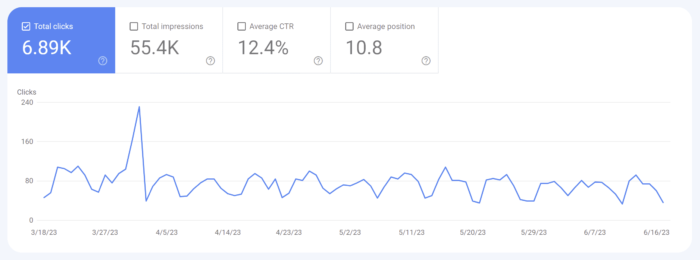
This report provides a comprehensive view of how your website is performing in search results. You’ll gain insights into search queries, impressions, clicks, and average position. Dive into these metrics to uncover hidden opportunities and fine-tune your SEO strategy for maximum impact.

Keyword Optimization and Click-Through Rate:
Within the Performance Report, you can identify keyword opportunities and optimize meta tags, titles, and descriptions to improve your website’s organic CTR. With compelling and relevant meta information, you increase the likelihood of enticing users to click through to your website. This optimization not only improves your CTR but also enhances your website’s visibility in search results.

Index Coverage and Crawl Errors:
Monitoring your website’s index coverage and identifying crawl errors are crucial for ensuring that search engines properly index your web pages. Search Console provides alerts for any issues that may prevent certain pages from being indexed. By addressing crawl errors promptly, you can ensure that search engines can access and understand your website’s content effectively.

Enhancing Website Usability and Mobile-Friendliness:
User experience plays a vital role in SEO. Google Search Console offers the Core Web Vitals and HTTPS reports (the old Mobile Usability report was retired in late 2023; use Lighthouse in Chrome DevTools for mobile checks), helping you optimize your website’s usability and mobile experience. These reports provide valuable insights into mobile-friendly issues, loading performance, and interactivity.

Schema Markup and Structured Data:
Implementing schema markup and leveraging structured data can greatly enhance your website’s appearance and understanding by search engines. Google Search Console allows you to validate and test your structured data, ensuring that it follows the recommended guidelines. With structured information about your content, you increase the chances of rich snippets, knowledge panels, and other enhanced search result features, boosting your website’s visibility and click-through rates.

Backlink Analysis and Link Building:
Backlinks remain a vital aspect of SEO. Google Search Console offers a Links report that allows you to identify and analyze the backlinks pointing to your website. Understanding the quality and quantity of your backlinks helps you assess your website’s authority and identify potential areas for improvement. Implementing effective link-building strategies, such as reaching out to relevant websites or creating valuable content, can help you acquire high-quality backlinks that strengthen your website’s SEO performance.

Addressing Technical SEO Issues

Exploring the Coverage Report:
One of the key aspects of technical SEO is addressing coverage issues within your website. Google Search Console’s Page indexing report (formerly called the Coverage report) provides insights into crawl errors, URL submission, and canonicalization. It’s essential to address these issues to ensure that search engines can crawl and index your web pages effectively.

Site Speed and Performance Optimization:
Website loading speed is a critical factor in user experience and SEO. With Google Search Console’s Core Web Vitals report (which replaced the old Speed report), you can analyze your website’s performance and identify areas for improvement. Slow-loading pages can lead to higher bounce rates and lower search engine rankings. By optimizing your website’s speed, leveraging techniques such as image compression, caching, and minifying code, you create a smoother and faster browsing experience for your users, leading to improved SEO performance.

XML Sitemap Submission and Monitoring:
Submitting an XML sitemap to Google Search Console is vital for ensuring that search engines can discover and index your web pages efficiently. Google Search Console provides a convenient way to submit your XML sitemap and monitor its status. Regularly check the sitemap report to ensure that all relevant pages are included, detect any potential issues, and track the indexing status of your website. This helps you ensure that your web pages are appropriately indexed and accessible to search engine users.

Utilizing Google Search Console for SEO Insights and Reporting

Analytics

Query and Page Reports:
Extracting valuable SEO insights is crucial for refining your optimization strategies. With Google Search Console’s Query and Page reports, you can dive deep into keyword performance, impressions, and click-through rates. Analyze this data to gain valuable insights into how users discover and engage with your website in search results. Understanding which keywords are driving traffic and optimizing your content accordingly empowers you to enhance your website’s relevance and visibility.

Analyzing User Behavior with Google Analytics Integration:
Integrating Google Search Console with Google Analytics provides a powerful combination of SEO and user behavior data. This integration enables you to gain deeper insights into user behavior, conversions, and engagement metrics. With the combined information from both platforms, you can identify which pages attract the most organic traffic, understand user journeys, and uncover opportunities for improving conversion rates. This integration offers a comprehensive understanding of how your SEO efforts impact user engagement and website performance.

Generating SEO Performance Reports:
Tracking the progress and impact of your SEO efforts is crucial for measuring success and making informed decisions. Google Search Console allows you to create custom SEO performance reports using its data. These reports help you track key metrics, identify trends, and evaluate the effectiveness of your optimization strategies. Regularly generate and review these reports to fine-tune your SEO approach and identify areas for improvement.

It is important to emphasize the significance of Google Search Console in refining your SEO approach. By implementing this tool, you gain valuable insights, enhance your website’s visibility, improve search engine rankings, and drive organic traffic. However, it’s crucial to remember that SEO is an ongoing process that requires continuous monitoring and adaptation. The dynamic nature of search engine algorithms necessitates staying ahead of the game. Regularly leveraging Google Search Console allows you to stay informed, identify trends, and make necessary adjustments to maintain and enhance your website’s SEO performance.

How to Maximize SEO Keyword Density Without Over Stuffing

On the web today, search engine optimization (SEO) plays a vital role in driving organic traffic to websites. One key aspect of SEO is keyword optimization, which involves strategically incorporating relevant keywords into web content to improve search engine rankings. However, striking the right balance between keyword density and user-friendly content is crucial for a successful SEO strategy.

Search engines rely on algorithms that analyze the presence and prominence of keywords on web pages to determine their relevance to search queries. By ensuring appropriate keyword density, you increase the chances of search engines recognizing your content as highly relevant to specific topics or queries. This, in turn, can lead to improved visibility and higher rankings in search engine results pages.

While optimizing keyword density is important, it should never come at the expense of user experience. Websites must provide valuable and engaging content that meets the needs of their visitors. Overstuffing keywords can result in awkward and unnatural-sounding text, negatively impacting the user’s reading experience. Therefore, finding the delicate balance between keyword optimization and user-friendly content is the key to successful SEO.

What is Keyword Density?

Keyword density refers to the percentage of times a target keyword appears within a piece of content compared to the total word count. It provides search engines with a quantitative measure of keyword prominence, helping them assess the relevance of your content to specific search queries.

Search engine algorithms consider keyword density as one of the factors when determining the topic or theme of a webpage. Search engines analyze the frequency and distribution of keywords to categorize the subject matter covered in your content. Consequently, this impacts how your website ranks in SERPs when users search for relevant keywords.

While keyword density remains a relevant metric, search engine algorithms have evolved to emphasize the overall context and user intent rather than solely relying on keyword frequency. This shift aims to provide users with more accurate and valuable search results. Today, search engines prioritize content that naturally incorporates keywords and delivers high-quality information to users.

It’s important to note that there isn’t a universal ideal keyword density percentage that guarantees top rankings. The optimal keyword density may vary depending on factors such as industry, competition, and user intent. Instead of fixating on a specific percentage, focus on crafting high-quality content that incorporates relevant keywords in a natural and meaningful manner.

What is the Optimal Keyword Density?

Keyword research

When it comes to maximizing SEO keyword density without keyword stuffing, finding the right balance is key. While there isn’t a one-size-fits-all approach, there are several factors to consider when determining the optimal keyword density for your specific content and target audience. Let’s explore these factors and uncover strategies to strike the perfect equilibrium.

  • Content Length: The length of your content plays a role in keyword density. Longer pieces of content naturally accommodate a higher keyword density, allowing for more opportunities to incorporate relevant keywords. However, be cautious not to sacrifice readability and user experience by overusing keywords. Aim for a keyword density that feels organic and seamless within the context of your content.
  • Keyword Relevance: Relevance is paramount when selecting keywords for your content. Focus on using keywords that accurately reflect the topic and intent of your content. Ensure they align with what users are searching for and are contextually appropriate. Incorporate variations of your target keywords to diversify your content and cater to different search queries.
  • User Intent: Understanding the intent behind user searches is essential for optimizing keyword density. Consider the purpose of the keywords you’re targeting and how they align with the needs and interests of your audience. Are they informational, navigational, or transactional in nature? Tailor your keyword usage to match the user intent and deliver content that meets their expectations.
  • Competitor Analysis: Analyzing the keyword strategies of your competitors can provide valuable insights. Identify the keywords they are targeting and evaluate their keyword density. This analysis can help inform your own keyword optimization approach. However, avoid simply replicating your competitors’ strategies and focus on providing unique value to your audience.
  • User Experience: While keyword optimization is important for SEO, prioritizing user experience should always be the foundation of your content creation. Ensure your content flows naturally, engages readers, and provides value. Avoid excessive keyword repetition or awkward keyword placements that may disrupt the readability or coherence of your content.

Finding the optimal keyword density requires a balance between catering to search engine algorithms and providing a seamless user experience. Aim to create content that is informative, engaging, and relevant while strategically incorporating keywords to enhance its discoverability.

What’s Wrong With Keyword Stuffing?

While optimizing keyword density is important, it’s important to steer clear of a deceptive practice known as keyword stuffing. Keyword stuffing refers to the excessive and unnatural use of keywords within a piece of content, with the sole intention of manipulating search engine rankings. Search engines have become increasingly sophisticated in detecting this practice, and its consequences can be detrimental to your website’s visibility and reputation.

Dangers of Keyword Stuffing

  1. Search Engine Penalties: Search engines, such as Google, actively penalize websites that engage in keyword stuffing. They aim to provide users with the most relevant and high-quality content, and keyword stuffing violates those principles. Penalties can result in lowered search rankings, reduced organic traffic, and even complete removal from search engine results.
  2. User Experience: Keyword stuffing creates a poor user experience by compromising the readability and cohesiveness of your content. When keywords are unnaturally inserted and disrupt the flow of the text, readers may find it difficult to engage with the content. This can lead to higher bounce rates, lower time-on-page, and decreased user satisfaction.

Common Signs of Keyword Stuffing

  1. Excessive Keyword Repetition: Repeating the same keyword or phrase unnaturally throughout the content is a clear indication of keyword stuffing. Instead, focus on using synonyms, related terms, and variations to maintain a natural and diverse keyword usage.
  2. Irrelevant Keywords: Including keywords that are unrelated to the content or using irrelevant keywords excessively is a red flag for search engines. Ensure your keywords align with the topic and intent of your content to maintain relevance.
  3. Hidden Keywords: Concealing keywords by using the same color as the background, employing tiny font sizes, or hiding them within HTML code is a deceptive practice that search engines actively penalize. Always prioritize transparency and provide valuable content to your audience.
  4. Unreadable or Unnatural Sentences: Crafting sentences that are awkward, nonsensical, or grammatically incorrect solely to incorporate keywords is a clear sign of keyword stuffing. Always prioritize readability and ensure your content flows naturally.

To maximize the effectiveness of your SEO efforts, focus on creating high-quality content that serves the needs of your audience. Strive for a natural incorporation of keywords that enhances the value and relevance of your content.

Strategies for Maximizing Keyword Density

Incorporating Keywords in Headings and Subheadings

Headings play a crucial role in both user experience and search engine optimization. They provide structure to your content and signal its relevance to search engines. Search engines place a higher emphasis on headings when analyzing the content of a page. Including keywords in headings helps search engines understand the main topics and themes of your content. So what can we do to optimize headlines and subheadings with relevant keywords?

  • Use H1 Tag for the Main Heading: Place your primary keyword in the H1 tag, as it carries the most weight in terms of SEO. Make sure the H1 tag accurately represents the topic of your page.
  • Incorporate Keywords in Subheadings: Utilize H2, H3, and other heading tags to structure your content. Include relevant keywords in subheadings to provide additional context and reinforce the main topic.
  • Maintain Readability: While incorporating keywords in headings is important, don’t sacrifice readability. Ensure your headings are clear, concise, and naturally flow within the content.

Optimizing Meta Tags and URLs

Building SEO-friendly URLs

Meta tags and URLs provide valuable opportunities to include keywords and improve search visibility. Consider the following guidelines when crafting meta tags and URLs:

  1. Title Tag: Incorporate primary keywords in the title tag, ideally at the beginning, to clearly convey the topic of your page.
  2. Meta Description: Write a compelling meta description that incorporates relevant keywords and accurately summarizes the content of your page. While not a direct ranking factor, a well-optimized meta description can improve click-through rates.
  3. URL Structure: Keep your URLs concise, descriptive, and keyword-rich. Use hyphens to separate words and avoid unnecessary characters or numbers to optimize your URLs for SEO.

Image Optimization

Images not only enhance the visual appeal of your content but also offer an opportunity to optimize for SEO. Consider the following techniques for maximizing image optimization:

  1. Image File Name: Use descriptive file names that include relevant keywords before uploading images. For example, “keyword-optimized-image.jpg” is more effective than “IMG12345.jpg.”
  2. Alt Tags: Write meaningful and descriptive alt tags that accurately describe the image and include relevant keywords. Alt tags improve accessibility and provide additional context to search engines.
  3. Image Captions: Where appropriate, include keyword-rich captions for your images. Captions can reinforce the relevance of the image and contribute to the overall keyword optimization of the page.

Maximizing Internal Linking Opportunities

Internal linking refers to linking to other pages within your website. It not only helps with website navigation but also offers an opportunity to optimize keywords. Consider the following strategies for maximizing internal linking opportunities:

  1. Anchor Text: When linking to other pages within your website, use descriptive anchor text that includes relevant keywords. Avoid generic phrases like “click here” and instead provide meaningful context.
  2. Contextual Relevance: Ensure the pages you link to are thematically related and provide additional information or value to the reader. Linking to relevant content reinforces the topical focus and improves keyword optimization.

Writing for Humans First

It’s important to remember that search engines serve as a conduit between your content and your audience. While optimizing for keywords is important, it’s equally vital to prioritize the human element in your content creation.

  1. Emphasize User Experience and Readability: Your content should be engaging, informative, and easy to comprehend. By crafting content that resonates with your target audience, you create a positive user experience that keeps visitors on your site longer and encourages them to explore further.
  2. How Quality Content Attracts Organic Traffic: Search engines value high-quality content that meets the needs and interests of users. When your content delivers value, it naturally attracts organic traffic as users find it relevant and shareable. This, in turn, enhances your website’s visibility in search engine results pages.
  3. Improving SEO Performance: Quality content aligns with search engines’ goals of delivering the most relevant and valuable information to users. When you prioritize writing for humans, you indirectly optimize for search engines. Factors like longer page visits, lower bounce rates, and increased social shares positively impact your SEO performance.

To strike the right balance, consider the following tips:

  • Understand Your Target Audience: Conduct research to identify your audience’s preferences, pain points, and information needs. Tailor your content to address their specific interests and concerns.
  • Write Compelling Headlines: Craft attention-grabbing headlines that clearly communicate what readers can expect from your content. Incorporate relevant keywords naturally to optimize for both search engines and users.
  • Provide Value and Depth: Offer in-depth information, insights, and practical tips that go beyond surface-level content. Create a resource that users will find valuable and share with others.
  • Incorporate Visuals: Enhance your content with relevant images, infographics, and videos that complement the text. Visuals not only make your content more appealing but also help convey information more effectively.

Focusing on creating content that resonates with your audience will help you naturally optimize your SEO performance while delivering a valuable experience to your readers. Remember, at the heart of SEO lies the need to connect with and serve the human beings behind the search queries.

Conclusion

Finding a balance of keyword density remains a vital factor in improving your website’s visibility and attracting organic traffic. As you move forward with implementing effective keyword density strategies, remember to always prioritize the user experience. Strive to create content that speaks directly to your target audience, addressing their needs and interests. By striking the delicate balance between keyword optimization and user-centric content, you’ll reap the rewards of improved search engine rankings, increased organic traffic, and higher conversion rates.

In the ever-evolving world of SEO, continuous monitoring, analysis, and adaptation are key. Stay up to date with industry trends, search engine algorithm updates, and user preferences to refine and optimize your keyword density strategies. With the right approach, your efforts will contribute to a website that not only ranks well but also provides value to your audience, earning their trust and loyalty along the way.

5 Secrets of Writing Effective Headlines for Your Website

In the ever-evolving world of web design, grabbing your visitors’ attention from the get-go is crucial. And guess what? The secret sauce lies in none other than your headlines! Those small but mighty snippets of text can make or break your website’s success. Think of headlines as the gatekeepers of your content, beckoning visitors to explore further and enticing them to stay awhile. In this article, our goal is to equip you with a treasure trove of insights and strategies that will empower you to write compelling headlines that shine. So get ready to level up your headline game as we share a few tricks of the trade to help you craft headlines that will make your website shine.

Understanding the Role of Headlines

Alright, let’s dive into the fascinating world of headlines! These little nuggets of text are the unsung heroes of web content. They may seem small, but their impact is mighty. Headlines are like the flashy neon signs that lure you into a bustling store or the irresistible scent of freshly baked cookies wafting from a bakery. They grab your attention, pique your curiosity, and make you want to dig deeper.

So, what exactly are headlines? Well, they’re the bold, eye-catching phrases that introduce your content and act as a gateway to your website’s wonders. They’re the first thing visitors see, the virtual handshake that welcomes them and entices them to explore further.

Now, here’s where things get interesting. Headlines aren’t just fluff or decorative elements. They play a crucial role in three key areas: SEO, user engagement, and click-through rates (CTR). Let’s break it down.

First up, we have SEO (Search Engine Optimization). Search engines are hungry beasts constantly scouring the web for the juiciest content. And guess what they feast on? You got it—headlines! Crafting keyword-rich headlines that accurately reflect your content can significantly boost your search rankings. It’s like giving your website a shiny beacon that helps it stand out in the vast digital landscape.

Next, we have user engagement. Think of your headlines as the charismatic party hosts who keep guests entertained and craving more. A compelling headline sets the stage for your content, capturing readers’ attention, stirring their emotions, and making them eager to explore further. When users engage with your content, whether it’s reading an article, watching a video, or browsing through your products, they’re more likely to stick around, share your content, and become loyal fans.

Last but not least, we can’t forget about click-through rates. These measure how many people actually click on your headlines and venture into your website. A well-crafted headline can be the game-changer that entices visitors to take that crucial next step and explore what you have to offer. Higher click-through rates mean more visitors, more conversions, and a whole lot more digital success.

Crafting Attention-Grabbing Headlines

First things first, let’s talk about SEO optimization. Keywords are the secret sauce that helps search engines find and rank your content. So, sprinkle those relevant keywords and phrases throughout your headlines like confetti at a party. But remember, it’s not just about stuffing keywords; it’s about seamlessly blending them into engaging and meaningful phrases. It’s like finding the perfect balance between optimizing for search engines and enticing human readers.

Now, let’s move on to the techniques that will make your headlines sparkle like fireworks on a summer night. Curiosity is a powerful force. Tap into it by creating headlines that tease and tantalize. Make readers think, “What’s behind that intriguing headline? I need to find out!” Think of it as the virtual equivalent of a cliffhanger in a thrilling TV series. But remember, don’t give away all the juicy details—leave some room for curiosity to work its magic.

Next up, we have urgency. Nothing gets people moving faster than a sense of urgency. Incorporate words and phrases that create a sense of time sensitivity. Whether it’s a limited-time offer, a time-bound event, or a hot trend that’s sweeping the internet, let your headlines convey that now is the time to act. Urgency taps into our innate fear of missing out (FOMO) and motivates us to take action before it’s too late.

But wait, there’s more! We can’t forget about emotional appeal. Humans are emotional creatures, and our decision-making is heavily influenced by our emotions. So, infuse your headlines with emotion. Trigger joy, curiosity, surprise, or even a touch of nostalgia. Make readers feel something, whether it’s a warm fuzzy feeling or a rush of excitement. Emotional headlines have the power to forge a connection and draw readers in.

Lastly, let’s talk about power words and sensory language. Power words are like the superheroes of headlines. They pack a punch and leave a lasting impact. Incorporate words that evoke strong emotions, trigger curiosity, or create a sense of exclusivity. Additionally, don’t shy away from sensory language. Paint a vivid picture with words that engage the senses. Whether it’s a mouth-watering description of a delicious recipe or a spine-tingling adventure awaiting readers, sensory language can transport them into your content.

Tailoring Headlines to Your Target Audience

To create headlines that truly resonate, we need to understand our target audience inside and out. After all, headlines are like a secret handshake—we want our audience to feel like we’re speaking directly to them.

So, let’s start by diving deep into the minds of our audience. What are their needs, desires, and pain points? What keeps them up at night, anxiously searching for solutions? Conduct some good old-fashioned research. Talk to your audience, survey them, read forums, and immerse yourself in their world. This valuable insight will be the foundation of your headline strategy.

Once you have a solid grasp of your audience’s motivations and challenges, it’s time to personalize those headlines. Remember, one size does not fit all. Your audience is made up of diverse individuals with unique preferences and experiences. Tailor your headlines to speak directly to specific audience segments. Whether it’s age, gender, location, or interests, find those sweet spots where your audience feels seen and understood.

Now this is where keyword research comes in. Dive into the world of keyword tools and explore the phrases and terms your audience is searching for. Align your headlines with user search intent to become the beacon of wisdom they’re seeking.

Formatting and Structure of Effective Headlines

It’s time to talk about the visual appeal of our headlines. We want our words to pack a punch, but they also need to look the part. So, let’s dive into the formatting and structure that will make our headlines shine like a diamond in the vast realm of web content.

In the world of headlines, brevity is our best friend. Keep your headlines concise and to the point. Aim for around 6 to 12 words, but don’t be afraid to break the rules if it serves your purpose. Remember, clarity is key. Your audience should instantly grasp the main idea and know what to expect when they click on that enticing headline.

Now, let’s spice things up with some headline jazz. Numbers, lists, and questions are our secret weapons. Humans have a soft spot for lists and numbers. They promise clear and organized information. So, if your article offers tips, tricks, or steps, don’t be shy about flaunting them in your headline. “10 Ways to Boost Your Productivity” or “7 Must-Try Recipes for Chocolate Lovers” can be irresistible temptations for your audience.

And who doesn’t love a good question? Questions are like a friendly invitation, luring readers in and promising answers. “Are You Making These Common Mistakes in Social Media Marketing?” or “What’s the Secret to Mastering the Art of Public Speaking?” These question-based headlines create curiosity and make readers eager to discover what lies beyond.

Now, let’s shift our focus to the structure of our headlines. In this fast-paced digital world, our audience loves to scan and skim content. So, let’s make their lives easier. Break your headline into chunks, using subheadings or punctuation to guide the reader’s eye. This scannability factor ensures that even the busiest of bees can quickly grasp the main points of your content.

Additionally, make sure your headlines are visually appealing. Use proper capitalization, bold or italicize keywords for emphasis, and choose a font that aligns with your brand’s personality. The visual presentation of your headlines should be as captivating as the words themselves.

Remember, formatting and structure are the icing on the cake. They make your headlines visually appealing, scannable, and irresistible to your audience. So, keep it concise, leverage numbers and questions, and optimize the structure for maximum readability.

Avoiding Common Headline Mistakes

We’ve all fallen victim to those irresistible headlines that promise the world but deliver disappointment. As ethical content creators, we must resist the temptation to resort to clickbait tactics and other annoyances. Instead, let’s focus on crafting headlines that accurately represent the content and provide genuine value to our audience. Remember, trust is the foundation of any successful online relationship.

Another trap to avoid is making misleading claims. It’s tempting to go for the flashy and exaggerated approach, but it can quickly backfire. When your headline promises something extraordinary but fails to deliver, you risk losing credibility and trust. Be authentic, be honest, and ensure your headlines align with the actual content. Your audience deserves nothing less.

TL;DR

Headlines are the gatekeepers to our content, the first impression that can make or break a visitor’s interest. With relevant keywords, attention-grabbing phrases, and audience targeting, we can create a powerful magnetic force that draws readers in.

Now it’s time to put our newfound knowledge into action. Take these techniques, apply them to your own websites, blogs, and social media channels, and watch as your engagement soars and your results flourish. Remember, writing effective headlines is an art form that requires practice and experimentation, so don’t be afraid to test, tweak, and optimize along the way.

So go forth, armed with the power of persuasive headlines. Spark curiosity, evoke emotions, and engage your audience like never before. With these strategies in your arsenal, there’s no limit to what you can achieve.


Building SEO-friendly URLs

The highly competitive nature of search engine rankings means that having a well-optimized website is crucial for achieving high search engine rankings and providing a seamless user experience. One often overlooked aspect of website search engine optimization is the structure and format of your URLs. SEO-friendly URLs not only make it easier for search engines to understand and index your content, but they also improve the overall user experience by making it simple for visitors to navigate your site and share your content.

What Makes a URL SEO-Friendly?

Creating an SEO-friendly uniform resource locator (URL) involves several key factors that contribute to its effectiveness in both search engine rankings and user experience. Let’s take a closer look at these factors:

Readability and Simplicity
An SEO-friendly URL should be easy to read and understand for both search engines and users. A clear and simple URL structure helps search engines accurately index your content and allows users to quickly grasp the topic of the page. Avoid using complex or ambiguous terms, and instead, focus on creating URLs that accurately represent the content of your page.

Keyword Usage
Incorporating relevant keywords into your URL can significantly improve your search engine rankings. When search engines crawl your website, they use the keywords in your URL to determine the topic of your content. By including descriptive and relevant keywords, you make it easier for search engines to understand and rank your content. However, it’s essential to avoid keyword stuffing, as this can lead to penalties from search engines.

URL Length
Shorter URLs are generally more SEO-friendly than longer ones. Long URLs can be difficult for users to remember and share, and they may also be truncated in search engine results, making them less effective. Aim to keep your URLs concise while still accurately representing the content of the page. As a general rule, try to limit your URLs to around 50-60 characters.

Hyphens and Underscores
When creating SEO-friendly URLs, it’s important to separate words with hyphens rather than underscores or spaces. Search engines, like Google, treat hyphens as word separators, making it easier for them to understand and index your content. On the other hand, underscores are not treated as word separators, which can lead to confusion and negatively impact your search engine rankings.

Best Practices for Creating SEO-Friendly URLs

Now that we’ve covered the key elements of an SEO-friendly URL, let’s dive into some best practices for creating effective URLs.

Keep URLs Short and Concise
As mentioned earlier, shorter URLs are generally more SEO-friendly than longer ones. Shorter URLs are easier for users to remember and share, and they also tend to be more visually appealing. To keep your URLs short and concise, consider removing unnecessary words, such as articles (a, an, the), prepositions (in, on, at), and conjunctions (and, or, but). Additionally, avoid using dynamic URLs that include session IDs or other parameters, as these can make your URLs unnecessarily long and complex.

Avoid Using Special Characters and Capital Letters
Using special characters, such as %, &, and @, in your URLs can cause issues with search engine indexing and user experience. Special characters can be misinterpreted by search engines, leading to indexing errors and lower search engine rankings. Similarly, using capital letters in your URLs can cause confusion and lead to broken links, as URLs are case-sensitive. To avoid these issues, stick to using lowercase letters and hyphens in your URLs.

Use a Consistent URL Structure
Using a consistent URL structure across your website can improve both search engine rankings and user experience. A logical and consistent URL structure makes it easier for search engines to crawl and index your content, and it also helps users navigate your site more efficiently. When creating your URL structure, consider using a hierarchical format that reflects the organization of your website. For example, you might use a format like “domain.com/category/subcategory/page” to represent the structure of your site.

Examples of good URL structures include:

  • domain.com/page/subpage
  • domain.com/year/month/day/post-title
  • domain.com/product-category/product-name

These best practices can help you create URLs that are both SEO-friendly and user-friendly, ultimately improving your website’s search engine rankings and overall user experience.

Implementing SEO-Friendly URLs in Popular Content Management Systems

If you’re using a content management system (CMS) like WordPress, Joomla, or Drupal, implementing SEO-friendly URLs can be relatively straightforward. Here are some tips for optimizing your URLs in these popular CMS platforms:

WordPress
WordPress offers several options for customizing your URL structure. To access these options, navigate to the “Permalinks” settings in your WordPress dashboard. From here, you can choose from several pre-defined URL structures or create a custom structure that suits your needs. Additionally, there are several plugins available for WordPress that can help optimize your URLs, such as Yoast SEO and All in One SEO Pack.

Joomla
Joomla also offers options for customizing your URL structure. To enable search engine friendly (SEF) URLs in Joomla, navigate to the “Global Configuration” settings and select the “SEO Settings” tab. From here, you can enable SEF URLs and customize the URL structure to your liking. Additionally, there are several extensions available for Joomla that can help optimize your URLs, such as SH404SEF and JoomSEF.

Drupal
Drupal has built-in support for clean URLs, which are SEO-friendly by default. To enable clean URLs in Drupal, navigate to the “Clean URLs” settings in your Drupal dashboard and ensure that they are enabled. Additionally, you can use the Pathauto module to automatically generate SEO-friendly URLs based on your content’s title or other criteria.

Creating SEO-friendly URLs is an essential aspect of website optimization that can significantly impact your search engine rankings and user experience. If you follow the best practices outlined in this article, such as keeping URLs short and concise, avoiding special characters and capital letters, and using a consistent URL structure, you can create URLs that are both SEO-friendly and user-friendly. This will go a long way in helping to improve your website’s search engine rankings, drive more traffic to your site, and provide a better user experience for your visitors.

Keyword Research: Optimizing Your SEO Plan

Keyword research is a vital aspect of search engine optimization (SEO). It’s the process of identifying and analyzing the search terms and phrases that people use to find information on the internet. Keyword research helps website owners and marketers to understand their target audience and create content that matches their search queries. Here we discuss what’s involved with keyword research for effective SEO.

Identify Your Target Audience

Before you start researching keywords, you need to know who your target audience is. Who are the people that you want to attract to your website? What are their interests, needs, and pain points? Understanding your audience will help you choose relevant keywords that will attract them to your website.

This can be done by analyzing your website’s traffic, surveying your current customers, and researching your competitors. Once you have a clear understanding of your target audience, you can begin to develop a list of relevant keywords that they’re likely to use when searching for your products or services. By focusing on the keywords that your target audience is using, you can better optimize your website for SEO and improve your chances of ranking higher in search engine results pages (SERPs).

Brainstorm Potential Keywords

Brainstorming a list of potential keywords can be a critical step in conducting keyword research for SEO. It involves coming up with relevant and related words and phrases that people might use when searching for information related to your website or business. You can use a variety of sources such as Google Autocomplete, related searches, and industry-specific tools to come up with a comprehensive list of keywords.

One way to do this is to put yourself in your target audience’s shoes and think about what they would type into a search engine. Consider the pain points, questions, and interests that your target audience might have and then brainstorm relevant words and phrases that match those topics.

Another helpful technique is to use keyword research tools such as Google Keyword Planner, SEMrush, Ahrefs, or Moz’s Keyword Explorer. These tools can help identify keywords and phrases that are frequently searched for by your target audience and provide insight into the competitiveness and potential traffic associated with each keyword.

It’s also essential to prioritize your keywords based on their relevance, search volume, and competition. This will help you focus on the most important keywords and optimize your website’s content accordingly.

Analyze Keyword Competitiveness

After you have generated a list of potential keywords, analyze their competitiveness to find keywords that have a good balance between search volume and competition. This will help you determine which keywords are worth targeting and which ones you should avoid. Keyword competitiveness can be evaluated by looking at metrics such as search volume, competition level, and keyword difficulty. You can use tools like Google Keyword Planner or Ahrefs to see how many people are searching for a particular keyword and how difficult it is to rank for it.

Search volume refers to the number of searches that a keyword receives in a given period. It’s important to target keywords that have a reasonable search volume to ensure that your content is being seen by enough people.

Competition level refers to the number of other websites or web pages that are also targeting the same keyword. Higher competition means it will be more difficult to rank for that keyword.

Keyword difficulty is a metric that estimates how difficult it is to rank for a specific keyword based on various factors such as the competition level, domain authority, and page authority of the top-ranking pages. This metric can help you determine which keywords are worth targeting and which ones may be too difficult to rank for.

It’s important to find a balance between search volume and competition when selecting keywords for your SEO strategy. Targeting highly competitive keywords can be difficult for smaller websites, while targeting keywords with very low search volume may not generate enough traffic to be worthwhile.

Focus on Long-tail Keywords

Long-tail keywords are longer and more specific phrases that people use to search for information, and shouldn’t be overlooked. They usually contain more than three words and are less competitive than broader keywords. They may have lower search volumes, but they are often easier to rank for and attract more qualified leads to your website.

For example, instead of a highly competitive term like “running shoes,” you might find more success from targeting longer niche phrases like “women’s running shoes for overpronation” or “minimalist running shoes for flat feet.” As you can see, long-tail keywords are more specific and targeted than broad keywords and often indicate a specific problem, need, or interest.

Using long-tail keywords can help you reach a more targeted audience, which means you’re more likely to attract visitors who are interested in what you have to offer. They can also help you rank higher in search engine results because they are less competitive than broad keywords.

To find long-tail keywords, try using tools like Google’s Keyword Planner, Moz’s Keyword Explorer, or Ahrefs’ Keyword Explorer. These tools will help you identify long-tail keyword opportunities based on search volume, competition, and relevance to your business.

Consider User Intent

When selecting keywords, consider the intent behind the search. User intent refers to the reason behind a user’s search query and the type of information they are looking for. Are people looking for information, products, or services? Understanding user intent will help you create content that meets their needs and matches their search queries.

There are three main types of user intent: informational, navigational, and transactional. Informational intent is when a user is searching for information on a particular topic. Navigational intent is when a user is searching for a specific website or webpage. Transactional intent is when a user is searching for a product or service with the intent to purchase.

When creating content for your site, it’s helpful to take user intent into consideration. This can help you create content that matches the user’s intent and provides them with the information they are looking for. By creating content that matches user intent, you can increase the likelihood of your content ranking higher in SERPs and driving more targeted traffic to your website.

Keyword research is an ongoing process, and it’s important to regularly monitor and update your list of keywords to stay ahead of the competition. By following these tips, you can conduct effective keyword research and improve your website’s visibility and ranking in search engine results pages.