Bot or Not? How to Spot and Filter Bot Traffic in GA4

You open Google Analytics on a Monday morning and there it is: a traffic graph shaped like a hockey stick. Sessions are up 400%. For about four seconds you feel like a genius. Then you notice your new biggest market is Lanzhou, China, nobody stayed longer than zero seconds, and every one of these “visitors” showed up through Direct with a landing page of (not set).

Congratulations, you have bot traffic in GA4. You are in good company. It is one of the most common complaints in analytics circles this year, and the good news is that it is usually harmless to your site and very fixable in your reports.

Think of your analytics as a guest book at a wedding reception. Most signatures belong to real guests. But somebody left the door open, and now a busload of mannequins has been wheeled through, each one “signing” the book on the way past. They didn’t eat the cake. They didn’t dance. They just make the headcount look amazing. Your job isn’t to panic about the mannequins. It’s to learn what a mannequin signature looks like, stop counting them, and maybe put a bouncer at the door.

What GA4 Already Filters (and What It Doesn’t)

First, some credit where it’s due. According to Google’s known bot-traffic exclusion documentation, GA4 automatically excludes traffic from known bots and spiders, using Google’s own research plus the IAB’s International Spiders and Bots List. You can’t turn it off, and you can’t see how much it excluded.

The key word is known. Polite crawlers that identify themselves get caught. Bots that run a real headless browser, execute your Google Analytics tag, and pretend to be Chrome on Windows walk right past the velvet rope. So do spammers who fire fake hits straight at GA without ever touching your site.

The Telltale Signs of Bot Traffic

Mannequins are easy to spot once you know what to look for. Here are the fingerprints showing up most often in 2026:

  • Sudden Direct or Unassigned spikes. A big jump in Direct (or Unassigned) sessions that starts and stops abruptly, often with no matching bump in leads or sales.
  • Landing page “(not set)”. The session started, but no proper page_view with a page location came along. Real browsers rarely do that in bulk.
  • Weird cities. Lanzhou and Singapore have been the headline acts; WIRED reported that traffic traced back to cloud networks rather than actual residents. Data-center towns like Boardman, Oregon and Ashburn, Virginia (home to huge AWS footprints) are classic suspects too.
  • Zero engagement. Engagement rate near 0%, average engagement time measured in fractions of a second, and one page per session.
  • Suspicious sameness. 99% desktop, one browser, one operating system, one screen resolution. Humans are messier than that.
  • Referral spam. Referrals from domains you’ve never heard of, sometimes with a “visit my SEO service” vibe, that never seem to send anyone who actually reads anything.

Search Engine Watch described a September 2026 wave where Singapore sessions jumped ninefold in a day with a 0% engagement rate and about half a second per session. Some newer bots are getting better at faking human-looking behavior, so don’t rely on one signal. Look for a cluster of them.

Investigate With an Exploration

Standard reports will show you the spike. An Exploration will show you who’s behind it. Go to Explore, start a Free form exploration, and build a table like this:

Exploration recipe: "Who are these people?"

Rows:     Session default channel group
          City
          Landing page + query string
Columns:  Device category
Values:   Sessions
          Engaged sessions
          Average engagement time per session
Filter:   Session default channel group exactly matches Direct
Date:     The spike, plus a normal week before it

Then swap in Browser, Operating system, Screen resolution, and Hostname as rows. If one combination accounts for most of the spike, and its engagement is basically zero, you’ve found your mannequins. Hostname is especially useful: if hits are arriving for a domain that isn’t yours, that’s spam sent straight to your measurement ID rather than visits to your site.

Hide the Noise in Your Reports

Once you know the pattern, you have a few non-destructive ways to look past it:

  • Comparisons. In standard reports, add a comparison that excludes the suspicious city or country. Great for a quick “what does reality look like?” check.
  • Segments. In Explorations, build a session segment that excludes the bot fingerprint (say, City is Lanzhou, or Screen resolution equals that one suspicious value with zero engagement). Reuse it any time you analyze.
  • Report filters. Google itself recommends report filters when you want to hide data without permanently removing it.

These views are reversible, which matters. If you exclude all of Singapore and you actually have customers there, you can simply undo it.

Data Filters: Powerful, Permanent, and Picky

GA4 also has data filters, which stop matching events from being processed at all. Here’s the fine print you need to know before reaching for them:

  • They only work going forward. Data filters don’t affect historical data. GA4 can’t retroactively delete last week’s bot spike.
  • Exclusions are permanent. Excluded data is never processed and won’t show up in GA or BigQuery later. Always run a filter in Testing state first.
  • The menu is short. The filter types are Developer traffic, Internal traffic (by IP address), and, more recently, Web hostname traffic. There’s no “exclude Lanzhou” or “exclude screen resolution” data filter.

Internal and developer filters are still worth setting up, because your own team’s visits are a different flavor of noise. Define your office IPs under your web data stream’s tag settings (Define internal traffic), then activate the Internal traffic filter under Admin → Data collection and modification → Data filters. If you see spam arriving for strange hostnames, a hostname filter that includes only your real domain(s) is the best defense GA4 offers against fake hits.

What About Unwanted Referrals?

GA4’s List unwanted referrals setting (in your web stream’s tag settings) sounds like a spam filter, but it isn’t. It tells GA4 not to credit certain domains as referrers, which is meant for things like payment processors bouncing shoppers back to your checkout. It doesn’t delete the sessions. Use it for legitimate third-party hops, and use segments or report filters for spam.

Check the Door, Not Just the Guest Book

GA4 only sees visitors that run your tag. To see what’s really knocking, cross-check with your CDN or server. If your site sits behind Cloudflare, its traffic and security analytics show requests by country, ASN, and user agent, and paid plans add Bot Analytics with bot scores. Cloudflare’s CDN layer is also where you can actually block or challenge bad traffic with a rule, before it ever reaches your site:

# Cloudflare custom rule (expression) → Action: Managed Challenge
(ip.src.country eq "SG" and not cf.client.bot)

Adjust that to whatever your Exploration revealed, and only challenge regions you don’t actually serve. Your web host‘s raw access logs are the other source of truth: a burst of requests from one cloud provider’s IP range with one user agent tells you more than any GA dashboard can.

AI crawlers are a related but separate headache. Most of them don’t run JavaScript, so they rarely show up in GA4 at all, but they do show up in your logs and bandwidth bill. I wrote a separate guide on which AI crawlers to block with crawl rules and robots.txt.

Common Pitfalls

  • Excluding whole countries forever. Fine as a report view, risky as a habit if you sell internationally.
  • Skipping the Testing state. A sloppy data filter can permanently delete real data. Test first.
  • Blaming SEO. Bot hits in GA4 don’t hurt your rankings. Keep an eye on Google Search Console for real search performance.
  • Assuming it’s always bots. A broken tag, consent banner change, or slow-firing session_start can also produce Unassigned or (not set) data. Check your setup before you blame the robots.
  • Ignoring your forms. If bots are filling out your contact form too, that’s a security problem, not just an analytics one.

Count the Guests, Not the Mannequins

Bot traffic in GA4 is annoying, but it doesn’t have to ruin your data. Recognize the fingerprints, isolate them with an Exploration, hide them with segments and comparisons, use data filters carefully for what they can handle, and stop the worst offenders at the door with Cloudflare or your server. Then annotate the spike so future-you doesn’t spend another Monday morning wondering if you went viral in Lanzhou.

Planning a new site and want it built with clean analytics, sensible filters, and bot protection from day one? Request a custom web design quote and let’s make sure your numbers tell the truth from launch.

8 Epic Tips for Finding Your Target Audience

In the vast and ever-evolving world of business, one fundamental truth remains: understanding your target audience is the key to success. Whether you’re launching a new product, expanding your services, or refining your marketing strategies, the ability to connect with the right people is paramount. But how exactly can you find your target audience amidst the noise and competition?

In this article, we will guide you through a comprehensive set of top tips to help you navigate the intricate process of finding and engaging with your ideal customers. With these strategies, you can uncover valuable insights, build meaningful connections, and align your efforts with the very people who will benefit most from what you offer. Let’s dive in and discover the secrets to unlocking the power of connection with your target audience.

Tip #1 – Define Your Product or Service

In order to effectively find your target audience, it’s crucial to have a clear understanding of what you offer and the unique value proposition it brings to the table. Defining your product or service will enable you to identify the specific needs and preferences of your target audience that align with what you provide.

Start by thoroughly analyzing your product or service and identifying its key features, benefits, and advantages. What sets it apart from competitors? What problems does it solve? How does it fulfill the needs or desires of your customers? This deep understanding will serve as the foundation for connecting with your target audience.

Remember, as your business evolves, it’s important to regularly reassess and refine your understanding of its unique value proposition. Stay attuned to the changing needs and preferences of your target audience, and be prepared to adapt your offerings to meet those demands.

Tip #2 – Conduct Market Research

When searching for your target audience, conducting thorough market research is an essential step. Gathering data and insights about your industry, competitors, and potential customers will provide you with valuable information to understand the demographics, behaviors, interests, and pain points of your target audience.

  1. Surveys: Create surveys to gather quantitative data from your target audience. Design questions that cover important aspects such as demographics, purchasing habits, preferences, and challenges they face. Online survey tools make it easy to distribute surveys and collect responses. Analyze the data to identify trends and patterns that will inform your marketing strategies.
  2. Interviews: Conduct one-on-one interviews with your existing customers or individuals who fit your target audience profile. These qualitative interviews provide in-depth insights into their needs, motivations, and experiences. Ask open-ended questions to encourage detailed responses, and listen actively to understand their perspectives.
  3. Online Research: Utilize various online resources to gather information about your industry, competitors, and target audience. Explore industry reports, market trends, and customer reviews. Engage with online communities and forums related to your niche to gain insights and understand the challenges and pain points faced by your potential customers.
  4. Competitor Analysis: Study your competitors to understand their target audience and positioning strategies. Analyze their marketing campaigns, website content, social media presence, and customer reviews. Identify gaps and opportunities that you can leverage to differentiate yourself and appeal to a specific segment of the market.

With the combination of these strategies, you will gather a wealth of data and insights about your target audience. This knowledge will enable you to create targeted marketing messages and develop products or services that address their specific needs and challenges.

Remember, market research is an ongoing process. As your industry and target audience evolve, continue to stay updated with the latest trends and changes. Regularly reassess your findings and adjust your strategies accordingly to maintain a deep understanding of your target audience.

Tip #3 – Leverage Analytics Tools

Analytics

Data is a powerful tool for understanding your target audience. With analytics tools, you can gain valuable insights into your audience’s online behaviors, preferences, and engagement patterns. These insights are crucial for guiding your marketing strategies and content creation.

  1. Website Analytics: Website analytics tools, such as Google Analytics, provide a wealth of information about your website visitors. They offer data on user demographics, traffic sources, popular pages, time spent on site, conversion rates, and more. Dive into these analytics to uncover key insights about your audience’s online behaviors, such as which channels drive the most traffic, which pages resonate the most, and how users navigate through your site. Use this information to optimize your website, identify areas for improvement, and tailor your content to better engage your audience.
  2. Social Media Insights: Social media platforms have built-in analytics tools that offer valuable insights into your audience’s engagement with your social media posts. These tools provide data on reach, impressions, likes, shares, comments, and follower demographics. Pay close attention to engagement metrics, as they indicate which types of content resonate most with your audience. Identify the topics, formats, and posting times that generate the highest levels of engagement.
  3. Data Analytics Tools: In addition to website analytics and social media insights, consider leveraging other data analytics tools to gain a deeper understanding of your audience. These tools can include customer relationship management (CRM) platforms, email marketing analytics, heatmaps, user testing tools, and more. Each tool provides a unique perspective on your audience’s behaviors and preferences.
  4. Key Metrics to Monitor: While the specific metrics to focus on will depend on your business and goals, there are some key metrics that can provide valuable insights into your audience’s engagement and preferences. These metrics include click-through rates, conversion rates, bounce rates, time on page, social media engagement rates, email open and click-through rates, and customer retention rates. Regularly monitor these metrics to identify trends, spot opportunities for improvement, and track the effectiveness of your marketing efforts.

Analytics tools offer a treasure trove of data to unlock valuable insights about your audience’s online behaviors, preferences, and engagement patterns. The power of analytics lies in its ability to uncover hidden opportunities and help you connect with your target audience in meaningful ways.

Tip #4 – Create Buyer Personas

To truly understand and connect with your target audience, it’s crucial to create buyer personas. These detailed profiles of your ideal customers go beyond basic demographics and delve into their motivations, challenges, and goals. Developing buyer personas helps humanize your target audience and allows you to tailor your marketing efforts to their specific needs.

  1. Gather Data from Market Research: Begin by analyzing the data and insights you gathered during your market research. Look for patterns, commonalities, and recurring themes in the information you collected. Identify key demographic information such as age, gender, location, education, and occupation. Dive deeper into their motivations, pain points, aspirations, and purchasing behaviors.
  2. Identify Common Characteristics: Based on your research findings, identify the common characteristics and attributes shared by your target audience. These could include their interests, hobbies, lifestyle choices, preferred communication channels, and online behaviors. Look for patterns and trends that will help you paint a clear picture of who your ideal customers are.
  3. Create Persona Profiles: Once you have identified the common characteristics, create individual profiles for each buyer persona. Give each persona a name and include a detailed description of their background, demographics, and psychographics. Include information such as their goals, challenges, values, purchasing behavior, and preferred communication style. The more detailed and specific you are, the better you can tailor your marketing strategies to resonate with each persona.
  4. Use Empathy and Visualization: As you develop each persona, put yourself in their shoes and cultivate empathy. Visualize their daily lives, their pain points, and their aspirations. This exercise will help you understand their perspective and craft marketing messages that genuinely speak to their needs.

These personas you will gain a deeper understanding of your target audience and be better equipped to tailor your marketing efforts to their specific needs and preferences. This will serve as a guiding compass for your marketing strategies, content creation, product development, and customer engagement initiatives.

Tip #5 – Engage in Social Listening

Using social media in web design

Social media platforms and online communities have become bustling hubs of conversation and engagement. Engaging in social listening, which involves monitoring these platforms and online communities relevant to your industry or niche, can provide invaluable insights into the needs, pain points, and desires of your target audience.

  1. Identify Relevant Platforms and Communities: Start by identifying the social media platforms and online communities where your target audience is most active. Research where your audience gathers to discuss topics related to your product or service.
  2. Monitor Discussions and Conversations: Once you’ve identified the relevant platforms and communities, actively monitor the discussions, comments, and conversations happening there. Pay attention to what your target audience is saying, what questions they are asking, and the challenges they are facing. Look for patterns, recurring themes, and emerging trends.
  3. Use Social Listening Tools: Social listening can be a time-consuming process, especially if you have a large audience or if discussions are happening across multiple platforms. To streamline the process, consider using social listening tools. These tools can help you track keywords, hashtags, and mentions related to your industry or brand. They can provide real-time notifications and insights, allowing you to stay on top of relevant conversations and engage with your audience effectively.
  4. Engage and Respond: Social listening is not just about observing; it’s about actively engaging with your audience. When you come across discussions or comments that are relevant to your product or service, join the conversation. Respond to inquiries, offer solutions, provide valuable insights, and demonstrate your expertise.

Engaging in social listening is a powerful way to gain a deeper understanding of your target audience. Social listening allows you to be in tune with your audience’s evolving needs and preferences, enabling you to better meet their expectations.

Tip #6 – Analyze Your Existing Customer Base

One of the most valuable sources of information for understanding your target audience is your existing customer base. By analyzing your current customer database, you can uncover valuable insights into the characteristics and preferences of your target audience. This information will help you refine your marketing strategies and better align your offerings with their needs.

  1. Gather Customer Data: Begin by collecting and organizing data on your existing customers. This can include information such as demographics (age, gender, location), purchase history, engagement metrics, customer feedback, and any other relevant data points you have available. Utilize your CRM (Customer Relationship Management) system or other tools to aggregate and analyze the data.
  2. Identify Patterns and Commonalities: Once you have gathered the data, carefully examine it for patterns and commonalities among your most loyal and satisfied customers. Look for similarities in demographics, behaviors, preferences, and purchasing patterns. Identify any trends or clusters that emerge from the data analysis.
  3. Segment Your Customer Base: Based on the patterns and commonalities you have identified, segment your customer base into distinct groups or segments. These segments can be based on factors such as demographics, buying behaviors, or customer preferences.
  4. Analyze Segment Characteristics: For each customer segment, delve deeper into their characteristics, preferences, and motivations. Understand what sets them apart from other segments and how they relate to your overall target audience.
  5. Draw Insights and Make Adjustments: Once you have analyzed the characteristics of each segment, draw actionable insights from the data. Identify the segments that align most closely with your ideal target audience and focus your marketing efforts on these groups. Tailor your messaging, marketing channels, and product offerings to better meet the needs of each segment.
  6. Personalize Customer Experiences: Armed with the insights gained from analyzing your customer base, aim to personalize the customer experience for each segment. Develop targeted marketing campaigns, personalized communications, and tailored offerings that resonate with the specific needs and preferences of each segment.

Analyzing your existing customer base provides invaluable insights into the characteristics and preferences of your target audience. Now that you understand the patterns and commonalities among your most loyal and satisfied customers, you can refine your marketing strategies, personalize customer experiences, and attract new customers who closely align with your ideal target audience.

Tip #7 – Utilize Keyword Research

Keyword research

On the web, where billions of searches are conducted every day, understanding the search behavior of your target audience is paramount. With some strategic keyword research, you can uncover the specific search terms and phrases that your audience uses when looking for products or services similar to yours. This valuable information allows you to optimize your content and SEO strategy to attract relevant traffic and increase your visibility in search engine results.

  1. Identify Relevant Keywords: Start by brainstorming a list of keywords that are relevant to your business, industry, and offerings. Think about the terms and phrases that your potential customers are likely to use when searching for products or services like yours. Put yourself in their shoes and consider the language they would use.
  2. Use Keyword Research Tools: Once you have a preliminary list of keywords, it’s time to dive deeper using keyword research tools. These tools provide valuable insights into search volume, competition, and related keywords. Popular keyword research tools include Google Keyword Planner, SEMrush, Moz Keyword Explorer, and Ahrefs. These tools can help you refine your list, discover new keyword opportunities, and understand the popularity and competitiveness of each keyword.
  3. Consider Long-tail Keywords: In addition to broader keywords, consider incorporating long-tail keywords into your strategy. Long-tail keywords are more specific and typically consist of three or more words. While they may have lower search volume, they often indicate stronger user intent and can drive highly targeted traffic to your website. Long-tail keywords also tend to have less competition, making it easier to rank higher in search engine results.
  4. Focus on User Intent: Keyword research should go beyond identifying keywords based solely on search volume. It’s essential to consider the intent behind the search. Are users looking for information, seeking a solution to a problem, or ready to make a purchase? Understanding user intent helps you align your content with what your audience is seeking, ensuring that you deliver valuable and relevant information that meets their needs.
  5. Incorporate Keywords Strategically: Once you have identified your target keywords, it’s time to incorporate them strategically into your content and SEO efforts. Optimize your website’s meta tags, headings, URLs, and image alt tags with relevant keywords. Create high-quality, informative content that naturally incorporates these keywords. Avoid keyword stuffing, as search engines prioritize quality and relevance over excessive keyword usage.

This knowledge allows you to create content that resonates with their needs, optimize your website for relevant searches, and attract organic traffic that is more likely to convert. Remember, keyword research is a dynamic process that requires continuous monitoring and adaptation to stay ahead of the curve.

Tip #8 – Test and Iterate

Success lies not only in planning and execution but also in the ability to adapt and optimize based on real-time data and insights. Once you have identified your target audience and crafted your marketing strategies, it’s essential to test and iterate to ensure that you are effectively connecting with your intended audience. By continuously measuring performance, gathering feedback, and refining your approach, you can enhance your messaging and maximize the impact of your marketing efforts.

  1. Launch Targeted Campaigns: Implement focused marketing campaigns or content initiatives that align with your identified target audience. Whether it’s through email marketing, social media campaigns, paid advertising, or content creation, ensure that your messaging is tailored to the specific needs and preferences of your target audience.
  2. A/B Testing: A/B testing, also known as split testing, allows you to compare two different versions of a campaign or webpage to determine which one performs better. Create variations of your content, headlines, calls-to-action, or design elements and randomly present them to different segments of your audience. Analyze the performance metrics to identify which version resonates more effectively with your target audience.
  3. Gather User Feedback: Actively seek feedback from your target audience to understand their perceptions, preferences, and pain points. Utilize surveys, interviews, focus groups, or online feedback mechanisms to gather qualitative insights. Feedback from your audience can provide valuable perspectives and uncover opportunities for refinement.
  4. Iterate and Optimize: Armed with the data and insights gathered from testing and feedback, make iterative adjustments to your marketing approach. Refine your messaging, visuals, targeting, or content strategy based on the findings. Continuously monitor the performance of your campaigns and initiatives and refine your approach accordingly.

Target Acquired

Finding and studying your target audience is a crucial step in any successful marketing strategy. Understanding the needs, preferences, and behaviors of your target audience can help you tailor your messaging, content, and marketing efforts to effectively reach and engage them.

Remember, understanding your target audience is an ongoing process. As the market evolves and customer preferences shift, it’s essential to stay vigilant, adapt, and refine your approach. By continuously learning and listening to your audience, you can ensure that your marketing efforts remain relevant and impactful.


Driving Traffic: How to Get More Visitors to Your Website

As a web designer, you know how important it is to get more visitors to your website. More traffic means more exposure, more authority, more leads, and more conversions. But how do you get more traffic in the first place? How do you make your website stand out from the millions of other websites on the internet?

The short answer is simple: the first thing is to optimize your website for search engines. Search engines are the main source of traffic for most websites. They help people find what they are looking for online. If your website ranks high on search engines, you will get more visitors who are interested in your services and products.

The longer answer involves topics such as keyword research, compelling content creation, and promotion strategies. If you can make it through this article, you should have a better idea of how to improve your website traffic and grow your online business.

Search Engine Optimization

SEO is the process of improving your website’s quality and relevance for search engines and users. SEO is crucial for improving your website ranking and visibility on search engines because it helps you match your website with the search intent and expectations of your potential customers.

Here are some tips and techniques for optimizing your website for search engines:

  • Keyword research is the process of finding and analyzing the words and phrases that your potential customers use when they search for something online. Keyword research is essential for getting more traffic to your website because it helps you understand what your audience is looking for and how you can provide them with the best solutions.
  • Meta tags are snippets of code that provide information about your website to search engines and users. Meta tags include the title tag, which is the title of your web page that appears on search results, and the meta description tag, which is the summary of your web page that appears below the title on search results. You should use meta tags that are relevant, concise, and compelling for your web page.
  • Alt text is the text that describes an image on your web page. Alt text helps search engines and users understand what the image is about and how it relates to your content. Alt text also helps users who have visual impairments or use screen readers to access your web page. Use alt text that is descriptive, accurate, and keyword-rich for your images.
  • Internal links are links that connect one page of your website to another page of your same website. Internal links help search engines and users navigate your website and discover more content. Internal links also help distribute the authority and relevance of your web pages across your website. You need to use internal links that are relevant, clear, and natural for your web pages.
  • SEO tools and plugins are software or online services that help you analyze and improve your website’s SEO performance. Some of the most popular SEO tools and plugins are Google Analytics, Google Search Console, and Yoast SEO. These tools and plugins can help you monitor your website’s traffic, ranking, keywords, errors, speed, etc. and provide you with suggestions and recommendations for improving your website’s SEO performance.
  • Link building is the process of getting other websites to link to your website. Link building helps search engines and users find your website and trust your website’s authority and relevance. Link building also helps drive more traffic to your website from other sources. You need to use link building strategies that are ethical, relevant, and valuable for your website and your audience. Some of the link building strategies that you can use are guest posting, creating shareable content, and reaching out to influencers.

Content Creation

Content creation is the process of generating topic ideas that appeal to your target audience, creating engaging content around those ideas, and making that information accessible to your audience as a blog, video, infographic, or other content formats.

Content creation is important because it’s an effective mechanism for pulling people into and down your marketing funnel. Content can help you attract, engage, and delight prospects and customers, and ultimately generate revenue for your business.

To create high-quality, original, and useful content for your website, here are some tips and best practices:

  • Find proven topics. You want to create content that your audience is interested in and searching for. You can use tools like Google Trends to find popular topics and keywords in your niche.
  • Pick a content type and format. Depending on your goals, audience preferences, and resources, you can choose from different types of content, such as blog posts, podcasts, videos, infographics, ebooks, etc. You can also mix and match different formats to create engaging and diverse content.
  • Plan, create, and publish. Before you start creating content, you should have a clear plan of what you want to achieve, who you want to reach, and how you want to distribute your content. You should also follow a content creation process that involves researching, outlining, writing or producing, editing, and publishing your content.
  • Analyze your content. To measure the success of your content creation efforts, you should track and analyze key metrics such as traffic, engagement, conversions, retention, and revenue. You should also use feedback from your audience and data from your analytics tools to optimize and improve your content over time.

Promotion Strategies

Promotion strategies are the methods and tactics you use to spread the word about your website and attract more visitors. Effective promotion strategies are necessary for driving more traffic to your website because they help you increase your online visibility, reach new audiences, and generate leads and sales.

To promote your website online effectively, here are some tips and methods you can use:

  • Share the latest updates on social media. Social media is a powerful channel for promoting your website and engaging with your audience. You can use social media platforms like Facebook, Twitter, Instagram, and LinkedIn to share your latest blog posts, videos, infographics, ebooks, or any other content you create. You can also use social media to interact with your followers, answer their questions, solicit feedback, and build relationships.
  • Invest in pay-per-click (PPC) ads. PPC ads are online advertisements that you pay for every time someone clicks on them. PPC ads can help you reach more potential customers who are searching for products or services related to your niche. You can use platforms like Google Ads, Facebook Ads, and Instagram Ads to create and run PPC campaigns. To optimize your PPC ads, you should research your target audience, choose relevant keywords, write compelling ad copy, design attractive landing pages, and track your results.
  • Create a Google My Business page. Google My Business is a free tool that allows you to create a business profile on Google. Google My Business can help you promote your website locally by showing your business information, location, reviews, and photos on Google Search and Maps. To create a Google My Business page, you should verify your business information, add your website URL, encourage customers to leave reviews, and post regular updates.
  • Giveaways for better promotion. Giveaways are contests or sweepstakes that offer prizes to participants who enter by performing certain actions. Giveaways can help you promote your website by increasing your brand awareness, generating buzz, growing your email list, driving traffic, and attracting new customers. To run a successful giveaway, you should choose a relevant prize, set clear rules and goals, choose a platform or tool to host the giveaway, promote it on social media and email, and follow up with the winners and participants.

Using Analytics to Optimize Your Strategy

Using analytics to optimize your strategy means using data and insights from various sources and tools to measure and improve your content performance and results. Using analytics can help you understand what works and what doesn’t, what your audience wants and needs, and how to adjust your content strategy accordingly.

To use analytics to optimize your strategy, here are some steps you can follow:

  • Use Google Analytics. Google Analytics is a free tool that allows you to track and analyze various aspects of your website traffic and performance. You can use Google Analytics to measure metrics such as sessions, users, bounce rate, and conversion rate, and see how they are affected by your content creation and promotion strategies. You can also use Google Analytics to set up goals, track events, create custom reports, and segment your audience to gain deeper insights into your content results.
  • Use social media analytics. Social media analytics are the data and insights that you can get from monitoring and measuring your social media activities. You can use social media analytics to measure metrics such as impressions, reach, engagement rate, and click-through rate (CTR) to see how they are influenced by your social media promotion strategies. You can also use social media analytics to identify trends, patterns, sentiments, and influencers that can help you optimize your social media promotion strategies.
  • Use A/B testing. A/B testing is a method of comparing two versions of something (such as a web page or an ad) to see which one performs better. You can use A/B testing to measure metrics such as CTRs or conversion rates for different versions of your content or promotion materials. You can also use A/B testing to experiment with different elements such as headlines, images, colors, and buttons, and see which ones generate more traffic or conversions.

These are just some of the ways to use analytics to optimize your strategy. There are many more tools and methods to explore and experiment with depending on your goals and resources.

Now it’s time to put these tips and strategies into action and start creating and promoting your website content. Remember, content is the key to attracting and engaging your visitors and ultimately generating revenue for your business.

Google Analytics: Gaining Insight Into Your Website Traffic

Keeping track of your website’s traffic is an essential aspect of digital marketing. There are many tools and services for this, but one of the most popular is Google Analytics. With this free tool, website owners can track and analyze their website’s performance, including how many visitors the site receives, where they come from, and how they interact with the site. There are many advanced features to go over, but in this article we will scratch the surface with the basics of tracking website traffic with Google Analytics.

Here are some of the benefits of tracking website traffic with Google Analytics:

  • Improved understanding of your website visitors: Google Analytics provides a wealth of information about your website visitors, such as their location, device, and interests. This information can be used to improve your website’s content and design to better appeal to your target audience.
  • Identifying areas for improvement: Google Analytics can help you to identify areas of your website that are underperforming. This information can be used to make changes to your website to improve its performance.
  • Tracking the effectiveness of your marketing campaigns: Google Analytics can help you to measure the effectiveness of your marketing materials. This information can be used to improve the performance of your campaigns and get better results.
  • Making better business decisions: Google Analytics can provide you with valuable knowledge about your website’s performance. This information can be used to make better business decisions, such as which marketing channels to invest in and how to improve your website’s content.

Getting Started

It can feel awkward typing the first four letters of “analytics” into the address bar. Butt you doo get used to it!

To get started with Google Analytics, you first need to create a Google Analytics account. This can be done by going to the Google Analytics website and signing up with your Google account. Once you’ve created an account, you’ll need to set up a new property for your website by entering your website’s domain name and other relevant information.

After setting up a profile for your website, you’ll be given a tracking code to add to your site. This code should be placed on every page of your website that you want to track. If you’re using a content management system like WordPress, you can often add the tracking code through a plugin or by adding it to your theme’s header file.

Once your tracking code is in place, the hits will start streaming in, and you can start collecting data about your website visitors. Since the data collection has only just begun, it will take some time before it can show any meaningful statistics.

Diving Into the Data

Now that you’re setup with Google Analytics, you can begin to view your website’s traffic data. The dashboard in Google Analytics provides a ton of information about your website’s visitors, including their location, demographics, behavior, and more. It’s a good idea to check your analytics dashboard regularly to monitor your website’s performance and identify areas for improvement.

Google Analytics 4 is the latest version of Google’s web analytics tool. The GA4 dashboard provides a more comprehensive view of user behavior across websites and mobile apps. The new dashboard has several updated features, including advanced tracking options, predictive analytics, and machine learning capabilities. With GA4, you can track events, conversions, and user journeys, as well as monitor performance across different channels and platforms. The dashboard also includes a customizable interface, allowing you to choose the metrics and dimensions that are most relevant to your business goals. Overall, the new Google Analytics 4 dashboard provides powerful insights to help you optimize your website and improve user engagement.

Here are some ways to make the most out of this useful tool:

  • Leverage AI with Insights: Google Analytics Insights uses machine learning to discover trends and anomalies in your traffic data. You can even receive automated email alerts when these events occur.
  • Set up goals: Google Analytics allows you to set up goals, which are specific objectives that you want to achieve with your website. For example, you might want to increase the number of visitors to your website, improve the time that visitors spend on your website, or increase the number of people who sign up for your newsletter. Once you have set up goals, you can track your progress towards them in Google Analytics.
  • Use filters: Google Analytics allows you to apply filters to segment your data. For example, you might want to filter your data by date, location, or device. Using filters can help you to get a better understanding of your website traffic.
  • Create reports: Google Analytics allows you to create custom reports. This is a great way to track the metrics that are most important to you. You can also export your reports and share them with others.
  • Use the API: Google Analytics also has a powerful API that you can use to integrate it with other applications. This can be a great way to automate your marketing and analytics tasks.

Key Metrics

There is an almost overwhelming amount of data available to look at. One of the most important metrics to track is your website’s bounce rate. This metric represents the percentage of visitors who leave your website after viewing only one page. A high bounce rate can indicate a problem with your website’s content or user experience, so it’s important to keep an eye on this metric and take steps to reduce it.

Another key metric to keep an eye on is your website’s conversion rate. This metric represents the percentage of visitors who take a desired action on your website, such as filling out a contact form or making a purchase. By tracking your website’s conversion rate, you can identify areas for improvement and make changes to optimize your website for conversions.

Google Analytics also allows you to track the sources of your website’s traffic, including search engines, social media, and referral websites. By tracking these sources, you can identify which channels are driving the most traffic to your website and adjust your marketing and SEO strategy accordingly.

In addition to tracking your website’s traffic data, Google Analytics also provides valuable insights into how visitors interact with your website. This includes data on which pages are the most popular, how long visitors stay on each page, and which pages have the highest exit rates.

There are so many more valuable statistics than we can discuss in this article, but here is just a bit more of the information that Google Analytics provides:

  • Unique visitors: The number of unique visitors to your website. A unique visitor is someone who has visited your website at least once in a given period of time.
  • Sessions: The number of browsing sessions on your website. A session is a period of time during which a visitor interacts with your website.
  • Pages per session: The average number of pages that a visitor views per session.
  • Average time on site: The average amount of time that a visitor spends on your website per session.
  • Referrers: The websites that send visitors to your website.
  • Keywords: The search keywords that visitors use to find your website.
  • Location: The geographic location of your visitors.
  • Device: The devices that your visitors use to access your website.
  • Browser: The specific browser and version your visitor is using. This can be helpful for targeting your browser compatibility efforts.

Demographics

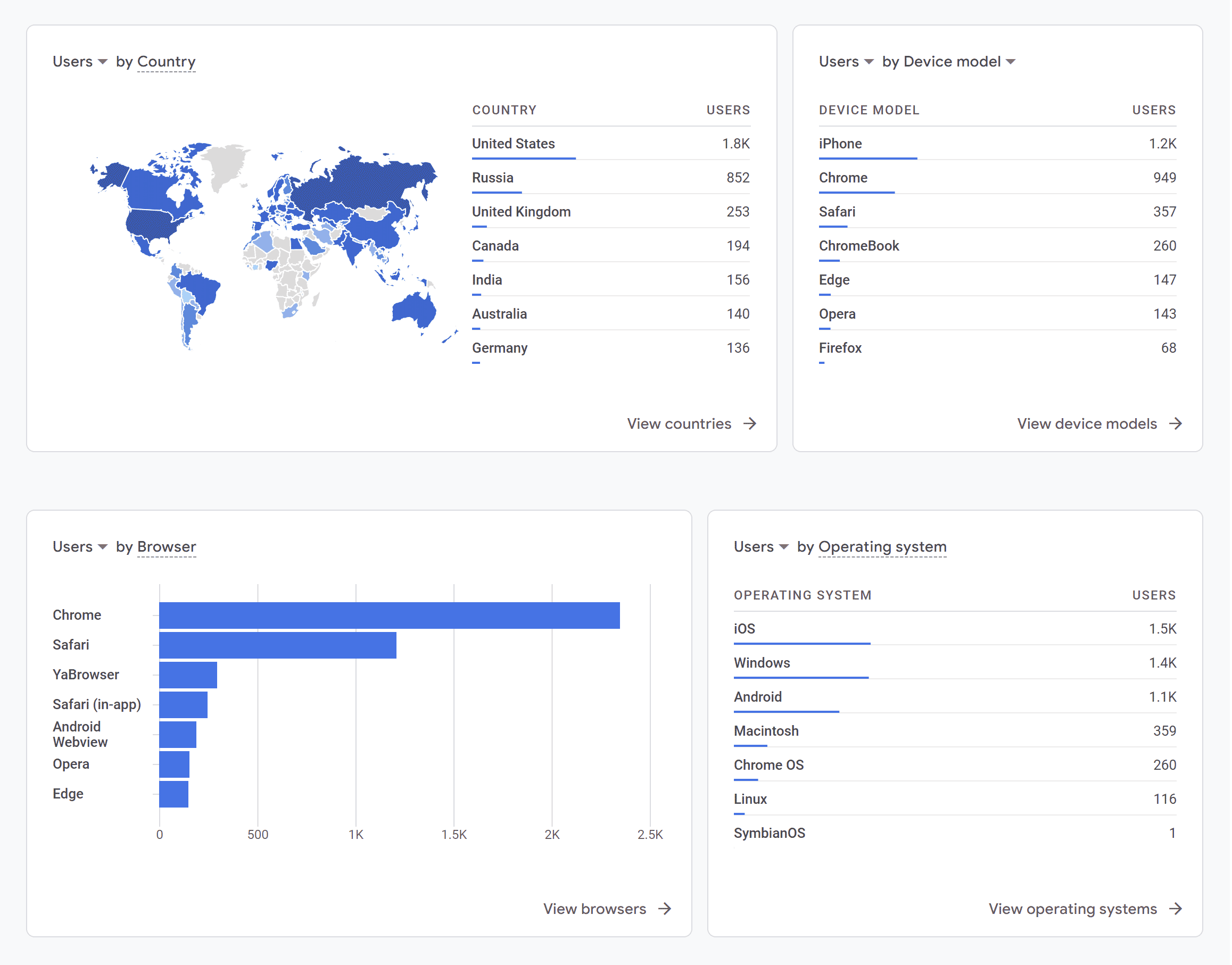
Example demographics data charts

One of the key benefits of Google Analytics is the ability to gain insight into your website visitors’ demographics. This information can help you understand who your target audience is and how to tailor your content and marketing efforts to their interests and needs.

To access this data, navigate to the “Reports” section of Google Analytics and select “Demographics” and “Overview.” Here, you can view information about your visitors’ age, gender, location, and interests. This information can be useful for tailoring your content and marketing strategies to your audience’s preferences. For example, if your website primarily attracts an audience of young adults, you may want to create content that is more relevant and engaging to that age group. Keep in mind that this data is only available for a subset of your website visitors who are logged into their Google accounts or have enabled cookies in their browsers.

Overall, tracking website traffic with Google Analytics is an essential part of any digital marketing strategy. If you are serious about improving your website’s performance, then you should consider using data gathering software like Google Analytics. It is a free service that can provide you with a wealth of information about your website’s traffic. By analyzing this data, you can identify areas for improvement and make changes to optimize your website for conversions and better user experiences.