

“Every tribe and tongue and people and nation.” (Revelation 5:9)
Most multilingual WordPress plugins work well for two or three languages. At ten or twenty, the language switcher is a wall of links, the admin is cluttered, and keeping translations in sync takes more effort than writing them.
Evertongue is a WordPress translation plugin built for sites with many languages. It is free, lightweight, and available on WordPress.org.
Why we built it
We built Evertongue with ministry and mission work in mind. Some of those sites need to reach people in dozens of languages from one WordPress install, such as discipleship courses, Bible resources, and outreach material.
The tools we tried were either too heavy or too narrow. We wanted something that felt like WordPress and stayed manageable as the language list grew.
How it works
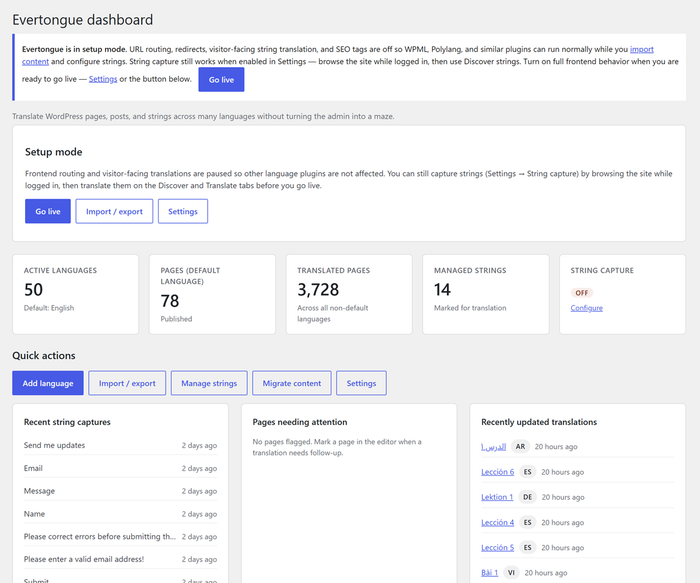
Every translation is a real WordPress page or post. Evertongue doesn’t hide translations in custom tables or serialized blobs. A French version of your Contact page is an ordinary page that you edit with the block editor you already know. Your page builder, custom fields, and SEO plugin all work as usual.
The URLs are simple. Your default language lives at the site root and every other language gets a prefix:
example.com/contact/example.com/es/contact/example.com/fr/contact/
Slugs stay identical across languages, so links are predictable and easy to share.
What you get
Page and post translation
Create a translation from the editor sidebar. Evertongue copies the content and custom fields into a new draft in the target language, and you replace the text. The pages list shows at a glance which languages exist for each page.
Theme and site string translation
Buttons, form labels, and other theme text are captured automatically as visitors and editors browse the site. You choose which strings to manage and translate them in one place. A progress view shows how complete each language is.
Shortcodes and custom strings
Every managed string gets a copyable shortcode, such as [evt_string id="42"]. Paste it into a page and it shows the right language for each visitor. You can also create custom strings for phrases that don’t come from your theme, such as a recurring call to action or a block label.
Identical phrases found in different places on the site can be merged into one string. They then share one translation and one shortcode, so you update the wording once.
Language switchers that handle large lists
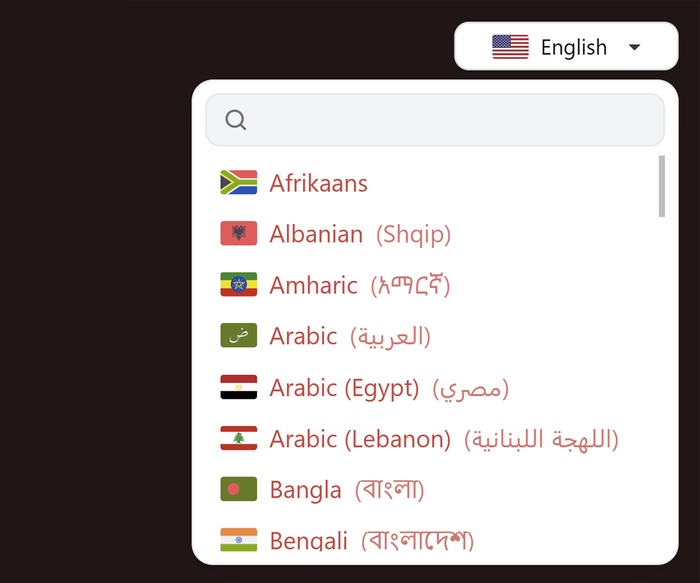
Use the Language picker block, a floating button, a footer list, or a template tag. The searchable dropdown stays usable at 50 languages. The block supports alignment, colors, borders, radius, padding, and shadow. It can also hide languages that have no translation of the current page.
Two translation modes
- Full site: translated menus, theme strings, text direction, and language attributes all follow the visitor’s language.
- Content-only: translate pages and posts and leave the rest of the site alone. This is a good fit when you only need a few translated pages.
Built for real-world teams
- Right-to-left support for languages such as Arabic and Hebrew
- Role-based permissions. Choose which roles can translate and which can manage settings, right from the Settings screen.
- Inactive languages. Keep a language out of the picker while you finish it. Anyone with the URL can still see it, so you can test it live.
- Setup mode. Import and prepare content before your multilingual URLs go public.
- SEO. hreflang alternate links and og:locale tags are added automatically.
Migration and portability
- Importers for WPML and Polylang
- PO file import and export, so translators can work in tools they already use
- CSV import for adding many languages at once
Where it fits
Evertongue is a good fit if you:
- Need to serve many languages without a bloated admin
- Want translations to be ordinary WordPress content
- Run a ministry, nonprofit, or educational site with a lot to translate
- Want simple URLs and a front end with no unnecessary overhead
It is probably not the right tool if you want automatic machine translation, or an all-in-one localization suite with every integration built in. Evertongue keeps its scope small and its foundation clean, so it stays understandable and fast.
Get started
- Install Evertongue from the WordPress plugin directory.
- Add your languages under Evertongue → Languages, or import a CSV.
- Pick your translation mode in Settings.
- Translate a page from the editor sidebar.
- Turn off setup mode when you’re ready to go live.
If you reach people across language barriers, Evertongue gives your message a way to travel with it.
Questions or feedback? Reach out at photricity.com/contact.